Work a closing in its deal lane
Each sale in closing has its own lane with Sapele and a card for every step: Deal Setup, the commission paid by card, the bill of sale, funds, gate pass, title, pickup and the closing complete, each done by the right person.
TL;DRAI summary
When a car sells, Cypress opens a deal lane for you to manage the closing. This chapter shows you how to complete tasks such as filling out deal paperwork, sending documents for signature, confirming funds, and issuing a gate pass.
For: Sellers and buyers with a sale in closing · Cypress Managers
Before you start
- A lane opens when an offer is accepted. It is under Deals in Huddle, named after the car, and holds your side only: buyer and seller never talk directly, Cypress sits between.
- Sapele is the voice of closings in Grove. It brings each step to whoever must act on it, and its cards show the step, whose turn it is, and how late it is.
Steps
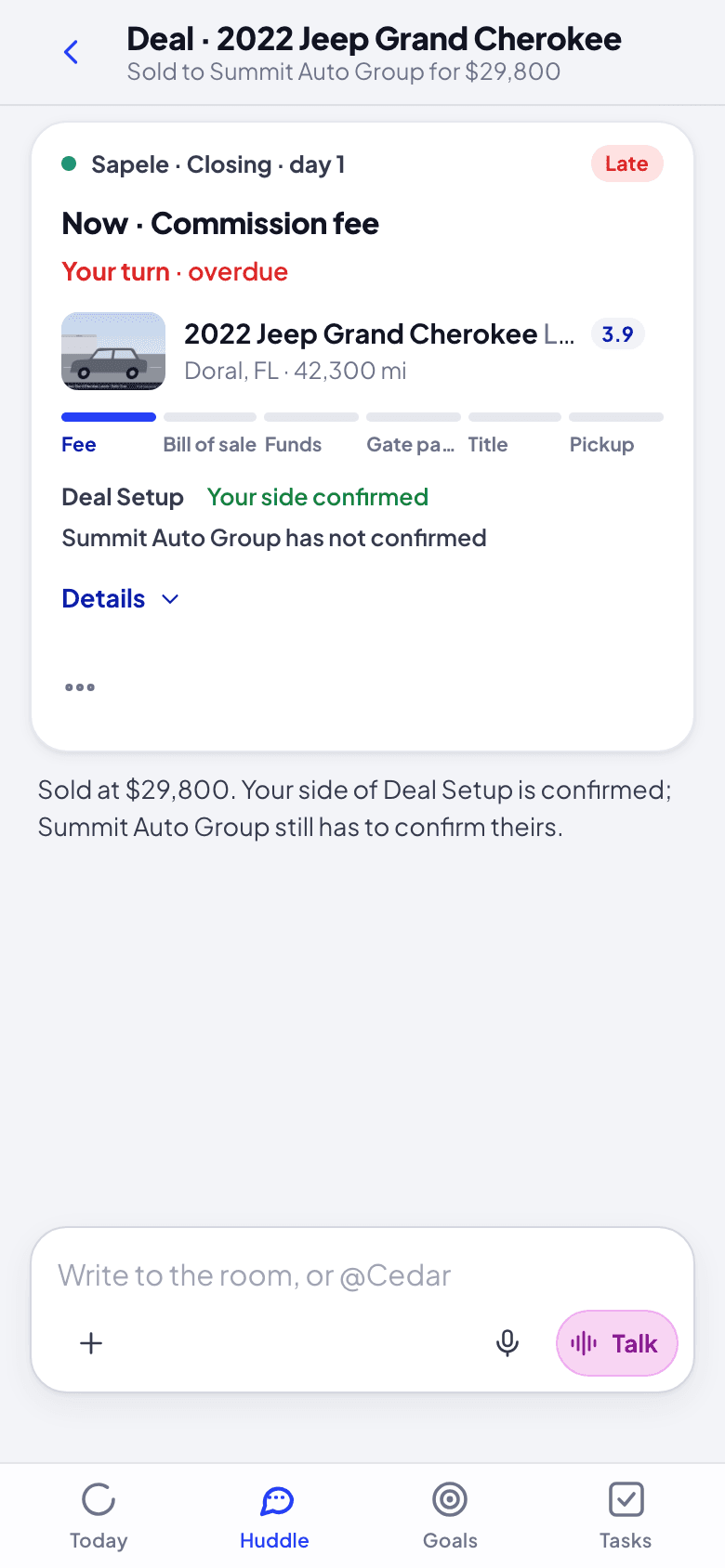
Open the lane from Today (a closing decision's Open) or from Deals. The pinned card shows where the sale is: the step now ("Now · Commission fee"), whose turn it is ("Your turn · overdue"), the six steps (Fee, Bill of sale, Funds, Gate pass, Title, Pickup), and Deal Setup on each side ("Your side confirmed", "Summit Auto Group has not confirmed"). Details opens the rest.
Fill Deal Setup. Its card lists each fact the paperwork needs, with what is still blank ("2 blank"). Tell Sapele the values in plain words ("PO 4471, pickup contact Marco 305 555 0142"), or click Fill on a row; Change edits one you already confirmed. A pickup location or a bank account not saved in Cypress yet is added right there: Add a new location… (saved in Settings › Locations, for every deal) or Add a new bank account…, whose Save to Cypress sends the numbers to Cypress only; Grove keeps none of them. Then Confirm Deal Setup.
Pay the commission (the seller). Once both sides confirm, Cypress bills its commission and the Commission card says how much. Pay … by card opens Stripe's own card form in Grove (Continue to card); the card goes to Stripe only. Leave Save this card for your next commissions on and Cypress charges it by itself next time, when Deal Setup is confirmed. On a cycle bill, it is paid from Billing in Cypress.
Each step has its own card, on each side, as it comes up: what it needs, and the one thing your side does there, or whom it waits on.
- Bill of sale: Send for signature (checked for blanks first), then Sign in DocuSeal when it is your turn; the card follows each signature. Each side sees only its own signing link. The seller can Send their link again to the buyer, at the address Cypress has; a new address for the buyer is their Cypress Manager's to set.
- Confirm funds: By ACH or By check, a person, or your Cypress Manager for you when you let Cypress act on your behalf.
- Gate pass: Issue gate pass (or Issue anyway with blanks), and Upload the signed gate pass before the pickup.
- Title: the carrier and the tracking number, then Submit tracking. Paid by check, the card stays open until The check cleared.
- Pickup: once the seller has uploaded the gate pass the yard and the carrier signed, the buyer's Confirm pickup completes the sale. Until then the buyer's card says it is waiting on that copy. Report a problem starts an issue to file with its photos.
Each asks you to confirm. When the sale completes, Closing complete sums it up on both sides.
A Cypress Manager working your account in Grove can do each step for you, on either side, when you let Cypress act on your behalf; every sheet says it is done for your organization, and Cypress records it that way. A signature stays your signer's: your Cypress Manager emails them their link, or opens it to sign with them in person. A sale finished outside Cypress is theirs to record, in Cypress (Record as sold outside Cypress on the deal's card).
When the other side is late, Nudge … sends Cypress's reminder once a day. Follow a filed issue in the lane.
What happens next
Each step done, here or in Cypress, by you or the other side, folds its card and updates the pinned card, and the next step's card comes to whoever must act. When the last step is done, the lane says the sale is complete. Overdue steps appear in Today with how late they are, whoever's turn it is.
If something goes wrong
- A paper would print blank. Its card says where each blank is filled: Deal Setup (after you confirm, Change on its card), your organization's profile, the car, or your bank account in Cypress.
- A row can't be filled. The value must come from a record in Cypress (a saved pickup location, a bank account): add one on the row, or in Cypress and then Check again. Adding a bank account from Grove the first time may ask you to sign in to Grove again, to let it.
- Pickup waiting on a signature. The gate pass needs the transporter's ink as well as your yard's: the seller uploads the signed copy, then the buyer confirms the pickup.
- A completed step should be reopened. That is the Cypress Manager's decision, made in Cypress with what reopening would undo.
Talk with Cedar and your team
The huddle, Cedar's own room, threads, conversations and deal lanes; how to ask Cedar in writing or out loud, and what its cards are.
Find and buy cars
Say what you are looking for: Cedar matches it to a target in your buy plan or drafts one, shows the cars that fit, and weighs sellers' counters against the plan.