Get drafts ready and take them live
Every draft with what it still needs (a cover photo, its condition checked, mileage, a lot, a floor), fixed on one card; then Go live with the ready ones through your pricing rule, which the card previews.
TL;DRAI summary
This chapter explains how to prepare new cars added to Cypress by checking their details and setting prices. You will learn how to make them available for sale through a pricing rule, or send them for review by your Cypress Manager.
For: Fleet managers and admins (sellers) · Cypress Managers acting for an organization, within what it allows
A car added to Cypress (from a spreadsheet, or one by one) is a draft: it is not on the market until it goes live. The Drafts card shows each draft with what it still needs, lets you fix it there, and takes the ready ones live through your pricing rule.
Before you start
- A draft is ready with: a cover photo, its condition checked by a person (or read by an inspection), its mileage, a lot, and a floor. Keys and damage are worth noting too.
- An import sets the condition to Good when the file has none, so Grove asks a person to look at each car before it goes live.
- Your pricing rule decides what happens when a car goes live: it lists the ones it approves at the price it works out, sends some back to draft, or leaves them for your Cypress Manager to review.
Steps
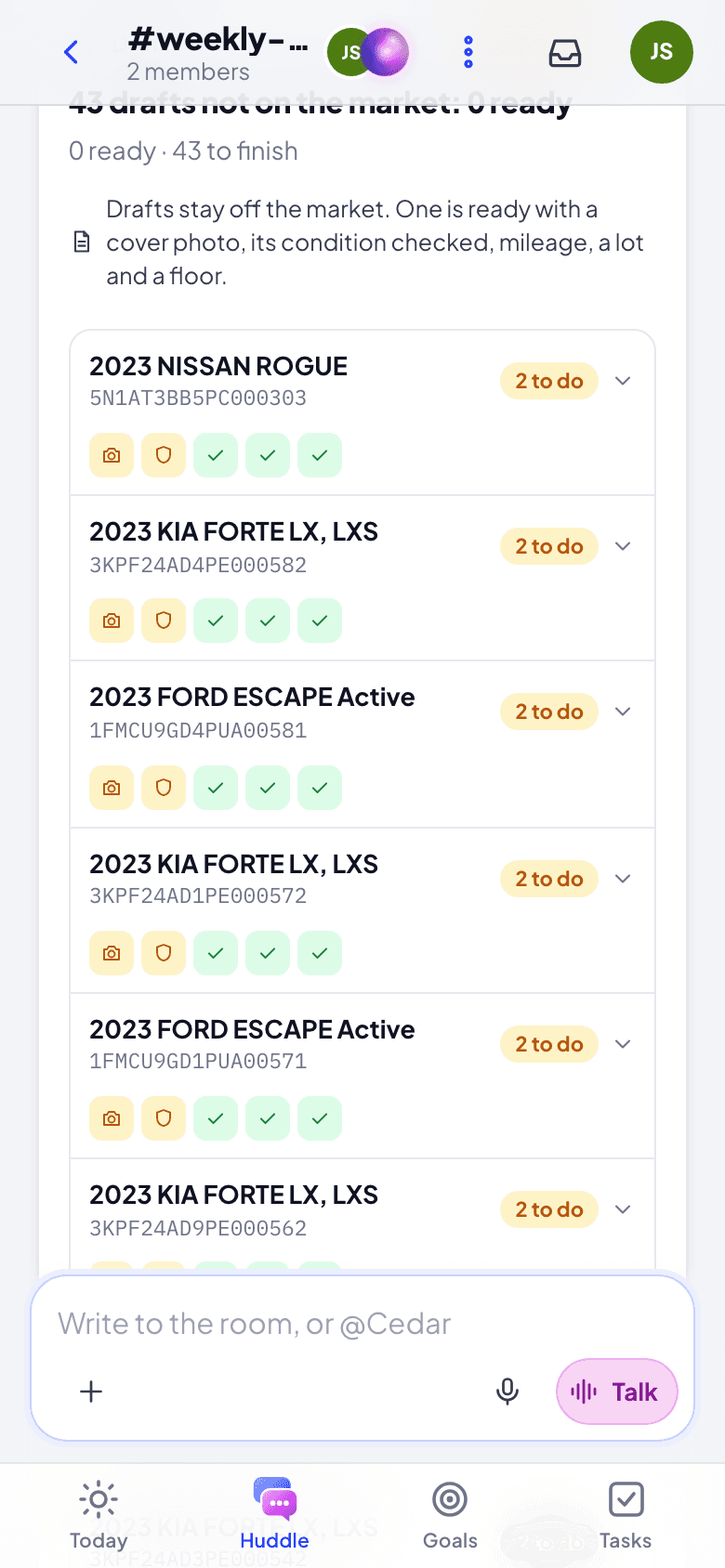
Open the card. Cedar posts it when an import finishes, with the new cars. To see every draft, ask Cedar "Which drafts are not ready to go live?". Each car shows five checks (photo, condition, mileage, lot, floor), green when done, and Ready or how many are left to do.
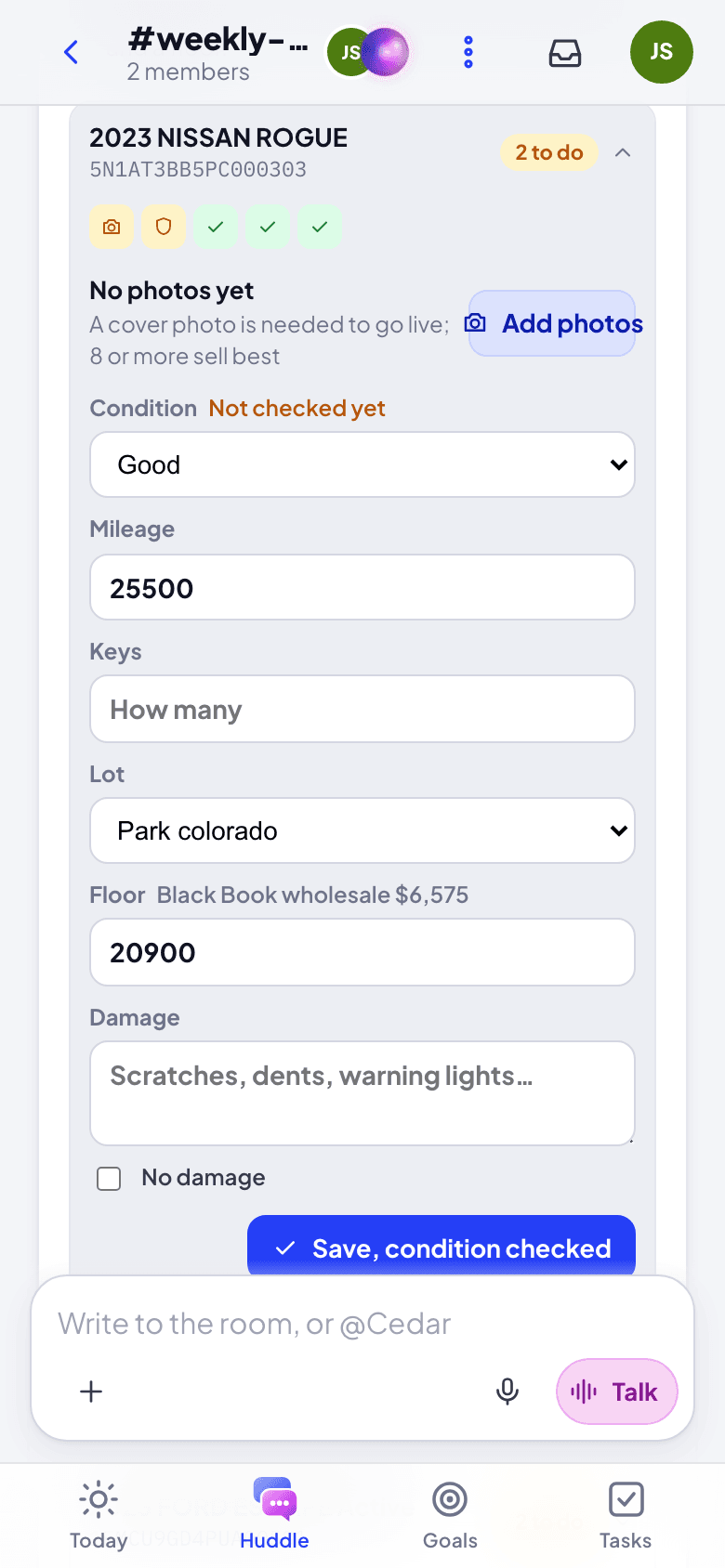
Fix a car: tap it. Add photos takes or picks photos (the first becomes the cover buyers see; 8 or more sell best) and sends them to Cypress after you confirm. Check the Condition, note the Damage (or tick No damage) and the Keys, and correct the Mileage, the Lot or the Floor (the card shows Black Book's wholesale value beside it). Click Save, condition checked, read the confirm (a mileage lower than Cypress has is said there: odometers do not go back), and save.
Set floors for many at once: when drafts have no floor, Set floors gives each one from its Black Book wholesale (at wholesale, or up to 10% over or under). Floors are private: buyers never see them.
Set how they go live. How they go live on the card lists your pricing rules in the order Cypress tries them (yours first, then Cypress's; the first that fits a car decides it), each in a sentence: which cars, and what it does. New rule (or Edit on one of yours) asks:
- Which cars: every make or some, up to a mileage, from a model year.
- What it does: list them, or leave them for your Cypress Manager to review.
- Listing price: the floor plus a percent (the card shows the price for one of your floors).
- Offers: accept offers within a percent of the listing price, decline offers under the floor plus a percent, both on their own.
- Also run on its own: Cypress also runs the rule every hour on cars waiting in review.
Read the confirm and save. A rule with other conditions is changed in Cypress: All rules in Cypress opens Settings, Pricing rules. With no rule, every car goes to review for your Cypress Manager or admin to list.
Read what your rule would do. A ready car shows it under its row, for example "Floor +5%" lists it at $22,890, or that it would wait for your Cypress Manager's review. Nothing has moved yet.
Click Go live with N (at the bottom of the card; while no draft is ready it says what is left), read the confirm (each car with its floor and what the rule would do), and click it. Cypress sends the cars to review, then your rule decides each. The card then shows, for each car, Live at $22,890, In review with your Cypress Manager or Back to draft by your rule. The drafts not ready yet stay open: finish them and go live again.
What runs by itself
Open What runs by itself on the card to see your organization's automations that move, price or list cars, each in a sentence ("When a car changes: it moves the car live on the market"). One that puts cars on the market says Lists cars. Pause stops it until you Resume it; nothing it already did is undone. To change what one does, ask your Cypress Manager: they change it in Cypress, and Cypress publishes every change before it runs.
Your pricing rule can also run on its own: when a car waiting in review gets one of your time labels, Cypress judges it by the rule every hour and, if the rule is set to run on its own, lists the cars it approves. Go live and Run your rule list the cars the rule approves either way.
What happens next
- A car your rule listed is live on the marketplace; the card shows the price it went live at.
- A car in review waits for your Cypress Manager (or an admin) to approve and list it.
- A car your rule sent back to draft is a draft again: its row says why.
If something goes wrong
- Go live is greyed out. No draft is ready yet: open each car and finish what it shows in amber. The card lists the cars closest to ready first; Show all shows the rest.
- "No rule matches". Your organization has no pricing rule for the car: it goes to review, and your Cypress Manager or admin lists it.
- "Grove cannot read your automations yet". Your organization connected Grove before it asked to read automations: an admin connects Grove again in Cypress (Settings, Connected apps), and everyone signs in to Grove once more.
- A photo did not go. Cypress takes JPEG, PNG, WebP and HEIC photos of up to 10 MB each.
Import a spreadsheet of cars in Grove
Send a CSV or Excel file to Cedar, check the columns and anything Cypress flags, read every car the import adds, updates or archives, then run it.
Talk with Cedar and your team
The huddle, Cedar's own room, threads, conversations and deal lanes; how to ask Cedar in writing or out loud, and what its cards are.