Choose Zen or Huddle
Grove's two looks: Zen, one private conversation with Cedar that holds everything, or Huddle, the full app with Today, your team's rooms, Goals and Tasks. What each shows, who sees what, and how to switch.
TL;DRAI summary
This chapter helps you choose how the Cypress platform looks and works for you. You can pick Zen for a simple, chat-like experience, or Huddle for a more organized view with team features. You can switch between them anytime.
For: Fleet managers and admins (sellers) · Buyers
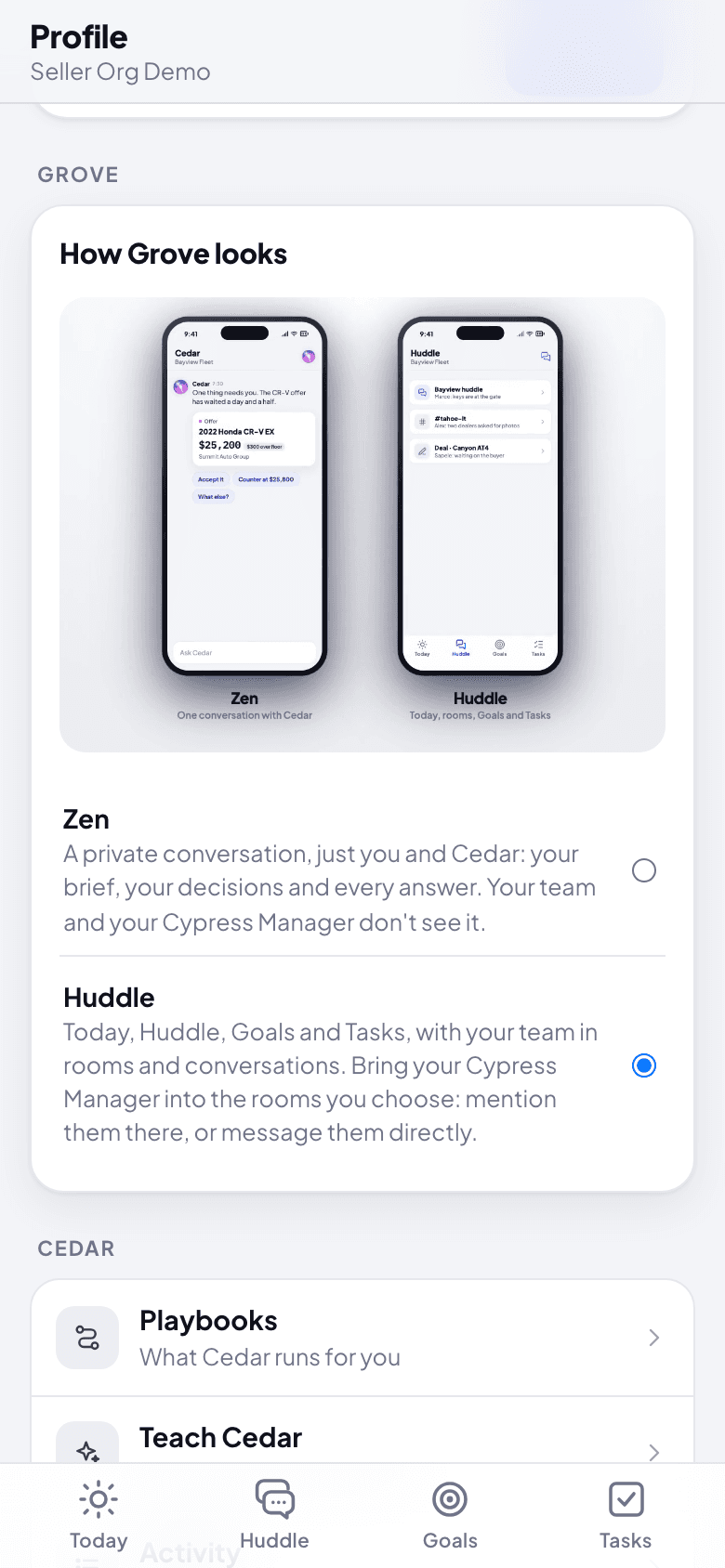
Grove has two looks. They show the same work, read the same Cypress and follow the same rules; only how it reaches you changes. Each person picks their own, and can switch at any time.
| Zen | Huddle | |
|---|---|---|
| What you see | One conversation with Cedar, and nothing around it | Today, Huddle, Goals and Tasks |
| Your morning | The brief opens the day in the conversation, each decision as its card | The brief on Today, the decisions under Needs you |
| During the day | Cedar says in one line what came in, with a chip to see it | Your Inbox, the rooms and the deal lanes |
| Your team | Not in it: nobody else sees this conversation, your Cypress Manager neither | Your organization's huddle, conversations and deal lanes, with your team and your Cypress Manager |
| Threads and tasks | Threads under any message; a task you make shows its card right in the conversation | Threads, tasks, and conversations per topic or car |
What stays the same in both: Cedar's cards and their confirms, your Inbox (at the top right), Profile, notifications and the lock-screen rule (at most two a day), and Talk to speak with Cedar.
Before you start
- Grove opens in Huddle for everyone who signs in with Cypress. Someone who starts from Try Cypress starts in Zen.
- A Cypress Manager acting for an organization always sees Huddle: Zen is a person's own conversation, and never one a Cypress Manager is in.
Steps
Open Profile: your picture at the top right. In Zen, it is at the top right of the conversation.
Under Grove, in How Grove looks, pick Zen or Huddle. The short video shows both side by side. Grove starts again from home in the look you picked.
In Zen, write to Cedar as you would to a person: "What needs me today?", "Show me the Rogue", "Make a task for Sam to call the buyer". Cedar answers with the card, and the buttons under its answer suggest what to do next.
What happens next
- From Zen to Huddle, later. After a few days of chats (three days, or twelve answers), Cedar offers the fuller Grove once, with a card: Switch to Huddle or Stay in Zen. Ask Cedar about the full app ("Show me the full app") and it shows the same card.
- Your Zen conversation stays. Switching to Huddle keeps it as Cedar in Huddle (just you and Cedar), and switching back brings you to it.
- Nothing you set changes. Your brief time, notifications, what Cedar remembers and how far Cedar goes alone (Teach Cedar) are the same in both looks.
If something goes wrong
- You can't find Today, Goals or Tasks. You are in Zen. Ask Cedar ("What needs me today?", "How are we on the quarter?"), or switch to Huddle in Profile.
- Your team can't see what you asked Cedar. That is Zen working as meant: it is your own conversation. To ask with your team, write @Cedar in your organization's huddle, in Huddle.
- There is no How Grove looks in Profile. You are a Cypress Manager acting for an organization: you always see Huddle there.
See it work
Three stories recorded live in Cypress and Grove, with Cedar explaining each step: a car from a spreadsheet to sold with no Cypress Manager needed, a morning with the team, and a first visit and a first day.
Install Grove and keep it up to date
Put Grove on your phone or computer so it opens from its own icon, like an app, and gets notifications; how Grove tells you a new version is ready, and how to check yourself.