Grove quickstart
Your first ten minutes in Grove: sign in with Cypress, read the brief, answer one decision on its card, and ask Cedar a question.
TL;DRAI summary
This chapter explains how to sign in to Grove and quickly get started. You'll learn how to view your daily tasks, respond to offers, and ask Cedar, the AI assistant, for information directly from your Cypress data.
For: Anyone at an organization that uses Grove · Cypress Managers
Before you start
- Your organization's admin has connected it to Grove once (the admin signs in first and approves what Grove may do). Until then, signing in ends with "Cypress did not allow the sign-in. If you are not an admin, your organization may not have connected Grove yet: ask an admin of your organization."
- You need your normal Cypress account. Grove has no password of its own.
- Grove opens in Huddle, the full app with your team. If you would rather have one private conversation with Cedar that holds everything, switch to Zen in Profile. See Choose Zen or Huddle.
Steps
Open Grove and click Sign in with Cypress. You land on Cypress's own sign-in; when it is done, Cypress sends you back to Grove. A Cypress Manager then picks the organization to act for.
Read Today. The first line says what is waiting ("Four offers are waiting and three closing steps are yours."), the tiles are Cypress's own numbers (live, in closing, need you), and Needs you lists the decisions, the most pressing first. Each card names the agent that brought it (Sapele for closings, Sakura for offers).
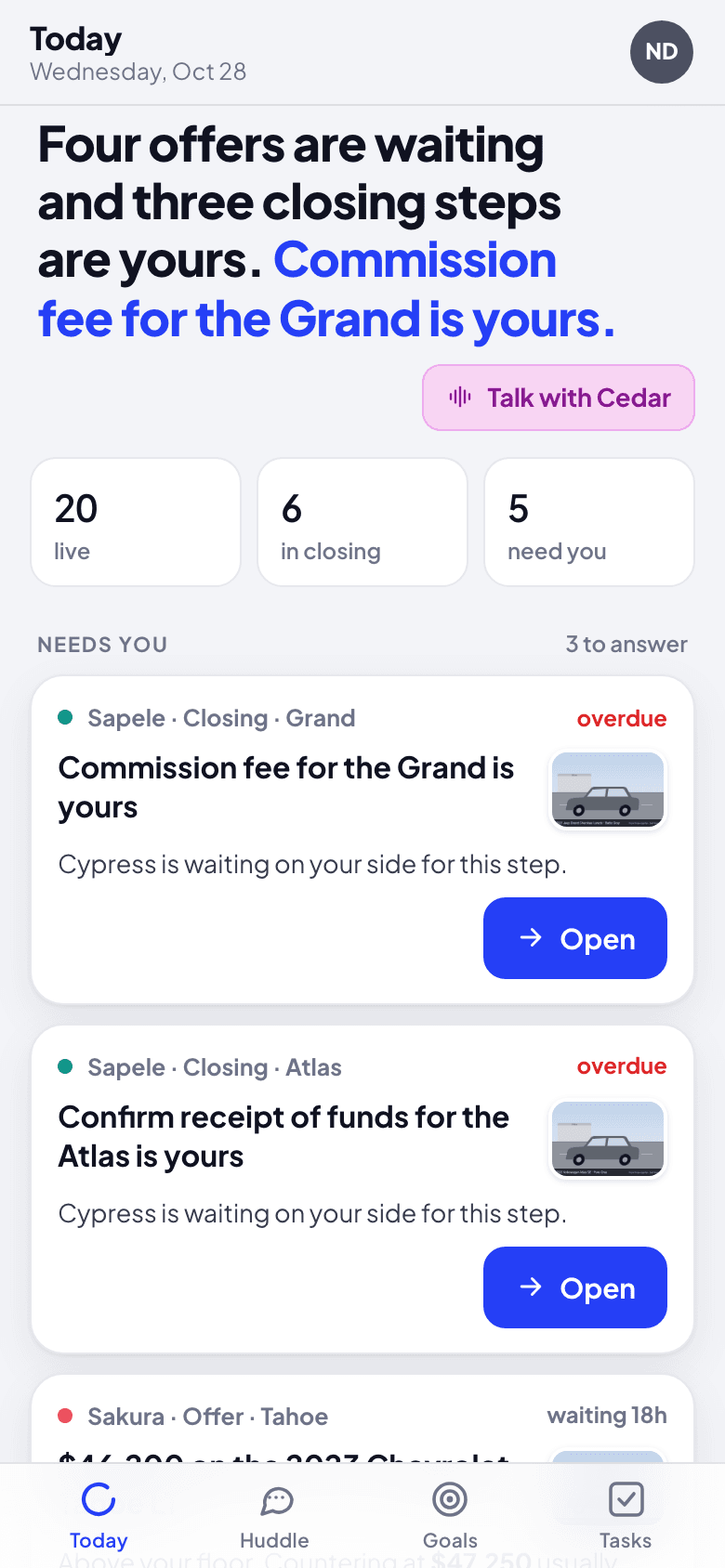
Click Open on a decision. It opens in its own thread, with its card: an offer shows the amount, the gap to your floor and the suggested counter. Every button on a card asks you to confirm before anything happens, and the confirm says plainly what Cypress will do. See Answer an offer.
Ask Cedar something. In Huddle, open Cedar (just you and Cedar) and write a question in plain words, for example "Which offer should I answer first?". Cedar reads Cypress for you and answers in a sentence or two, with a card when there is something to act on. Elsewhere, write @Cedar and it answers in a thread. Or click Talk with Cedar to speak.
Set your day in Profile: your brief time and time zone, and whether Grove may notify you. Everything that needs you lands in your Inbox as it happens. The lock screen gets one brief each morning and at most two interruptions a day, only when something cannot wait for tomorrow's brief; under On the lock screen you can choose more (every new offer, every match, and so on). Under This device, install Grove so it opens from its own icon (on iPhone, that is what lets notifications through). See Install Grove.
What happens next
The brief updates on its own when Cypress changes (an offer comes in, a step is done), and anything you answer leaves the list. What you did not get to waits for tomorrow's brief, and is in Cypress if you want it now. From here:
- What you can do, by role.
- Choose Zen or Huddle: one conversation with Cedar, or the full app.
- Talk with Cedar: rooms, threads, cards and voice.
- Teach and correct Cedar.
If something goes wrong
- Grove asks you to sign in again. Your Cypress session ended, or your admin disconnected Grove. Sign in again; if it keeps happening, ask your admin.
- Cedar answers "I can only read Cypress for people signed in to Grove. Sign in again and ask me once more." Your Grove session ended in the meantime.
- A number differs from Cypress. Click Refresh from Cypress at the bottom of Today; the brief reads Cypress again.