Follow the quarter's plan
Goals shows the quarter's sell and buy plans as Cypress keeps them: the goal, each month, the next hand-off, and this week's plays made into tasks.
TL;DRAI summary
This chapter shows you how to view your organization's quarterly sales or purchase plan in Goals, including your progress and the pace you need to meet targets. You can also generate weekly tasks to keep your plan on track.
For: Fleet managers, admins and buyers whose organization uses Planning · Cypress Managers
Before you start
- Goals shows the plan your organization keeps in Cypress, for the current quarter. Grove does not change goals: change them in Cypress, or tell Cedar what you are looking for and it matches it to a target.
- The plan needs Planning switched on for your organization in Cypress.
Steps
Open Goals. The header gives the quarter and the time left ("Q4 2026 · 10 weeks left · ends Dec 31"). The sell plan shows the goal ("Release 20 units"), where you are ("4 of 20 sold · 56 in motion"), each month against its share, the pace needed ("16 more sales in 10 weeks: about 2 a week."), the next hand-off to Cypress with its date, and what is selling now. A buyer sees the buy plan: the units goal, the budget and each target.
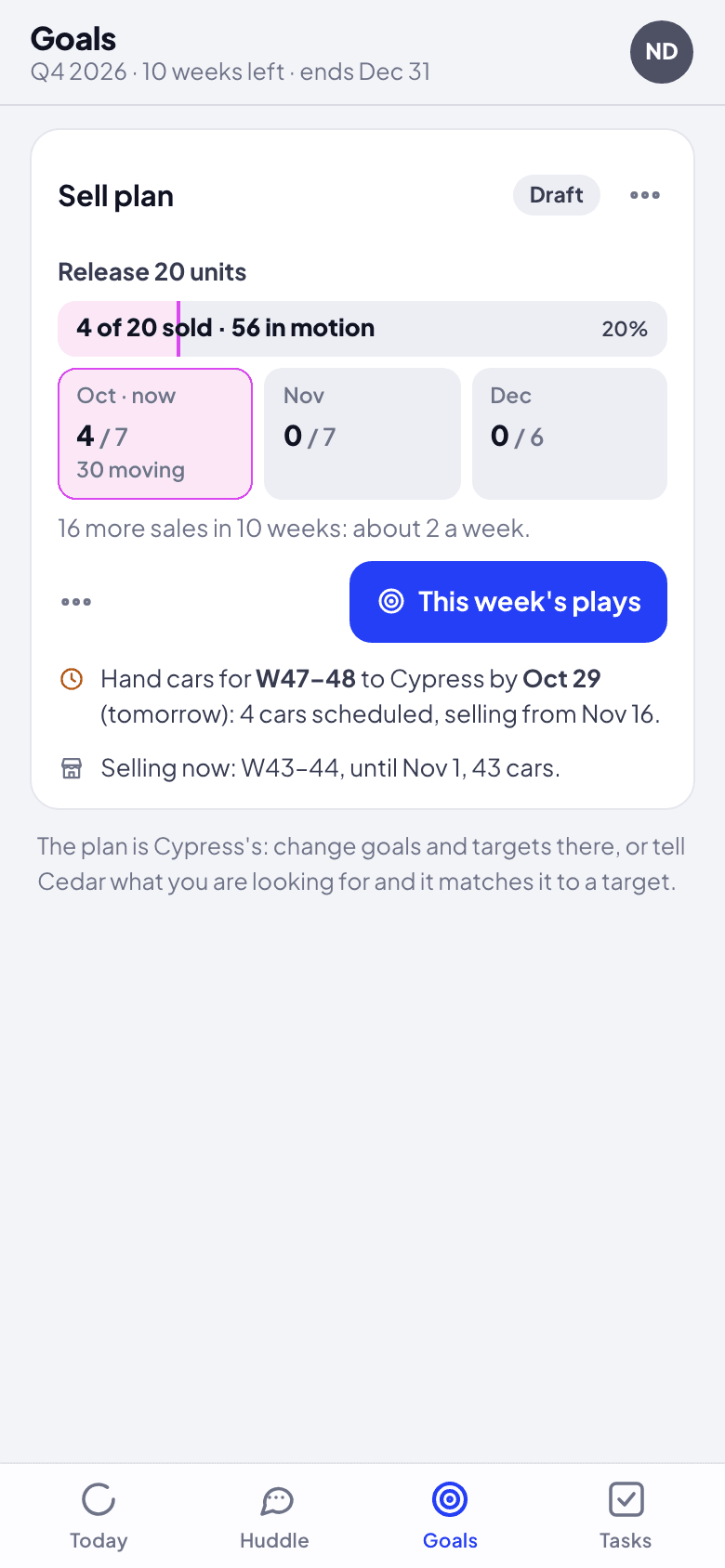
Click This week's plays. Cedar works out what would keep the plan on pace this week, one play per person ("Hand cars for W47–48 to Cypress by Oct 29"), each with an owner you can change.
Click Make these this week's plays. Each play becomes a task for its owner, in Tasks, and the goal's thread follows them.
What happens next
The plan's numbers come from Cypress each time you open Goals; a sale or a purchase moves them. A target or a goal has its own conversation when you want to talk about it with the team.
If something goes wrong
- Goals says there is no plan. Planning is off for your organization, or no plan exists for this quarter yet. Both are set in Cypress.
- A number differs from Cypress's planning page. Open Goals again; it reads Cypress each time.
Find and buy cars
Say what you are looking for: Cedar matches it to a target in your buy plan or drafts one, shows the cars that fit, and weighs sellers' counters against the plan.
Tasks and hand-offs
Make a task from any message, see Cedar's own tasks and the ones it hands you when it is not sure, and let a reply close a task.