The plan — goals, lots, and the quarter
Planning in the fleet's own units: a quarter plan with goals and monthly targets, lots of same-model vehicles cut into mileage bands, and how the plan stays live while an approval keeps a baseline.
TL;DRAI summary
This chapter explains how to plan which vehicles to sell and when. You'll set goals, organize vehicles into lots, and schedule them over a quarter, tracking progress through different stages until they are ready for sale.
For: Sellers (fleet managers, org admins) · Cypress Managers acting for a delegating org
Planning is the step before the metal moves: it decides which vehicles enter remarketing and when. It lives beside the pipeline — nothing on the Plan or Schedule tabs lists, prices, discloses or bills anything.
Three layers, one job each
| Layer | What it holds | Market effect |
|---|---|---|
| Plan — the quarter ("Q4 2026") | your goals, the lots in scope, monthly targets per lot; Draft → Approved → Closed | none |
| Schedule — the next six sale windows | which vehicles of which lot go into which two-week window, and by when each window's vehicles must be in Sell | none |
| Execution — what actually happened | read back from remarketing: handed to Sell → listed → offers → sold, against the plan value frozen when scheduled | read-only |
The three layers in order, and the states a quarter plan moves through:
The Plan tab is the first screen and speaks plain words: in operation, candidate, parked, scheduled, handed to Sell, listed, offers, sold, missed window. The engineering detail — provenance tiers, readiness checks, evidence coverage — lives on the Vehicles tab and behind a disclosure in the vehicle panel.
The plan is always there
There is no empty planning page and no wizard to get through first. The first time planning looks at a fleet with vehicles it opens the base plan: preserve fleet value as the mandate, default constraints, six two-week sale windows, the current quarter, and every vehicle enrolled. It has no market effect and nothing waiting for your approval, so a fleet that never plans loses nothing. Plan my quarter with Sequoia, the last button at the top right of the page, opens the Mandate & goals window, which changes the mandate the lots are ranked by, sets the quarter's goals and constraints, and retires the base plan softly underneath. Reset to the base plan, in the quarter bar, is the way back: the mandate's history stays queryable and the base plan opens again. The buttons at the top right are, in this order, Import fleet, Costs, Ask Sequoia and Plan my quarter with Sequoia: the same two Sequoia buttons as on the Buy plan.
The whole fleet is in the plan
Planning is the layer over the operating fleet, not a waiting room beside it. From the base plan on — and every time planning reads the fleet afterwards — every vehicle you own is in the plan, in one of the plan's own statuses:
| Status | Meaning | How a vehicle gets there |
|---|---|---|
| In operation | running the fleet, not under consideration this quarter | the default for an imported or existing vehicle |
| Candidate | on the bench: you want to work on it; Sequoia ranks and proposes it | Bench it — one vehicle, a lot, a band, or a Fleet selection |
| Parked | analyzed and dismissed until a quarter you name (or indefinitely) | Park it; the daily sweep brings it back to the bench on that quarter's first day |
| Scheduled | committed to a sale window, plan value frozen | allocate from the lot, accept Sequoia's proposal, or move it into a window |
| Handed to Sell → Listed → Offers → Sold | remarketing's stages, read back | hand the window to Sell; from there Sell acts, planning reads |
Vehicles that were already in Sell when planning met them — in intake, listed, under offer — are adopted: they are already in a plan, remarketing's, so they appear as handed to Sell, listed or with offers, with the month they entered the market and the stored valuation as their plan value. Planning never moves them; it reads what Sell does with them.
The first decision of a quarter is therefore to bench: open a lot and bench the vehicles in operation you want to work on (or the whole lot, or one mileage band), or select rows in Vehicles and pick Back to the bench from the Change stage menu. Nothing is proposed from vehicles in operation — the bench is what Sequoia ranks. Benching, parking and bringing back are each one change with the reason recorded. On the schedule cell's panel and on the Vehicles tab each asks first; the other places that offer them (the lot panel, a vehicle's own panel) act at once.
Tracks — several plans inside the quarter
Not every vehicle is sold with the same intent. A track is a mandate for a subset of the fleet, inside the one quarter plan and sharing its windows and constraints. Every plan starts with four:
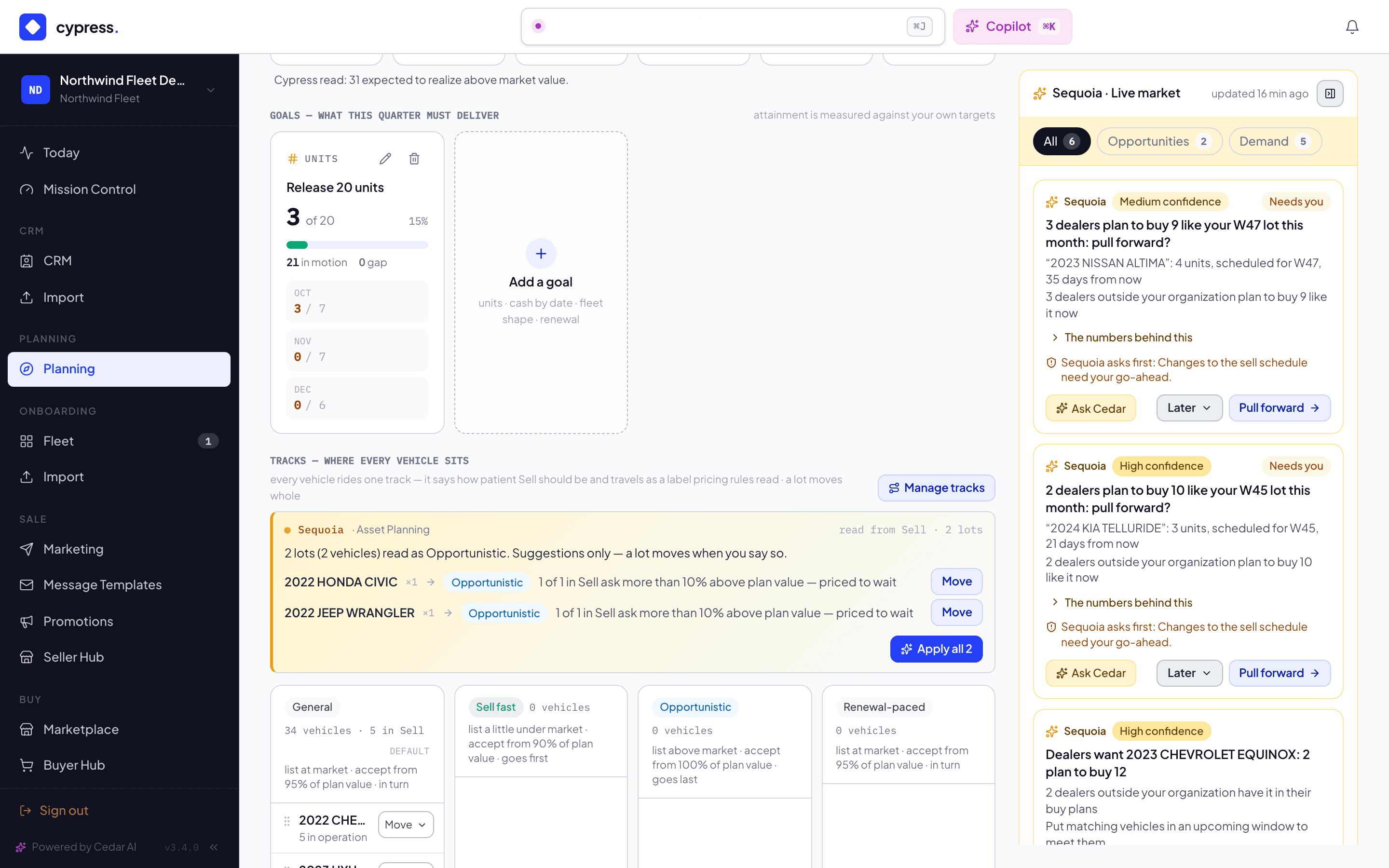
| Track | Ranks by | Sell's posture | In every proposal |
|---|---|---|---|
| General (default) | the quarter's mandate | list at market · accept from 95% of plan value | in turn |
| Sell fast | highest net value first | list a little under market · accept from 90% | picks first |
| Opportunistic | steepest decay first | list above market · accept at plan value or better | picks last — sells on a good offer |
| Renewal-paced | oldest, highest mileage first | list at market · accept from 95% | in turn |
Vehicles already in Sell when planning met them ride General: they are in a plan with no stated goal yet. Move a vehicle, a selection in Fleet, or a whole allocation onto a track; add your own track (a name, what it ranks by, its posture) or change a preset from Manage tracks on the Plan tab. A vehicle rides one track at a time; removing a track sends its riders to General. Every change is recorded with its reason.
A goal can be scoped to a track ("release 20 on Sell fast") and then counts only that track's vehicles. Inside a lot, each track ranks its own vehicles under its own rule and the tracks line up by urgency, so a Sentra on Sell fast is scheduled ahead of a Sentra on Opportunistic whatever their values say — and the reason on the line says so.
The track travels into Sell. At hand-off every vehicle receives the
label plan-<track> (for example plan-sell-fast), org-scoped and
system-derived, and the pricing rules that already read vehicle labels can
carry the track's posture into the listing price and the offer floor.
Change the track of a vehicle in Sell and the label follows; leave planning
and it goes.
Lots — the unit a fleet is bought in
Fifty identical Sentras are one lot, not fifty cards. A lot is every vehicle sharing year + make + model (trim optional per mandate), cut into mileage bands of 15,000 miles (45k–60k, 60k–75k …); a vehicle with no odometer lands in its own mileage unknown band, and one without an identity in a single Unidentified lot — nothing ever vanishes from the count. A lot carries its count, mileage spread, plan value (with how many are unvalued), weekly carry cost with its basis (verified · connected · estimated · default), open blockers by kind, and how many of its vehicles sit in each window and each status ("12 in operation · 3 candidates · 1 parked"). Individual vehicles are the drill-down: open the lot to bench the ones in operation, see the candidates ranked, park one, or open one vehicle's full analysis.
Goals — the numbers the quarter must deliver
A quarter can hold four kinds of goal, each with real numbers:
- Units by period — "release 50" (or "release 20 of the 2021 Sentras");
- Cash by date — "$600,000 net usable by November 30";
- Fleet shape — "average age at most 4 years · nothing over 90,000 miles · vans at most 40%": a standing policy the plan keeps satisfying;
- Renewal pacing — "release as replacements arrive": paced by the arrivals you expect each month.
Sequoia paces a goal into monthly targets (an even split for units, by days for cash, arrivals × releases for renewal) unless you type the pacing yourself. Each goal card shows target · sold · in motion · gap and the three months; attainment is measured against your own target, never against an invented "fleet value preserved" percentage. Unvalued vehicles count toward a units goal and never toward a cash goal — they are counted apart and named.
Lot targets and allocating
The lots table has one cell per month: target · sold · moving · still unscheduled. A lot with no candidates yet offers Bench N first; a lot with candidates offers Allocate. Set a target directly, or open the lot and schedule N of its candidates: pick how many, from the whole lot or one band, into a month (spread evenly across its open windows, or as early as possible) or a single window. Sequoia ranks the lot under your mandate — cash release puts the highest net plan value first, balanced renewal the oldest and highest mileage, EV migration combustion before electric, preserve value the steepest decay — with a stated tiebreak for identical vehicles (higher odometer first, then VIN order) and a reason on every line. Preview shows exactly which vehicles, into which windows, with what net cash and what warnings, before anything writes. Scheduling freezes each vehicle's plan value on its membership: that number is what realized-vs-plan is later measured against, and it never drifts with the live valuation.
Park is the exception inside a lot: "analyzed — not this quarter". A parked vehicle leaves its window and every proposal until the quarter you name (the sweep brings it back to the bench on that quarter's first day) or until you bring it back by hand; park indefinitely when there is no date. Back to operation is the other exit: the vehicle keeps running the fleet and drops out of the plan's consideration altogether.
The three are one menu, on the schedule's window panel (Take out of this window) and on the Vehicles tab (Change stage), and each item says what it does:
| Choice | What it does |
|---|---|
| Back to the bench | Still for sale this quarter; Sequoia can schedule it again. |
| Park until… | Not this quarter. It returns to the bench on that quarter's first day. You pick the quarter when you confirm: the next four quarters, or Indefinitely. |
| Back to operation | Leaves the sale plan; it keeps working in your fleet. |
On the schedule cell's panel and on the Vehicles tab, taking vehicles out asks first. The confirmation says how many vehicles will move, the window they leave, the quarter, and the day a parked vehicle comes back ("Park 2 vehicles until Q1 2027? They leave this quarter's plan and come back to the bench on Jan 1."). It counts only the vehicles that will really change: on the Vehicles tab, a selected vehicle that is already scheduled, already on the bench or already in operation stays as it is, and the confirmation says how many ("2 already scheduled or on the bench stay as they are."). A choice that would move none of them is off, with the reason beside it. Nothing changes until you confirm.
Approving the plan
Approve when the goals and the schedule look right, with Approve plan in the quarter bar. The approval binds to exactly what is on screen — if a target or a scheduled vehicle changed since the page loaded, you are asked to refresh and approve again. The approved plan becomes the baseline; every later edit is an amendment shown against it (only goals and lot targets count: "2 goals and 3 targets changed since approval"), and approving again moves the baseline. The quarter bar names the approval and what has moved since: Approved Oct 3 · 4 changes since, or just Approved Oct 3 when nothing has. Approval has no market effect.
Approving is a person's. An app acting for a person may approve through the API, with the same check that the plan is the one read; an agent your organization added may prepare everything up to it (the mandate, the goals, Sequoia's schedule) but is refused the approval itself (see Apps, agents and MCP).
The quarter bar and a closed quarter
Above the tabs, on every tab, the quarter bar says which quarter you are looking at. It has arrows to step to the quarter before or after, the quarter's name and its days, its status (Draft or Approved, with the changes since), the mandate, and two buttons on the right: Reset to the base plan and Approve plan. A quarter whose last day has passed is closed: a slate Closed badge with a lock sits beside its name, and nothing in its plan moves. The bar and a closed quarter work the same way on the Buy plan, so they are written once, for both sides, in The quarter bar and closed quarters.
The quarter follows the windows
In the last weeks of a quarter the six sale windows already belong to the next one, so Planning opens on the quarter holding most of the open windows — you can step to any quarter with the arrows in the quarter bar. When a quarter's last day passes, the daily sweep closes it with its attainment recorded and opens the next, carrying the standing goals (fleet shape, renewal pacing) but never the numeric ones — those are set fresh.
The mandate underneath
The plan starts from a mandate — preserve fleet value, balanced renewal, EV migration, or cash release. It is a bias, not a label: it decides the order Sequoia ranks a lot in, and the standing constraints (minimum operating fleet, cash reserve, days of prep before a window opens, mileage band width). What never changes with the mandate: blockers still gate the sale, every number carries its basis, nothing executes without your confirm. Ending a strategy is soft: every change, window and review it produced stays queryable.
One live plan, and a baseline when you approve
There is one plan, and it is always live. Adding a goal, setting a target, benching or parking vehicles, scheduling a lot, editing or removing a blocker, approving, handing a window to Sell, a window closing, a parked vehicle coming back — each changes the plan at once and is recorded with its reason. The chip in the page header reads Live · updated 12 min ago; select it to see what changed, newest first, by date.
Approving the quarter sets a baseline. "What did we believe when we decided?" always has an answer: the baseline holds what you approved, and the quarter bar counts the changes since.
Your plans count, anonymously
The vehicles you schedule are part of the market that dealers read. The Planning rail says so in one line: "Your plans count, anonymously, in the forecast dealers see: never your name, prices or VINs." A dealer sees only a range, and only when at least two sellers plan the same kind of vehicle. See Sequoia's market rail. The other side of that exchange, what you see of dealers' plans in the Seller Hub, the Fleet panel and Leads, is in Planning inside remarketing.
The Cypress desk — what Cypress staff see
Cypress staff have one more tab, marked Cypress only, that comes last, after Review: the Cypress desk. Sellers and dealers never see it. It lists every seller's lots that are coming to market, with the dealers who want them, and is where Cypress brokers a fit between the two sides. It has a chapter of its own: The Cypress desk.
Importing your fleet for planning
Import fleet on the Planning page opens the same import wizard the rest of the platform uses, in planning purpose: vehicles arrive in operation — in the plan, never in the Sell intake — already grouped into their lots, ready to be benched. Each new VIN gets its initial valuation — the market anchor Sequoia's curves project from. After that, planning stock is re-valued on the planning cadence: one real market point every 90 days, taken by the platform's own sweep, never on demand — a vehicle in planning is not for sale, and a quarterly point is what the curves need to re-anchor. Once a vehicle is handed to Sell it is live inventory and refreshes every 30 days. Only VIN and mileage are required; purchase price, purchase date and financing columns (acquisition method, monthly payment, payoff date, remaining balance) feed the carry-cost and cash models and are worth mapping when you have them. Re-importing the same file later refreshes odometers, costs and financing in place and flags vehicles missing from the file; an archive from an import becomes a request a Cypress Manager reviews.
Your fleet system can do the same over the integrations API: push vehicles in as Operation or Planning, keep their mileage, costs and financing current, and read and move the plan — see the Planning API. An API push buys no valuation; the daily valuation sweep values the new vehicles over the following days.
Market position — the plan's first number
Every vehicle, lot and fleet leads with its market position:
- Market value — the stored Orbis (Black Book) wholesale figure, with its rough-to-clean range and its age (marked aging past 135 days).
- Expected realized — what sales like this one realized across Cypress against their last market value (the same model year, else the model, else its class; five sales or more), times this vehicle's market value.
- Cypress trend — how the market is marking the model month over month across every real fleet on Cypress (five vehicles or more, mileage drift removed), against what the class curve expects for its age: falling faster than its age explains, as its age explains, or holding better. The trend also bends the plan value's next weeks, weighted by how many vehicles it reads (never more than half).
- Pace — how fast it sells and where it sells faster.
A model the market is marking down faster than its age explains, with hot demand, reads Sell now — into the demand, whatever the curve says.
The same car follows: what you paid, the market value, the plan value, what Cypress expects it to realize, and the ask once listed — with the gaps between them in words. When a loan balance is on file it shows the equity (or the negative equity) and offers to add the payoff blocker the sale will wait on.
Values — the market reference, the curve, and what they stand on
The market value is the reference: the stored Orbis (Black Book) wholesale figure, taken at import and refreshed every 90 days while a vehicle is in planning (every 30 days once it is in Sell). The plan value projects forward from it along a retention curve — the class curve (car, SUV, truck, van) bent to the vehicle's own history: its stored market values, purchase-to-market when both are known, and how its model loses value against its class across Cypress (aggregates only, floor of five). Mileage drift against the class norm moves it; the vendor's rough-to-clean band travels with it as a range. Where no defensible anchor exists the value reads unavailable — never an invented number.
Every value says what it stands on — the basis, because the same number supports different conclusions. Its sentence names the anchor first: whenever a market value exists, the value projects from it, and purchase data only benchmarks it; the purchase price is the anchor only when there is no market value yet.
- Full basis — purchase price and date, odometer, and a market value. Sequoia can say what the vehicle has cost you so far, per month, against what its class typically loses ("losing value faster than its class"), and project from there.
- Market value only — the forward projection stands, but what the vehicle has cost you is unknown: there is no purchase record. Most vehicles adopted from Sell are here.
- Purchase price only — a curve estimate from what you paid, until the planning sweep values the VIN. Weakest of the three.
- No basis — neither; the vehicle counts for units, never for cash.
Purchase & financing sits on the vehicle panel under Market position, and on both Fleet Details tabs: what was paid and when, how it was bought, the loan, the balance owed and the payoff date. Fleet managers and admins edit it there (Cypress staff when the fleet delegated); impossible values are refused with the field named, doubtful ones are saved with a warning, and every change is recorded. It never buys a valuation and never changes the plan itself — the plan reads it on its next look. Importing a file with those columns fills it too.
The basis chip sits on the vehicle panel, the Vehicles grid (with a Weak value basis slice: purchase price only, no basis, or a market value older than 135 days), the lot decision (a mix per lot) and the plan metrics. Under the numbers, one line says how plan values have held: your planned sales against their plan value once five have closed, before that your sales against their last market value, and Cypress-wide only when this fleet has neither. That line is what the projections learn from.
The tabs
The Sell plan has seven tabs under the quarter bar: Plan, Schedule, Vehicles, Tasks, Decisions, Market and Review. Cypress staff have a seventh, the Cypress desk, last. Sequoia's market rail sits beside all of them. Planning is a loop in three steps, a per-vehicle view, and the tabs that read the market around them.
- Plan — the quarter: its goals, its tracks, and which lot rides which track. Open a lot and Sequoia's decision comes first: keep it running until a quarter, bench some of it for sale, or put it on a track, with what holding it one more quarter costs. The tab opens on a row of seven steps, Mandate, Goals, Bench, Schedule, Approve, Hand to Sell and Execution. A done step is quiet, with a check; the next one still to do is lit and says next; a step that does not apply, because everything is already in Sell, is struck through and says why. Under the steps come What needs you (Sequoia's market reads first, as cards, then the plan's own asks, five at most and the most urgent first), The numbers (Market value, In operation, Candidates, In windows, In Sell and Sold; select a number to open those vehicles on the Vehicles tab), Goals — what this quarter must deliver, Tracks — where every vehicle sits (with Manage tracks) and Groups — cutting across lots.
- Schedule — the load over the weeks. Lots by sale window, left to right as the flow. Spread a lot across the windows, drag a cell onto another week, or ask for Sequoia's spread. A vehicle in Sell always sits in a window; one that does not sell by the close is carried into the next window with the miss counted. See The schedule, the hand-off, and what actually happened.
- Review — every two weeks, each window against what was planned for it and the month's target; the closed windows' reviews with your verdict and lesson; and what happens if only part of what is moving sells.
Vehicles is the per-vehicle view across every lot: each vehicle's readiness word, value, market and window. A search box takes a VIN, make or model, and the slices are All, In operation, Candidates, Scheduled, In Sell, Parked, Missed window, Sold · left, Missed a window, Stale · no offers, Offers below plan and Weak value basis; a slice with nothing in it is not shown. The bulk actions are Move to window, Move to group and Move to track, and the Change stage menu (back to the bench, park until a quarter, back to operation). Its row opens the vehicle panel with Sequoia's analysis.
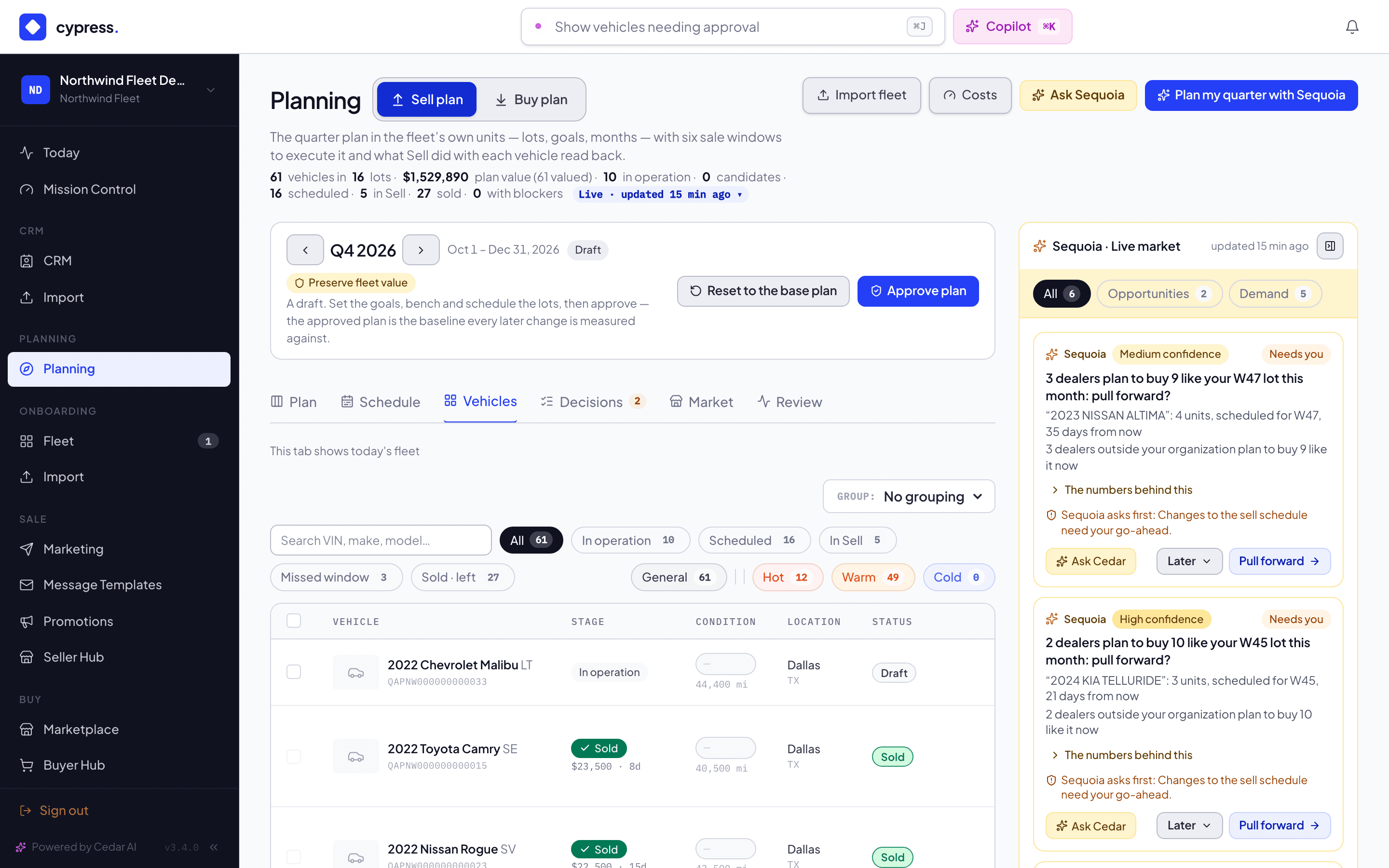
Tasks lists the quarter's work: the tasks on its goals, windows and lots and on the plan as a whole, by people and agents; see The work behind the plan.
Decisions is the trail of what Sequoia suggested for the quarter and what you decided; see Sequoia's decisions. Market reads what companies keep and do on Cypress, by make and model, and what it means for your plan; see The Market board.
Approving the plan approves its goals and lot targets. Moving vehicles between weeks never amends it.
Groups — cutting across lots
A lot is the fleet's own unit (same year, make and model). A group cuts across lots: every SUV over 80,000 miles, everything at one depot, the vehicles four years or older. Build one from the Plan tab's Groups section: a name, a colour, and a rule whose conditions must all hold — age, model year, mileage, class, make, model, state, mileage band, plan value, value lost in 13 weeks, stage or lot. Dry run lists exactly who the rule takes, which of them would leave another group, and how many are already in Sell; untick any, then Apply — one change. A group can also be hand-picked: "Move to group" in the Vehicles tab, or the group select in a vehicle's panel. A vehicle is in one group at most.
Sequoia suggests groups worth a decision, with the reason: the aging tail, the high-mileage tail, the vehicles losing value fastest, the biggest class-and-state concentration. "Accept as group" opens the builder prefilled — nothing is created until you apply.
On the Schedule, Lots · Groups switches the grid's rows. In Groups mode a group's row reads like a lot's, its cells open the same vehicle list, and opening the group lets you schedule some of its candidates into a month — ranked within the group, across its lots.
Market signal — your book, then Cypress-wide
Demand for a vehicle reads your own realized sales first. Under five comparable sales of your own, it reads anonymized sales across every Cypress seller over the last 180 days: the same make and model in the vehicle's state, else the model anywhere, else its class — never under five sales, never a seller's name or a single sale. The vehicle panel's market card shows both lines, and names the state where the model sells faster when the gap is three days or more ("Sells 9 days faster in GA"). Cypress-wide numbers are a baseline (T3) for your fleet, not its own measurement.
Cost & utilization
The hold-or-sell economics run on two figures per vehicle: what it costs to run a week, and what it earns while held. Planning → Costs sets them per class for this fleet, with the licensed class baseline beside each input; a vehicle's panel can override them for that vehicle only. The order is always the vehicle's own figure, then its class's, then the baseline. Without an "earns while held" figure the plan models value decay only — releasing sooner always looks better — and says so.
Practice: Keeping windows realistic
Why a slipped hand-off and a carried-over sale are different problems, and how to read the schedule so neither surprises you at window close.
Blockers & readiness
What can stop a sale (and what can't stop planning), and how readiness is four checks — never one score.