Sequoia's decisions
The trail of everything Sequoia suggested and everything you decided, and the lines Sequoia never crosses on its own.
TL;DRAI summary
This chapter explains the Decisions tab on both the Buy and Sell plans. It shows you a full timeline of every action Sequoia takes and every choice you make, so you always know what happened and why.
For: Dealers · Sellers · Cypress Managers
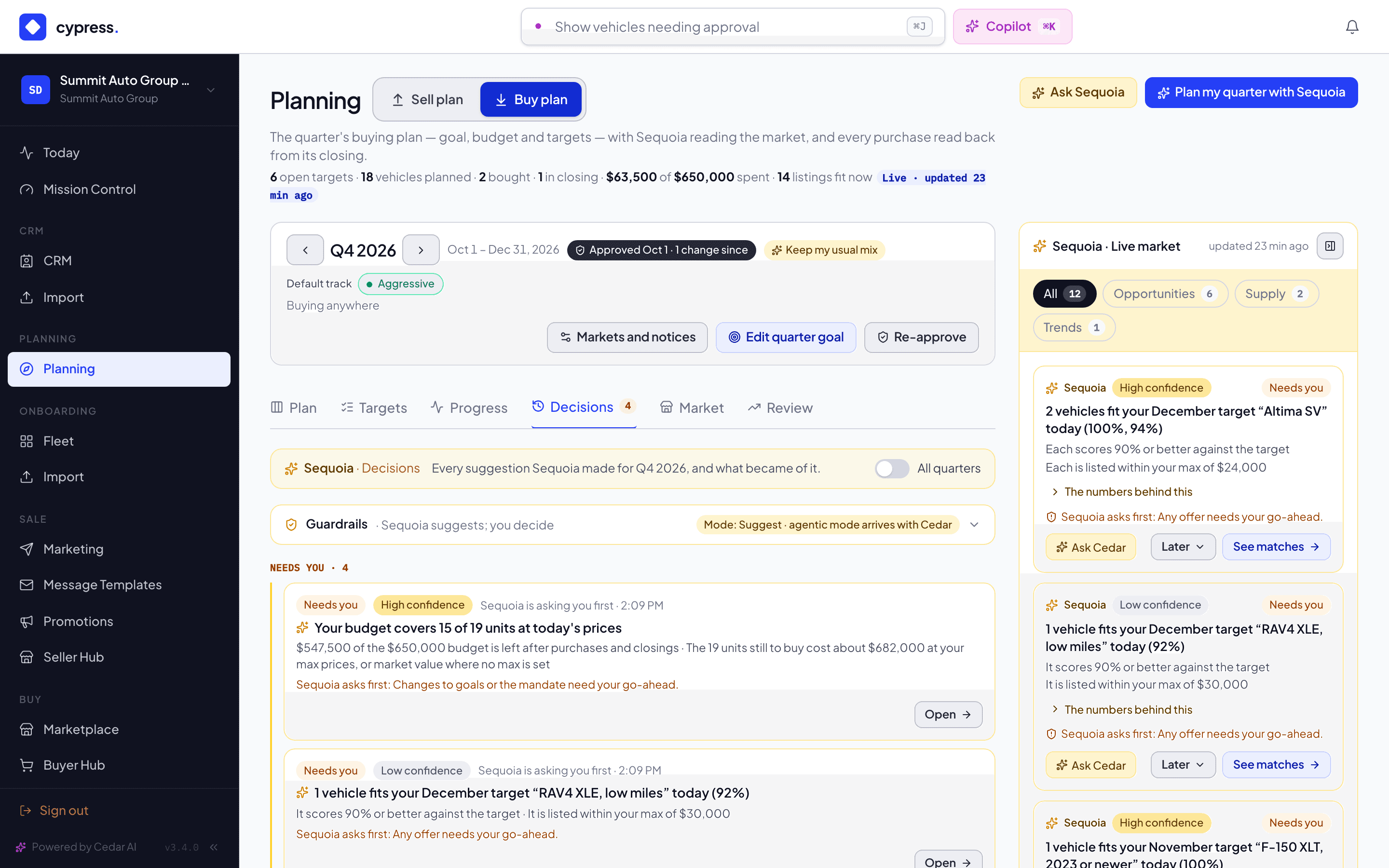
Every recommendation Sequoia makes, and every outcome, is recorded. The Decisions tab, on both the Buy plan and the Sell plan, opens with Sequoia's own header, Sequoia · Decisions, and shows the trail as a timeline: what waits on you first, under Needs you, then the rest newest first and grouped by day. Each entry is a compact Sequoia card with its badge, how sure Sequoia was (High, Medium or Low confidence, the same chip as the rail's cards), who acted and when. It follows the quarter bar: it shows the decisions of the quarter on the bar, and its All quarters switch shows every quarter's (Cypress remembers the switch for you in this browser, for each plan). A decision belongs to the quarter Sequoia made it for; one that is not Sequoia's own, such as a target you kept from Plan my quarter with Sequoia, belongs to the quarter it was made in. A quarter with none says No decisions in Q3 2026. Switch on All quarters to see others. The rail and What needs you are different: they always show the live items, whatever open quarter is on the bar. A quarter whose last day has passed is the record only: the tab reads What Sequoia suggested for Q3 2026, and what became of it., with no Open button on any past item, while the rail beside it still shows today's market and says so in one line. With All quarters on, the tab lists today's decisions too and keeps its buttons. Above it, a Guardrails row says which mode Sequoia is in. It is folded to one line, Guardrails · Sequoia suggests; you decide; open it to see what Sequoia may do on its own and what it always asks you first. Cypress remembers whether you left it open, for each plan, in this browser.
What each entry shows
- What it was, and why: its title and its first reasons.
- Its badge: Suggested, Needs you, Done, Skipped or You decided.
- Who acted and when: for example "Sequoia suggested", "You accepted" or "You chose not now".
- The line it reached, if any: "Sequoia asks first", with the line named.
- An Open button to what it is about: a target, a lot or a window (not on a closed quarter's record).
How an entry moves
| State | Meaning |
|---|---|
| Suggested | On the rail now. |
| Needs you | Sequoia reached one of its lines (below) and is asking you. |
| Accepted | You took it: you used its action on the rail or in What needs you, or kept the target in Plan my quarter with Sequoia. It reads You decided. |
| Done | What it asked for has happened. |
| Skipped | You chose Later, then Remind me next week. Sequoia does not suggest it again for a week. |
| Dismissed | You chose Later, then Not this quarter. Sequoia does not suggest it again this quarter. It reads You decided. |
| Expired | It is no longer true, for example because the vehicle sold. |
An expired entry leaves the timeline. The tab counts them at the bottom: "2 suggestions stopped being true before anyone acted; Sequoia retired them." Answered and expired entries are kept for 180 days.
The lines Sequoia does not cross
| Sequoia may do on its own | Sequoia always asks first |
|---|---|
| Watch a vehicle | Any offer |
| Notify you | Any price above your target |
| Draft a target, an offer amount or a lot move | Spending more than 10% of the quarter budget |
| Any change to your goals or mandate | |
| Any change to the sell schedule |
Suggest mode
Today Sequoia runs in Suggest mode. Everything it does is a proposal, and anything that reaches one of the lines above is marked Needs you with the line named. The Decisions tab says so: "Suggest · agentic mode arrives with Cedar". When Cedar can act for you, it will act through this same trail and within the same lines. The trail already says who acted, you or Sequoia or Cedar, so it will read the same when that day comes.
Related
Sequoia's market rail
The live market beside your plan: what Sequoia recommends, why, how sure it is, the Next weeks forecast, and what it never shows.
The Market board
The Market tab on both Planning pages: which models are selling fastest on Cypress, which models dealers want from plans, saved searches, saved vehicles and offers, what sellers plan to bring this quarter, what is live and the trend, and what it never shows.