Sequoia's market rail
The live market beside your plan: what Sequoia recommends, why, how sure it is, the Next weeks forecast, and what it never shows.
TL;DRAI summary
This chapter explains Sequoia's market rail, which sits beside your Buy plan and your Sell plan. Sequoia reads the market every hour and lists what it sees, with the reasons and how sure it is. A Next weeks section adds a forecast, in ranges, of what is coming for your targets or your lots. You can fold it away.
For: Dealers · Sellers · Cypress Managers
Both sides of Planning, the Buy plan and the Sell plan, show Sequoia's live market to the right of the plan, on every tab. On a narrow screen it moves above the plan, under the quarter bar, so it still comes first. You can fold it away to give the plan the room: see Fold the rail. It is today's market, whatever quarter the quarter bar shows, so it is there on a quarter whose last day has passed too. On such a quarter one line under the rail's header says so: Showing today's market — you're viewing Q3 2026. The quarter in progress has no such line. A rail you folded stays folded, and the line is there when you open it. On a quarter that is over the rail has no Next weeks section: that forecast is not read for a past quarter.
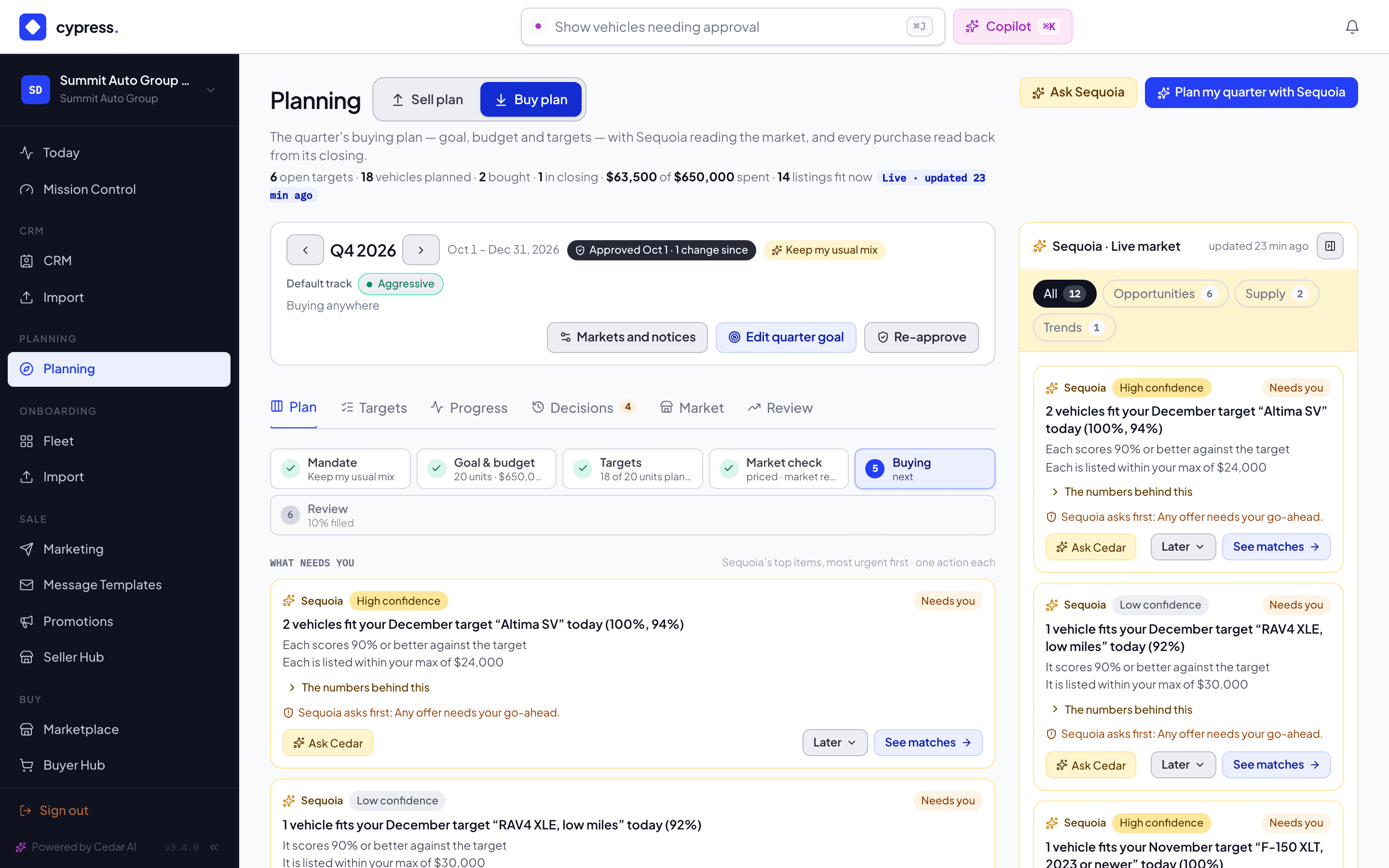
What a card says
Every card answers four questions:
| Part | What it is |
|---|---|
| What | One line: the opportunity or the risk, with its numbers. |
| Why | The reasons. The numbers behind this opens the figures Sequoia used. |
| Confidence | High, Medium or Low (see below). |
| Actions | Ask Cedar, on the left, which opens Cedar with the card's question and the numbers behind it, so Cedar answers about this card. On the right, a Later menu with two choices, Remind me next week, which hides the card for 7 days, and Not this quarter, which hides it until the next quarter begins (the menu says the date, for example "Hidden until Jan 1"); and then the main action, which opens what the card is about and records that you took it. |
When a card reaches one of Sequoia's lines, it says Sequoia asks first and names the line. See Sequoia's decisions.
The chips at the top narrow the rail: All, Opportunities, Supply (on the Sell plan, Demand) and Trends. A chip shows only when it has cards. A low-confidence suggestion shows under All only, unless it needs you or is also in What needs you. The rail shows six cards, then a button that reads Show N more, for example Show 4 more, which lists the rest.
The most urgent cards also appear in What needs you on the Plan tab, as the same cards, so you can act on them there too.
Confidence
| Level | When |
|---|---|
| High | At least 10 sales behind the signal, or a match of at least 95%. |
| Medium | At least 5 sales behind the signal. |
| Low | Anything thinner. |
On the Buy plan
| Card | For example |
|---|---|
| Ahead of plan | 2 vehicles fit your December target "Midsize SUVs" today (94%, 91%). |
| Selling fast | Fast seller with no target: a spec that sells quickly in your markets. |
| Supply coming | About 14 like "Midsize SUVs" coming to market from 3 sellers in the next 6 weeks. |
| Price trend | Prices for a target's spec are falling or rising 1% a month or more. |
| Budget | Your budget covers 31 of 40 units at today's prices. |
| Near matches | 3 near matches for "Midsize SUVs" (82–88%), with what each misses. |
| Your usual mix | No target for RAV4: you bought 7 in the last two quarters. |
| Due, no match | "Pickups" due W50 has no match. |
On the Sell plan
| Card | For example |
|---|---|
| Demand now | 4 dealers plan to buy 11 like your W47 lot this month: pull forward? |
| Hot demand | Dealers want Midsize SUVs: 3 plan to buy 12. |
| Competing supply | 23 similar vehicles are listed now against your W47 lot. |
| Sell sooner | Your lot is losing 2% of its value a month: sell sooner? |
| Realized | Your sales this quarter realized 97% of market value. |
How fresh it is
Sequoia reads the market every hour, and again about half a minute after you change a target, a goal or your markets. The rail says when it last read, for example "updated 12 min ago". A brand-new plan shows Sequoia is reading the market until the first read lands.
Fold the rail
The rail takes room the plan can use, so you can fold it. Select Fold the market rail, the button at the right of the rail's header, and the rail folds into a slim tab beside the plan. On a narrow screen, where the rail sits above the plan, it folds into a one-line bar that reads Sequoia · N suggestions. Select the tab or the bar to open the rail again.
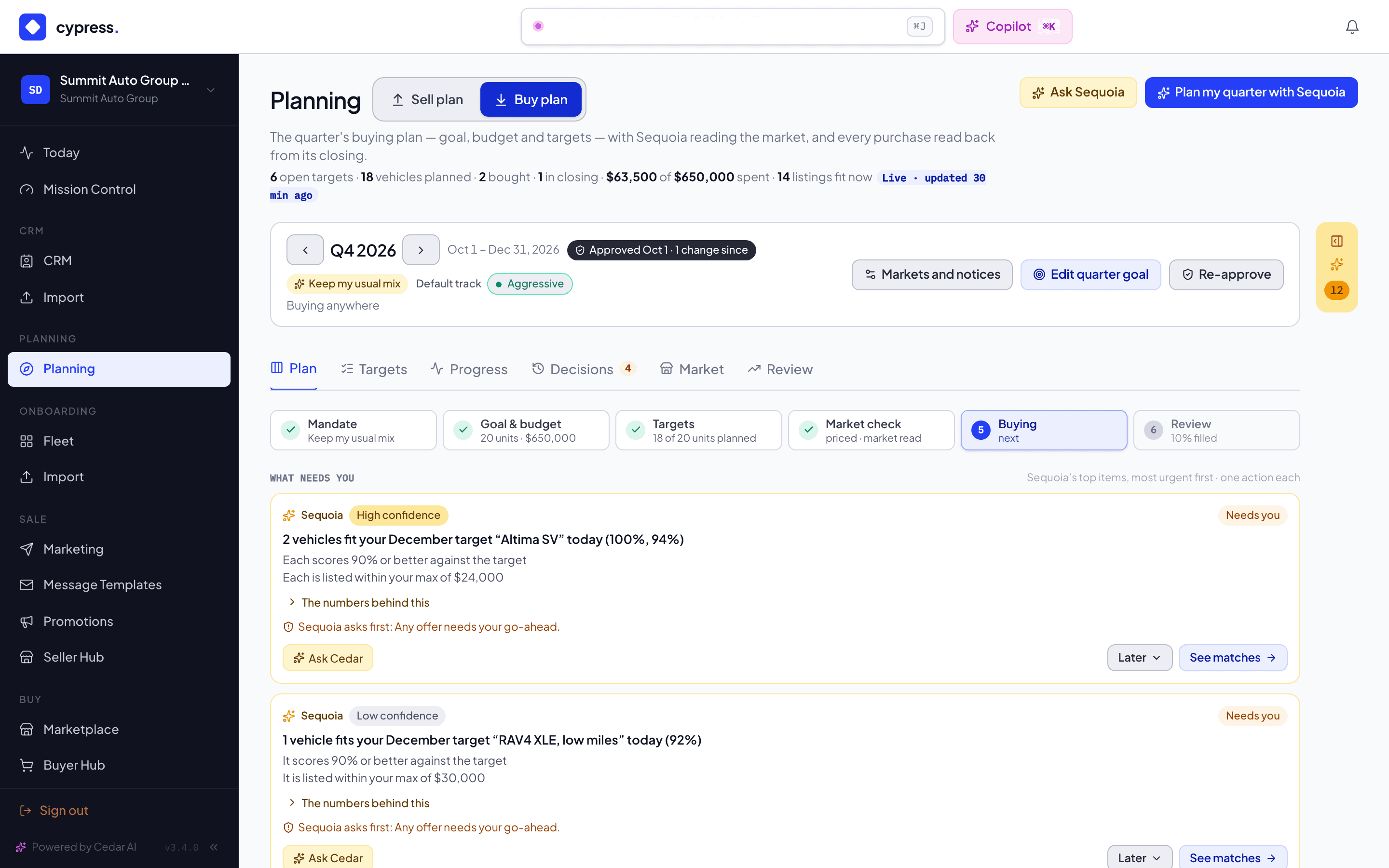
The tab and the bar tell you what is waiting without opening the rail:
- A count of the suggestions on the rail: the number the All chip would show.
- The count turns amber when something needs you, and keeps Sequoia's own color when nothing does.
- A dot shows when something on the rail is newer than the last time you had the rail open.
The whole rail folds, Next weeks included, and opens as you left it. The rail remembers your choice, separately for the Buy plan and the Sell plan, in the browser you used.
While Cedar's panel sits beside the page, the rail folds itself, so the plan is not squeezed between the two. That does not change your choice: when you close Cedar the rail goes back to how you had it. If you open the rail while Cedar is beside the page, it stays open until Cedar closes.
Next weeks: the forecast
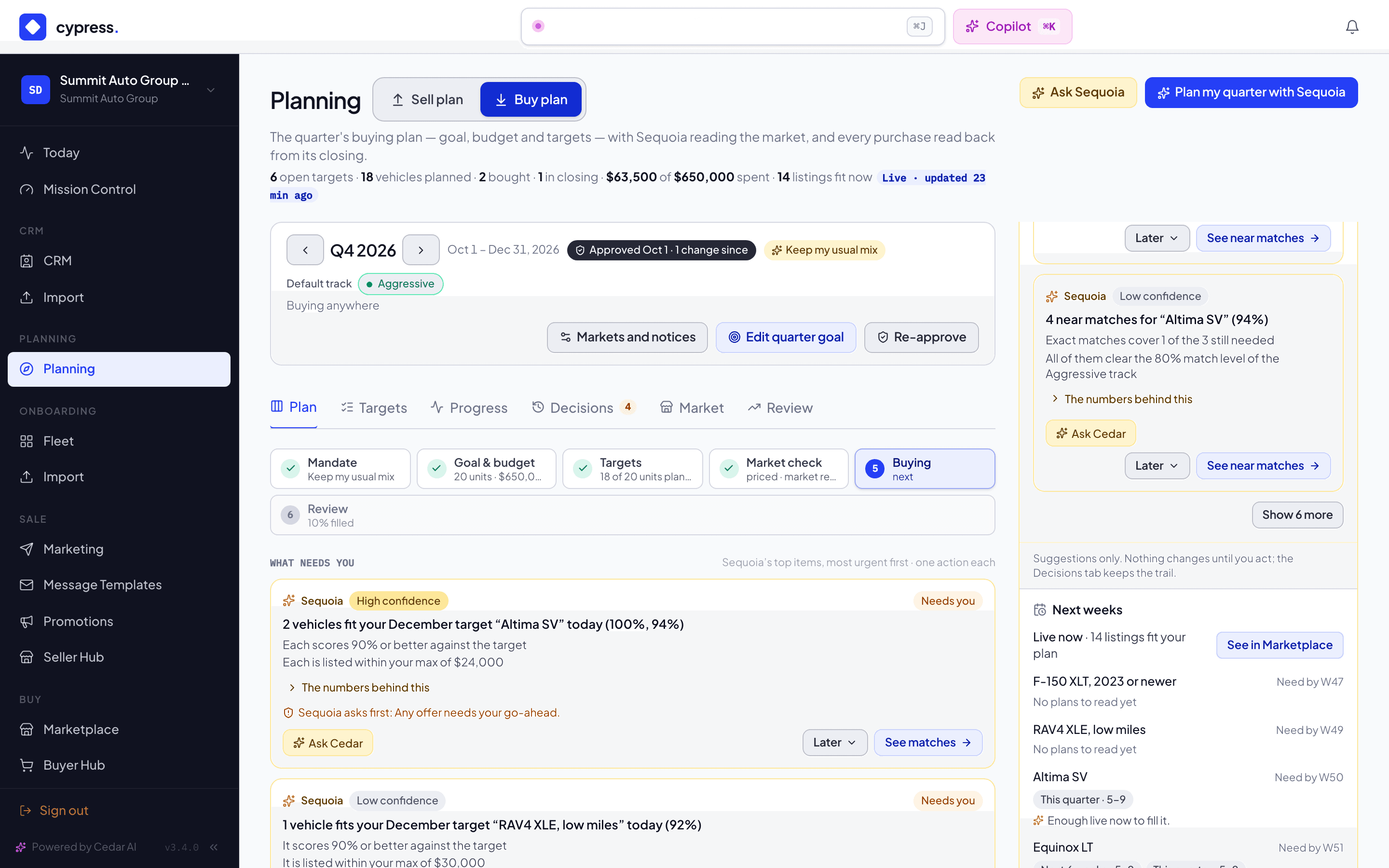
Below the cards, the rail has a section called Next weeks. It is not one of Sequoia's suggestions. It reads the plans that dealers and sellers keep on Cypress and tells you, in ranges, what is coming. It is there whenever Planning is switched on for that side, even when the rail has no cards.
What each side sees
On the Buy plan the section opens with Live now: how many listings fit your plan, with a link to the Marketplace. Under it, each open target that still needs vehicles shows, soonest needed-by first, five at first and then Show N more:
- the target's name and the week you need it by;
- a chip for each span, with the range that at least two sellers plan to bring to market by then, for example Next 2 weeks · 5–9 or Next 6 weeks · 10–19;
- one line that reads it.
A target with no span to show reads No plans to read yet. The line under a target is one of these:
| The line | When |
|---|---|
| Enough live now to fill it. | The listings that fit the target today already cover what it still needs. |
| More is planned before you need it. | Too few are live, and a span ends on or before the day you need them. |
| More is planned around when you need it. | Too few are live, and the spans shown all end after the day you need them. |
| Little is live or planned before you need it: buy what fits now. | Nothing fits today and no span can be shown. |
When some listings fit, but not enough, and no span can be shown, the target has no line.
On the Sell plan the section shows, for each of your lots, five at first and then Show N more:
- a chip with the vehicles dealers want in the next 13 weeks, for example Wanted by dealers, next 13 weeks · 10–19;
- a chip for each of your next four sale windows, for example During W43–44 · a few, with the range of vehicles wanted by dealers whose need is open during that window.
Every vehicle wanted by a dealer whose need is open during a window counts in it, so a later window often reads lower than the thirteen weeks. These are ranges of vehicles, not of dealers: they come from the counts the Planning page already shows beside each lot and window, and each needs at least two dealers behind it. A line at the top reads the lot with the most vehicles wanted, for example "10–19 wanted in the next 13 weeks for 2022 TOYOTA RAV4".
Under Your windows, for each of your next four windows and each lot scheduled in it, a chip shows the level of what other sellers plan to bring to market from today through the end of that window, when at least two other sellers do: Light, Normal or Heavy, measured against how fast Cypress usually sells that vehicle. When too few plan it, the lot reads Not enough plans to read, in gray text.
The spans: cumulative from today
The Buy plan's spans all start today: Next 2 weeks, Next 6 weeks and This quarter. The first two end on a Sunday, the last on the quarter's last day. Each counts everything planned by the end of it, so a longer span never shows less than a shorter one, and a span is never "between" two dates. A caption under the chips says so: Each counts everything planned by then.
The Sell plan's chips are not spans. One reads the next 13 weeks and the others read your own windows, with the caption Vehicles wanted by dealers whose need is open during that window.
Why ranges, and why a span is sometimes missing
The forecast never shows an exact number. It shows a few, 5–9, 10–19 or 20+. A range or a level appears only when at least two sellers stand behind it (on the Sell plan, at least two dealers), counted from today to the end of the span. With fewer, nothing is shown for it. A missing span, or Not enough plans to read, means there are too few plans to say anything. It does not mean none are planned.
Demo organizations see a demo-only market: a demo dealer reads demo sellers, a demo seller reads demo dealers, and real organizations never read demo plans. Your own organization and its stores are never counted as the other side in your own forecast.
What the forecast never shows
It never shows a name, a price, a VIN, a location, the date of anyone's window, how many sellers or dealers stand behind a range, or a total of planned vehicles. Neither side ever sees the other side's limits.
The footer
Every state of the section ends with this line: "From plans on Cypress. Plans change; nothing here is a commitment." On the Sell plan a second line follows it: "Your plans count, anonymously, in the forecast dealers see: never your name, prices or VINs."
The section reads the first time the rail is open: when the page opens, or, if you left the rail folded, the first time you open it. On the Sell plan, the first schedule window panel you open reads it too if the rail has not, and shows the part about its lot and window under Market for this lot. On the Buy plan it reads again after you change the plan. On the Sell plan it reads again the next time you open the page. Cedar reads the same forecast: ask "what is coming for my targets?" on the Buy plan or "how much demand is coming for my lots?" on the Sell plan, and it answers with the same ranges and levels.
What it never shows
- Dealers see sellers' plans only as anonymous counts and ranges, and only when at least two sellers contribute. They see no names, no vehicles and no prices.
- Sellers see dealers' plans only as counts and ranges for their own lots and windows, and only when at least two dealers plan to buy.
- Neither side ever sees the other side's limits or prices.
Related
- Planning inside remarketing: where the plans and Sequoia's cards also show up, in the Seller Hub, the Marketplace and the Buyer Hub
- Sequoia's decisions
- Tracks and near matches
- The Market board, the Market tab: which models dealers want and what sellers are planning to bring, by make and model