The quarter bar and closed quarters
The strip above the tabs of both plans that says which quarter you are looking at, how it moves between quarters, and what a quarter whose last day has passed shows and refuses.
TL;DRAI summary
This chapter explains the quarter bar, which helps you see which quarter you are viewing and move between quarters. It also explains what happens when a quarter closes, showing you which parts of your plan are now history and which actions you can still take.
For: Sellers · Dealers · Cypress Managers
Every Planning page is about one quarter at a time. The quarter bar, above the tabs on both the Sell plan and the Buy plan, says which one, steps to the quarter before or after, and holds the quarter's own buttons. When a quarter's last day has passed it is closed, and its plan becomes history. This chapter says what the bar holds and what a closed quarter shows, on each side.
The quarter bar
The bar is the same on every tab, and the same height: a line that belongs to one tab sits in the tab, never in the bar, so nothing moves when you change tabs. It always has the arrows, the quarter's name and its first and last day, and the quarter's status. What else it holds depends on the plan.
The Sell plan's bar
Above the tabs, on every tab, the quarter bar says which quarter you are looking at. It has arrows to step to the quarter before or after, the quarter's name and its first and last day (for example Q4 2026 and Oct 1 – Dec 31, 2026), its status (Draft, Approved with its date and the changes since), the mandate, a line of months, lots and goals, and two buttons on the right: Reset to the base plan and Approve plan (Approve amendments once the plan is already the baseline, Approved when nothing has changed since). The mandate is a pill; point at it to read what the mandate does. A quarter whose last day has passed is closed: a slate Closed badge with a lock sits beside the quarter's name and days, on every tab, and a Go to Q4 2026 button, last on the right, moves the bar to the quarter in progress. A closed quarter is history: see A closed quarter.

Plan, Schedule, Decisions and Review show the quarter on the bar, so the arrows move them all. Decisions lists that quarter's decisions, or every quarter's with its All quarters switch, and the bar then reads Q4 2026 · showing all quarters. Vehicles shows today's fleet, whatever the quarter, so the tab opens with one line, This tab shows today's fleet, and the bar keeps its arrows, its status and its buttons. Market shows today's board, whatever the quarter, so its tab opens with Today's market the same way; see The Market board. The bar is the same on every tab, the Cypress desk included, and the same height: the line is in the tab, never in the bar, so nothing moves when you change tabs.
The Buy plan's bar
Above the tabs, on every tab, the quarter bar says which quarter you are looking at. It is the same bar on every tab. It has arrows to step to the quarter before or after, the quarter's name and its first and last day (for example Q4 2026 and Oct 1 – Dec 31, 2026), whether it is approved, your mandate, your Default track, where you are buying, and the buttons for the quarter: Markets and notices, Edit quarter goal and Approve quarter. The Plan, Progress and Review tabs show the quarter on the bar, so the arrows move them. So do Targets, which lists the targets you need in that quarter, and Decisions, which lists that quarter's decisions; each has an All quarters switch that lists every quarter's instead, and the bar then reads Q4 2026 · showing all quarters. Market shows today's market whatever the quarter, so it says Today's market as the first line of the tab itself. The bar stays the same height on every tab, so nothing moves when you change tabs, and on Market it keeps its arrows, its approval and its buttons. The Cypress desk, for Cypress staff, follows the quarter bar too: its due filter opens on the quarter on the bar and one of its due chips is All quarters, and its bar is the same whole bar as on every other tab, for the dealer whose plan is open. In a quarter whose last day has passed, the bar says so on every tab, on both sides of Planning: a slate Closed badge with a lock beside the quarter's name and days, and a Go to Q4 2026 button, last on the right, that moves the bar to the quarter in progress. The goal button is gone, because a closed quarter's goal is what Review compares the quarter against, so it does not change; see A closed quarter.

A closed quarter
A quarter whose last day has passed is history. Nothing in its plan moves, the lists and Review stay, and the market rail beside the plan is today's market and says so in one line. The two sides read it a little differently.
A closed Sell quarter
A quarter whose last day has passed is history, on both sides of Planning:
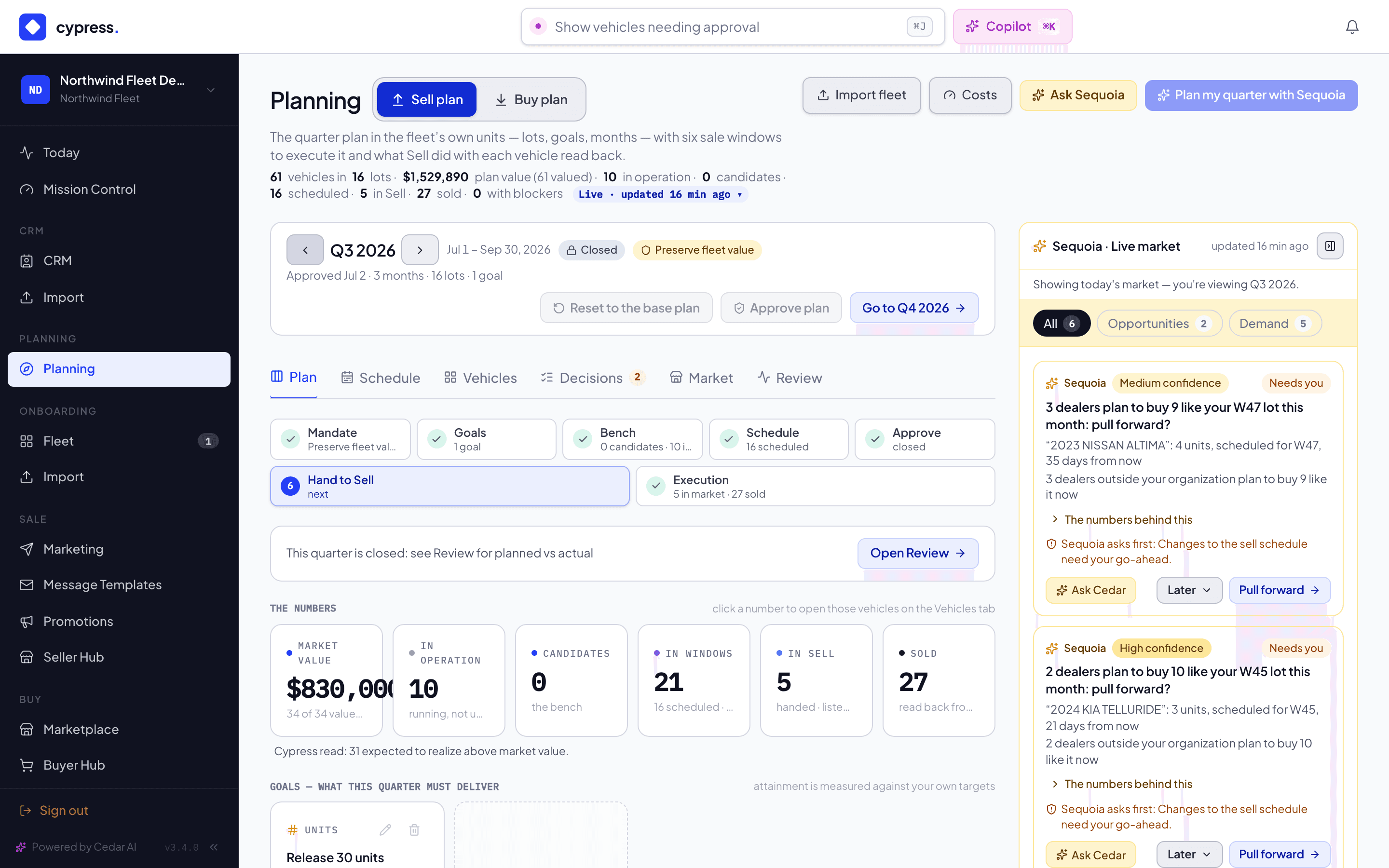
- The rail is today's market. The market rail stays beside the plan on a closed quarter, on every tab, and says in one line that it is today's market: Showing today's market — you're viewing Q3 2026. The Plan tab keeps its one line, This quarter is closed: see Review for planned vs actual, and the Decisions tab reads What Sequoia suggested for Q3 2026, and what became of it., with no button on any past item.
- Nothing in its plan moves. Its cells cannot be dragged, and moving
vehicles, taking them out, changing a planned vehicle's track, Spread, Bench,
Sequoia's proposal, Hand to Sell, the goal and track edits on the
Plan tab, and Reset to the base plan in the quarter bar are shown but off, each saying why: Q3 2026 is closed. Switch to Q4
2026 to move vehicles. (Plan my quarter with Sequoia, at the top of the page, says it
when you point at it and to a screen reader, not as a line beside the buttons, so the
buttons do not move when the quarter changes.) Analyze, the vehicle lists and Review stay. A
vehicle whose window closed unsold can still be moved out of it, from the
Vehicles tab. Cypress refuses the change if it is sent anyway, over the
API too: the Planning API answers
409 QUARTER_CLOSEDand writes nothing. - What you can still do. A vehicle already in Sell can still change track, from the window's vehicle list, the lot panel or the vehicle's own panel: a car that is still selling has a pricing posture that must not freeze, so only the vehicles still being planned are frozen with their quarter. You can still add, edit and resolve a blocker on a closed quarter, and pull a handed-off vehicle that is not yet listed back to planning from its panel; it goes to today's bench. They are facts, or the vehicle's future, like recording a purchase made elsewhere, not changes to the quarter's plan.
The Cypress desk, for Cypress staff, follows the quarter bar too. When staff are acting for a company, its bar is the same whole bar as on every other tab, for that company's plan. With no company chosen there is no plan to show, so the bar is the quarter, its days and the arrows only, on the current quarter, for the arrows to move.
A closed Buy quarter
A quarter whose last day has passed is history. It cannot be changed, and its Plan tab shows no live market of its own. The quarter bar says Closed and offers Go to Q4 2026, whatever tab you are on.
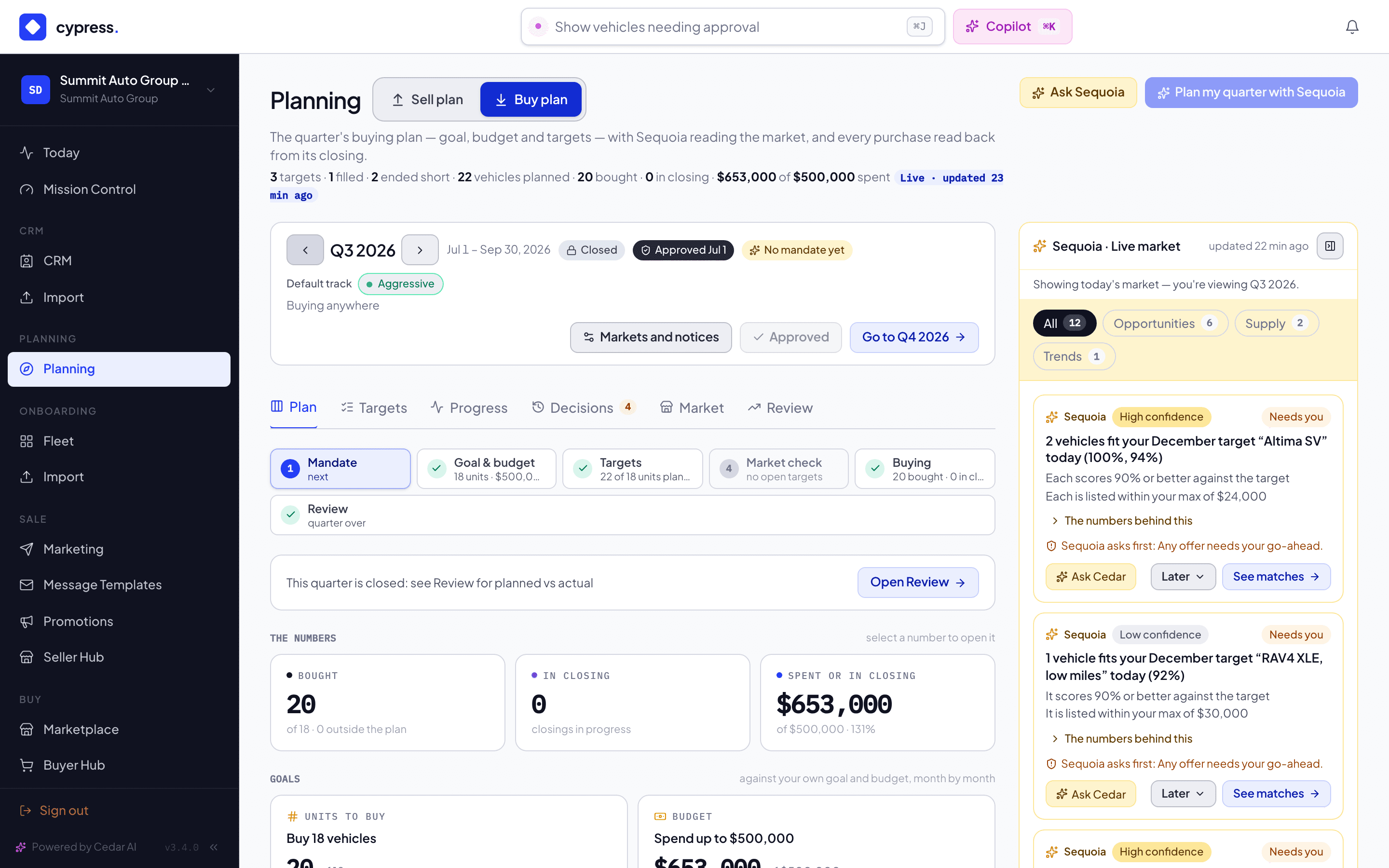
- No live market. What needs you, Live matches and Coming to market (the vehicles that at least two sellers plan to bring to market) are not shown, because they read the market as it is today, and one line stands in their place: This quarter is closed: see Review for planned vs actual, beside it a button, Open Review, opens the Review tab on the same quarter. Sequoia's market rail stays beside the plan, as on every tab, because it is today's market and says so in one line: Showing today's market — you're viewing Q3 2026. It has no Next weeks section on such a quarter. Bought, In closing and Spent or in closing stay, and so do the two goal cards; a goal that was never set reads No units goal was set or No budget was set, with no button.
- Nothing in the plan changes. Add target, Plan my quarter with Sequoia, and in a target's panel Edit, Pause (or Reopen), Close and Duplicate as alternative are shown but off, and each says why in the verb of what it would have done, for example Q3 2026 is closed. Switch to Q4 2026 to add a target. (Plan my quarter with Sequoia, at the top of the page, gives its reason when you point at it and to a screen reader, not as a line beside the buttons, so the buttons do not move when the quarter changes.) A new target cannot be needed in a closed quarter either: the needed-by date says Q3 2026 is closed. Pick a needed-by date in Q4 2026 or later. Cypress refuses the change if it is sent anyway.
- Purchases are facts. Record a purchase made elsewhere, and moving a purchase to a target, work on a closed quarter's targets, because a purchase may be recorded late.
- Decisions is the record. The Decisions tab on a closed quarter reads What Sequoia suggested for Q3 2026, and what became of it., with no Open button on any past item. Under All quarters it lists today's decisions too, and keeps its buttons.
- Targets read what they were. Each target reads Filled when nothing remains to buy and Ended · 3 short when its quarter closed with units never bought; the stored status you set, Open, Paused or Closed, is not changed.
Where to read more
- The plan: goals, lots, and the quarter for the Sell plan's approval and baseline.
- Approve and review the quarter for the Buy plan's.
- Sequoia's market rail, which stays beside a closed quarter and says it shows today's market.
- The Cypress desk, which follows the quarter bar for Cypress staff.
The Market board
The Market tab on both Planning pages: which models are selling fastest on Cypress, which models dealers want from plans, saved searches, saved vehicles and offers, what sellers plan to bring this quarter, what is live and the trend, and what it never shows.
Planning inside remarketing
Every place the Sell and Buy plans show up outside Planning, side by side: the Seller Hub, the Fleet panel and Leads for sellers; the Marketplace, the vehicle page, the Buyer Hub and notices for dealers. What each shows, where the number comes from, what you can do, and where it leads.