The schedule, the hand-off, and what actually happened
Sequoia's proposal into the six windows, handing a window to Sell by its date, the read-only execution mirror with the shortfall ladder, and the reviews the plan learns from.
TL;DRAI summary
This chapter explains how you schedule vehicles for sale, hand them off to be sold, and then review how well the sales performed against your original plan. It shows you how to manage your inventory and meet your sales targets.
For: Sellers · Cypress Managers
The schedule — lots by window
The Schedule tab is a matrix: rows are lots, columns are the six two-week sale windows (named by calendar week, with real dates) plus candidates — the bench. Vehicles in operation or parked are not on the schedule; they show as a muted count under the candidates column. A cell is how many of a lot sit in a window, tinted by where they are: scheduled is blue with an outline, handed to Sell is sky blue, in market is amber, sold is solid green with a check, and missed is red with a warning mark. The legend above the grid is drawn from the same colors as the cells, and no state is shown by color alone: every count chip says its state in words. A red number on the corner of a cell is what was carried over unsold. The stage chips in a lot's tooltip and panels use the same colors: Sold is solid green with a check, never black, and a vehicle with offers is amber with a hand-and-coins mark. Click a cell for the vehicles behind it (see A cell's panel, below). Every window header carries its hand to Sell by date: the day Sell needs the vehicles to prepare them (photos, condition, listing) before the window opens; a date already behind you reads past due.
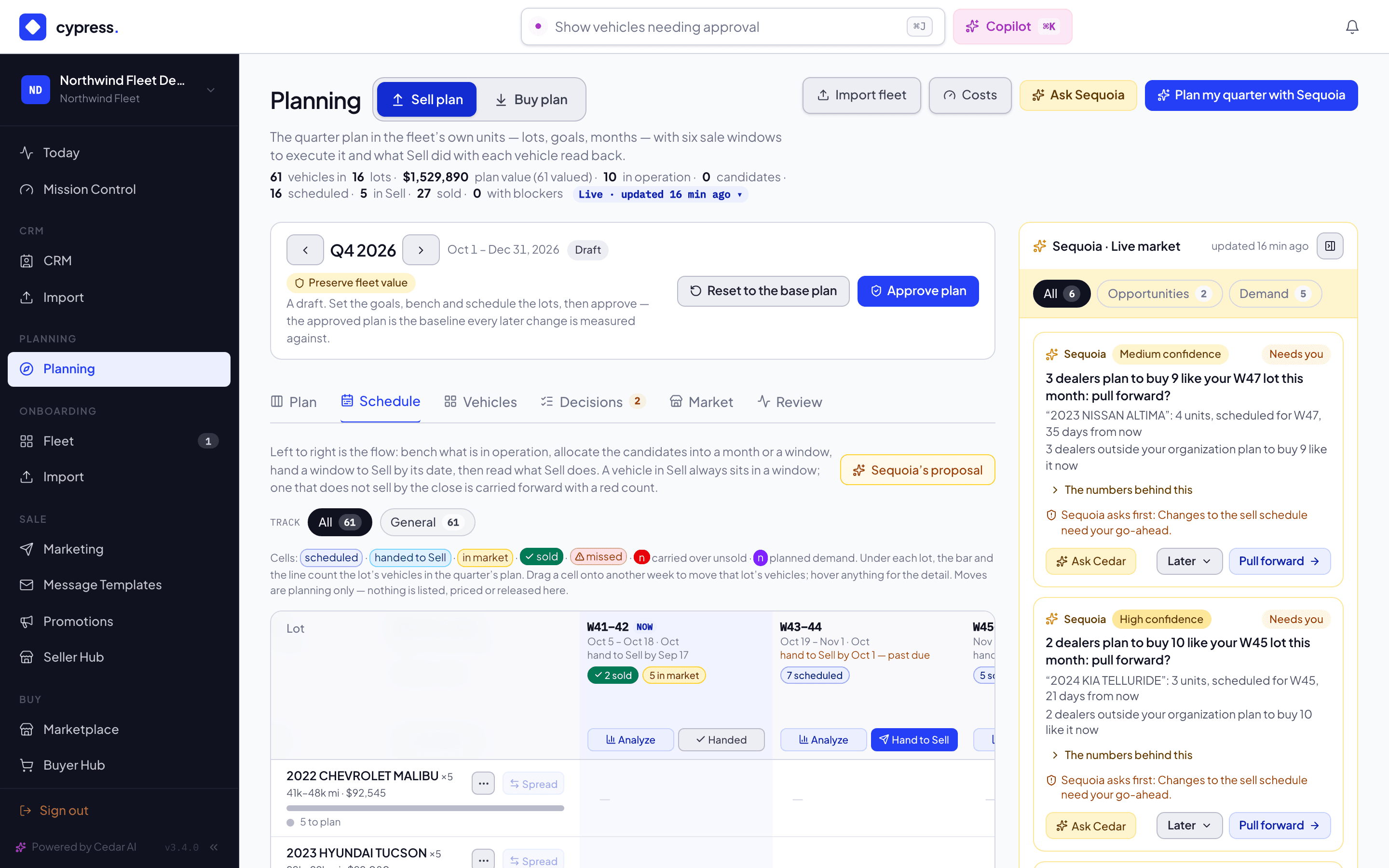
Every lot row counts its vehicles in the quarter's plan, so a week off screen can't hide anything. Under the lot's name and mileage sit a thin bar and one line: "3 sold · 2 in market · 1 handed · 1 scheduled · 1 missed · 2 to plan". The bar is split in that order, each part as wide as its count, and hovering it gives the breakdown. A state with none is left out of both. To plan is what is still in operation or on the bench with no window yet; parked vehicles are out of the quarter's plan and are not counted. The counts are the cells' own, added up across the lot's windows and its In Sell column: a vehicle selling in Sell outside the windows counts as in market.
All sold. When every vehicle of a lot in the quarter's plan is sold, the line gives way to a light green All sold badge with a check, the row's cells go quieter, and the lot sorts after the active ones under a quiet "All sold (3)" divider. It stays on the grid. A lot with even one unsold vehicle is not All sold.
The row's actions are always drawn, not only under the pointer: the menu (bench, back to operation, keep running) and Spread. One that doesn't apply is disabled and says why, in its tooltip and to a screen reader: "All sold", "Nothing to move: all sold", "Nothing to spread: it needs two or more vehicles in open windows".
Every window header has the same five rows, in the same order, so the buttons line up from one window to the next: the window with its state (now, closed), the dates, the hand to Sell by line, the counts and the buttons. The counts are small labelled chips of the states that are not zero, "2 sold", "1 in market", "3 scheduled", never bare numbers; each has a tooltip, in the color of its state. Analyze and Hand to Sell sit side by side, the same width. When everything in a window has been handed, the second button reads a disabled Handed with a check. A closed window has no Hand to Sell: it reads its result ("Closed · 2 sold · 1 missed") and keeps Analyze. When the current window would be cut off at the right edge, the grid opens scrolled so it sits right next to the lot column; when it is already in view, nothing moves and In operation and Candidates stay on screen.
Planned demand is violet. On the Sell plan's schedule, its panels and the demand cards, violet means planned demand and nothing else, so a dealer's plan is never read as one of your own states. Where a window has planned demand, its cell has a small violet dot on the top left with the number of dealers (the red carried-over number is on the top right), and the cell's tooltip opens on a violet block with the sentence, "2 dealers plan to buy 13 like this in this window." The lot's panel shows the same read as a violet Planned demand card above Mileage bands, and a window's panel draws Market for this lot in violet. Only the look changed: what is counted, the two-dealer minimum and every number are the same.
Windows roll: as a window's last day fully passes it closes, and a new one opens at the end of the horizon, so six are always live. A window that closes with nothing planned closes silently.
A cell's panel
The panel opens on Market for this lot, what the market says about this lot in this window. It repeats the cell's tooltip, "2 dealers plan to buy 12 like this in this window.", and adds what the Next weeks forecast says: how much dealers want the lot (Wanted by dealers, next 13 weeks, as a range) and how heavy other sellers' planned supply of the same vehicles is through the window (Light, Normal or Heavy). Anything with too few plans to say is left out, and the block is absent when nothing is. Every number is one you already see in the tooltip or the market rail.
Below it, the vehicles, and three groups of actions on the right of the toolbar. They act on the vehicles you select, or on all of them when none is selected:
- Move to a window, then Move.
- Track puts them on another track.
- Take out of this window is a menu of three exits, each with what it does: Back to the bench, Park until… and Back to operation. Vehicles already in Sell stay in a window; they are not taken out.
Move and Track apply at once. The message that appears has Undo, which puts exactly those vehicles back in the window or on the track they came from. It leaves alone any vehicle that has changed since: one you moved again, handed to Sell, sold or put on another track stays as it is, and the message says how many ("3 changed since and were left as they are."). The Vehicles tab's Move to window and Move to track have the same Undo. The three exits ask first (the confirmation names the vehicles that will move, the window, the quarter and, for Park, the day they come back), because they take vehicles out of the plan. Each is one change.
Sequoia's proposal
Sequoia's proposal lays the quarter's targets into the windows: month by month, your lot targets first and then the targets it derives from a fleet-wide goal, top-ranked vehicles first, spread evenly across a month's open windows so identical units do not all hit one window. It respects the hard constraints — no open window in a month, the minimum operating fleet — by leaving those vehicles unplaced with the reason, and it turns the soft ones into warnings: market crowding (more of one class in a window than the market clears in two weeks) and cash below the reserve in a given week (a later sale never funds an earlier payment). Every line carries its rank reasons, its hand-off date and its net cash; the panel shows what the proposal does for each goal per month. Apply all of it or a selection: the apply binds to exactly the set you saw — if the plan moved in between, you get a fresh proposal instead.
Targets are always net of what is already scheduled: a met target proposes nothing more, so asking again never double-books.
Analyze a window
Analyze on a window header answers the questions in the order you decide in: what is in it and by when it must be in Sell; whether the market can take it (crowding per class); whether the fleet can spare it (operating vehicles after this window vs your minimum); what cash it brings against what is due in those two weeks (expected, unconfirmed — a shortfall blocks a spending commitment, never a beneficial sale); and every vehicle with its plan value.
Hand a window to Sell — the hand-off, exactly
Hand to Sell on a window header is where planning hands that window's vehicles to the remarketing platform you already run. The preview shows the exact set and what confirming does: the vehicles leave planning and appear in your Sell intake (status stays Draft) so they can be prepared before the window opens. Nothing is listed, priced, disclosed to buyers, or billed — those steps keep their own approvals downstream.
Approval binds to a digest of that exact set. If anything changed between
preview and confirm — a vehicle moved, a blocker cleared — the confirm is
refused and a fresh preview is cut. Vehicles waiting on a payoff or on
arrivals are held, not dropped; the result lists every vehicle's outcome.
Each promoted vehicle also receives its track's label (plan-sell-fast,
plan-general …) so Sell's pricing rules can read the plan's intent.
The way back: a handed-off vehicle that has not reached listing can return to planning from its vehicle panel — a candidate again, with the reason recorded. Once listed, the selling side's own teardown (delist, archive review) is the path back, and the vehicle shows in planning as returned.
Execution — what actually happened, read back
The Review tab reads Sell back: planning reads it, and price and listing actions happen in Sell. Every vehicle the plan handed over or scheduled appears with its stage, its ask, its best open offer, its sale price and days to sale — against the plan value frozen when it was scheduled — and opens in Sell with one click. Above it, the goals' roll-up.
If only part of it sells. The shortfall ladder takes what is still moving — best-ranked first — and asks what 50, 75, 80 and 100 percent sell-through does: units and cash by date, the carry cost and value decay accrued on what stays unsold, the fleet's shape at quarter end, what spills into the next month, and which goals each rate misses. It is labeled an assumption, not a forecast. For the goals 75% misses, Sequoia proposes remedies — pull more ahead from the lots (opens the lot, ready to schedule), revise the target to what that rate attains, or move the cash date — each a proposal you apply, never an action it takes.
Window reviews — planned vs what happened
When a sale window's last day fully passes (a daily sweep), it closes and its review lands on the Review tab (only when something was planned). Each vehicle reads like a sentence once its outcome is known — Sold · 11 days · 97% of ask · −$300 vs plan, Sold elsewhere · price unknown, Left the fleet, Returned to planning, Missed window — and the header rolls up what the plan has learned so far: handed vs planned, sold, realized vs plan, median days to sale. Outcomes reconcile once, when they are final; a vehicle still in market stays a live mirror.
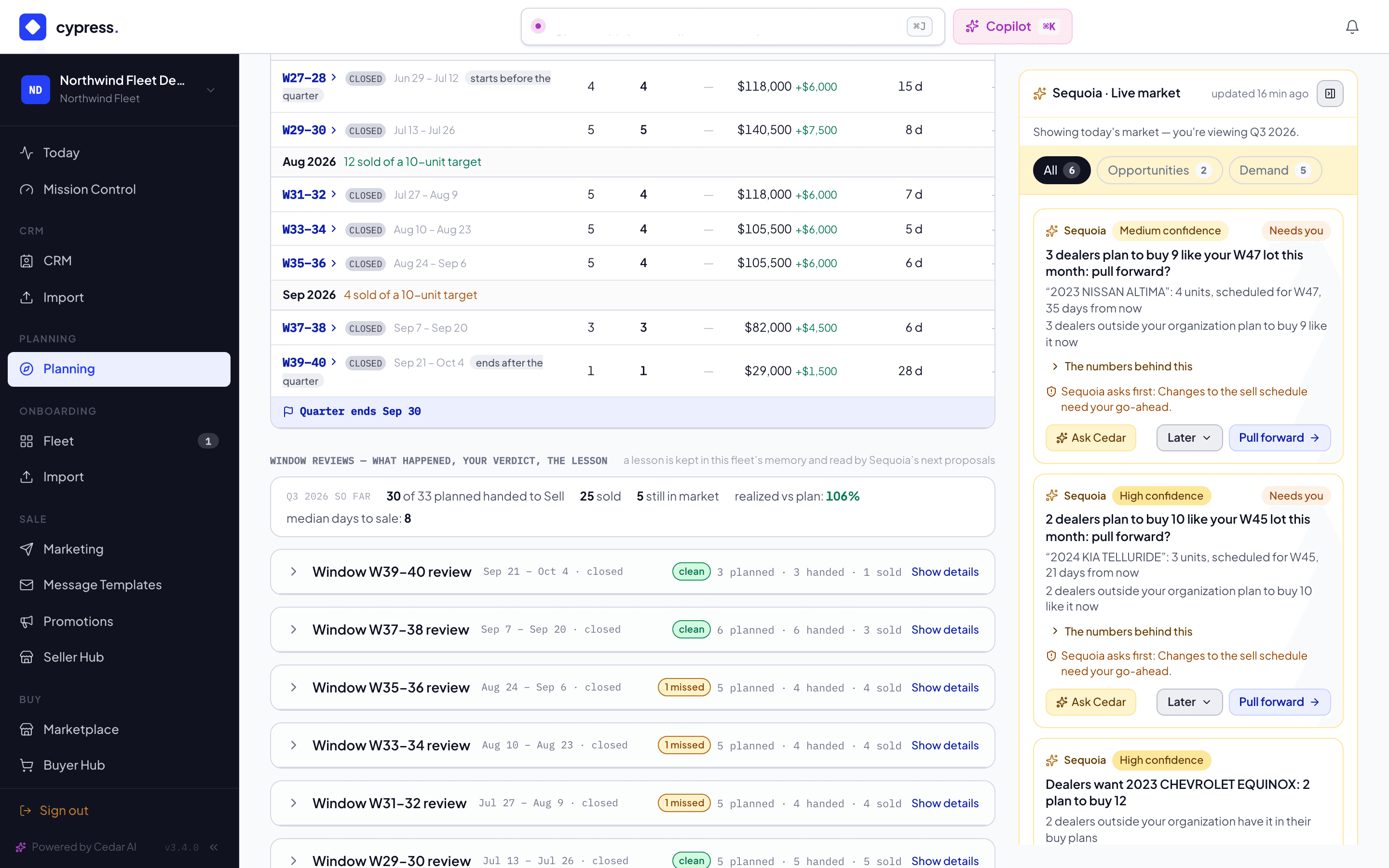
Each review takes your verdict — agree, partially, disagree — plus your words. Feedback is recorded to customer memory only (never shared outside your org) and informs future proposals; a policy change still needs its own explicit approval.
Blockers & readiness
What can stop a sale (and what can't stop planning), and how readiness is four checks — never one score.
The plan in Sell — one voice
How a fleet's live quarter plan shows up where vehicles are sold: plan chips and the In a plan slice, the read-only Plan tab, and one sell-or-hold voice across the platform.