The Market board
The Market tab on both Planning pages: which models are selling fastest on Cypress, which models dealers want from plans, saved searches, saved vehicles and offers, what sellers plan to bring this quarter, what is live and the trend, and what it never shows.
TL;DRAI summary
The Market board shows which models are selling fastest on Cypress, which models other companies want, and which models sellers plan to bring this quarter, with what that means for your plan. It shows models and ranges, never a name, a price or how many companies.
For: Dealers · Sellers · Cypress Managers
The Market tab sits between Decisions and Review on both the Buy plan and the Sell plan. It reads what companies keep and do on Cypress, and what has sold there, and shows, by make and model, which models are selling fastest, which models other dealers want, which models sellers plan to bring this quarter, how many of each are live now, and which way the Cypress market value is moving. It shows on whichever plan page the organization has.
The quarter bar above the tabs is the same bar as on every tab, with its arrows and buttons and the same height, so nothing moves when you open this tab; the tab itself opens with one line, Today's market. The board is read as of today, so stepping to another quarter would change nothing on it.
Part of being on Cypress
There is nothing to switch on and nothing to post. The plans that companies keep in Planning, the searches and vehicles that dealers save in the Marketplace and the offers they make feed the board, anonymously, and the board is part of what you get by being on Cypress. Under the two columns, the tab says so:
Part of being on Cypress: the plans, searches, saves and offers of companies here feed this board, anonymously — never names, prices or VINs.
Under that is the line every forecast on Cypress ends with: From plans on Cypress. Plans change; nothing here is a commitment.
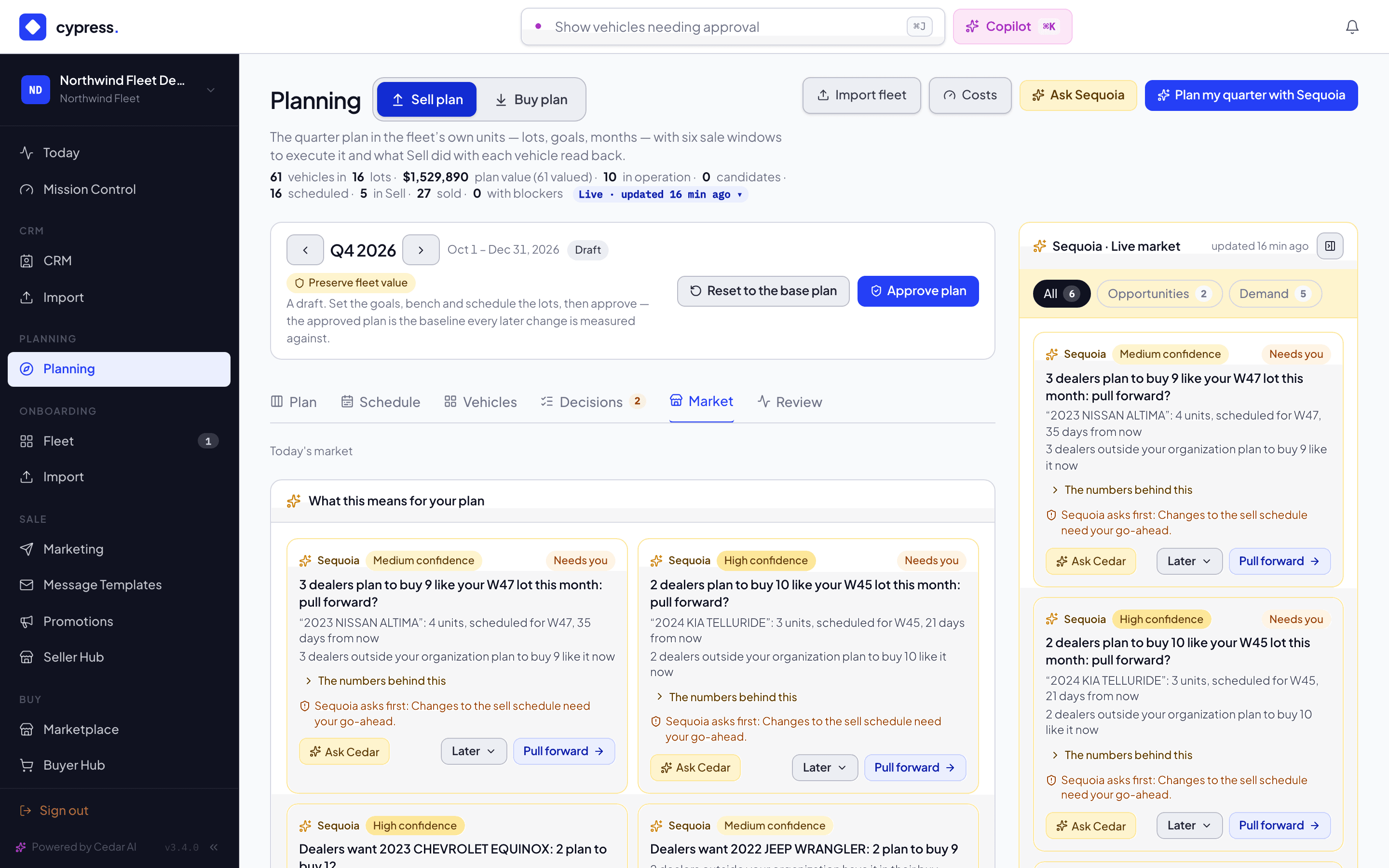
What this means for your plan
The tab opens with What this means for your plan: Sequoia's live suggestions that the market drove, as the same cards its market rail shows, at most four. On the Sell plan they are demand for your lots, demand that is hot, other sellers competing in your windows, and a falling market that argues for selling sooner; on the Buy plan, a hot model no target covers, supply that other sellers plan to bring, and a price trend that argues for buying now or waiting. Each card has its action, Ask Cedar and Later, as on the rail. With none, it says Nothing in the market calls for a change to your plan right now. The rail lists everything Sequoia suggests; this is the part of it the market below explains.
Hot on Cypress
Across the top of the tab, a section titled Hot on Cypress · selling fastest now lists up to eight models that are selling fastest on Cypress, fastest first. It is not built from plans. It is the same list of hot models that Sequoia's market rail uses to suggest a target, read from Cypress's own completed sales of the last six months, and nothing new is measured for the board.
- Which models. The models that sold the most per week. A model needs at least five sales behind it to show, and it shows with no seller and no price. The sales are those in the markets of your Buy plan. If your organization has no Buy plan, or none with markets set (a seller, say), they are Cypress-wide.
- Models you hold stay in. This list says what is selling, not what anyone plans, so a model your own company holds can be on it. For a seller that is the point: you see that a model you hold is hot. This is the difference from What dealers want, which leaves your own models out.
- Real sales only. Only completed sales of real customer organizations are read, and a demo organization's sales are never in it. Demo organizations see the same list.
A row shows:
- the model, for example Toyota RAV4;
- the chip Hot, the flame chip that marks a hot vehicle elsewhere in Planning;
- one sentence made from the median days it takes to sell, for example Sells in about 12 days on Cypress, or Selling fast on Cypress when there is no median;
- the live listings, for example 7 live (0 live when there are none), and the trend when the model has one, as described under Live listings and the trend below.
A row never shows how many sales, how many a week, how close to the asking price a model sold, a price, or who sold it. The tab says where the list comes from under its rows: From Cypress sales: at least five sales behind every model, never a seller or a price.
What dealers want
The first column is titled What dealers want · plans, saves and offers on Cypress. A row is one make and model that at least one company outside your own has in a plan, a saved search, a saved vehicle or a recent offer. The board starts with any number of companies, so a single company is enough for a row. Four things put a model here:
- A plan. An open target that names a make and a model, with vehicles still to buy, whose need overlaps the next 13 weeks. A need is open from the day it is needed from (from today, when it has no start day) until the day it is needed by, so it overlaps the next 13 weeks when it has not ended and starts no later than 13 weeks from today. This is the same reading the Planning page uses for the vehicles dealers want beside each of a seller's lots. A target that names only a class, or a make without a model, puts nothing here.
- A saved search. An active saved search in the Marketplace counts only when it names exactly one make and at least one model: it puts each of those models here, up to 10 models. A search that names several makes, a make without a model, or more than 10 models puts nothing here, because pairing its models with one of the makes would be a guess, and a list that long is not a search.
- A saved vehicle. A vehicle that someone at a company saved in the Marketplace in the last 30 days, on that vehicle's make and model. Only a vehicle shown on the Marketplace counts (not a private link or storefront-only vehicle): a save of a vehicle that is reachable only through a private link or a storefront never does. A save counts only when its saver belongs to one company, and only a company's, never a private individual's.
- A recent offer. An offer made in the last 30 days by a company, on a vehicle shown on the Marketplace (not a private link or storefront-only vehicle), whatever became of the offer. An offer made through a private link or a storefront never counts, because it would show stock that is not on the Marketplace.
Only companies count. A private individual's searches, saves and offers never feed the board, and neither does an offer made without a buying organization. A company with several stores counts once, and your own organization and its stores count for nothing on your board.
Only models Cypress knows count. A make and model reach the board only when Cypress has seen them in a live listing or a sale of the last year, the same list the target editor suggests from, and only when they read as a vehicle's name: a name that is very long, has symbols in it or is a VIN is left out. This is true of what sellers plan to bring as well as of what dealers want.
A row shows:
- the model, for example Toyota RAV4;
- the chip Wanted on Cypress;
- the live listings, for example 7 live, when there is a count for it;
- the trend, with an arrow and its words, when the model has one.
This column shows which models, never how many. It has no quantity and no range, and its rows are alphabetical, so the order says nothing about how much is wanted. A row never says whether a plan, a saved search, a saved vehicle or an offer put the model there. The tab says so under the column: Shows which models dealers want on Cypress, from plans, saved searches and vehicles, and recent offers. Never how many, and never who.
Models your own company holds are not in this column. For those, the Planning page already shows you the dealer demand on your own lots, and the tab says where: Models you hold show their dealer demand on your lots, in Planning. On the Sell plan, Planning opens the Plan tab.
The first 12 rows show, and a button reads Show N more with the number of rows left.
What sellers plan to bring
The second column is titled What sellers plan to bring · this quarter. A row is one make and model that at least one seller outside your own organization plans to bring to market from today to the end of this quarter: vehicles planned into a sale window that starts in that time.
A row with at least three sellers behind it carries a range of the vehicles planned, never the exact number:
| Range | Means |
|---|---|
| under 10 | Fewer than 10 vehicles. |
| 10–19 | Between 10 and 19 vehicles. |
| 20+ | 20 or more vehicles. |
A model that fewer sellers plan reads Planned, in a quieter chip, with no number at all. A range from one or two sellers would be those sellers' own volume, so the board does not give it. The tab says so under the column: A range shows when at least three sellers plan a model; otherwise it reads Planned.
The rows with a range come first, the largest range first, and rows in the same range are alphabetical, so the order never separates two models inside a range. The Planned rows follow, alphabetically. The first 12 rows show, and a button reads Show N more with the number of rows left.
Live listings and the trend
Every row, in the Hot section as in the two columns, can carry two more things, for the models the board shows:
- Live. The number of live listings of that make and model on Cypress right now, outside your own organization, for example 7 live. It is a count of public listings, so it is exact. A model with none reads 0 live.
- Trend. An arrow, up, flat or down, and Cypress's own words about the market value of that model, for example "Market value of Toyota RAV4 across Cypress: down 2.4% a month over the last 120 days." A model with too few vehicles in Cypress's valuation book has no trend. The words carry no price and no vehicle count.
What you can do from a row
Each row has small buttons on the right, each with its icon.
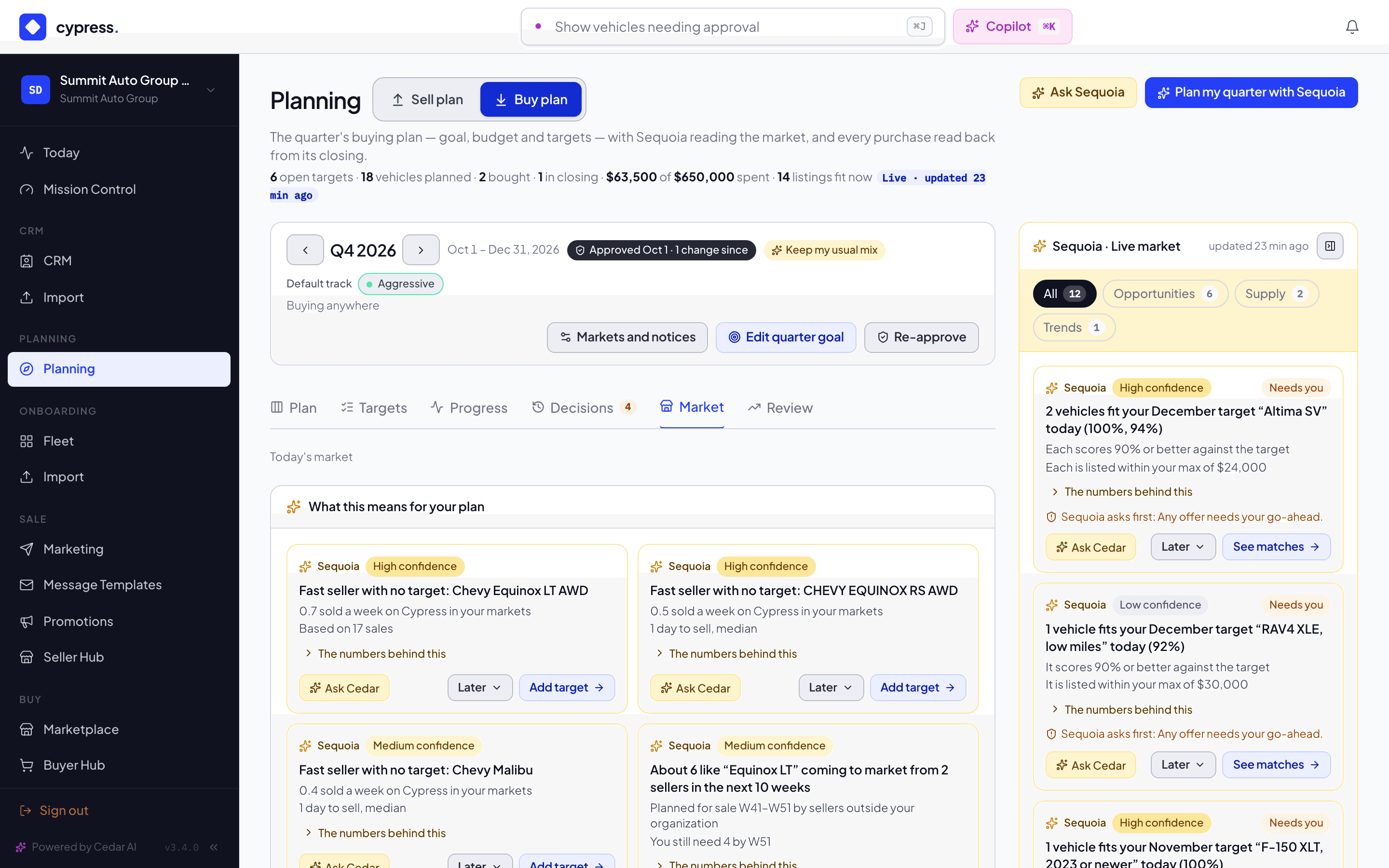
A row tied to your plan says so in a chip: on the Sell plan You hold 8, the vehicles of that make and model still in your fleet; on the Buy plan Your target: RAV4 XLE, an open target of the quarter that names it. When Sequoia has a suggestion about that model, one line under the row says it, after Sequoia:, with its action.
A row in the Hot section has the same buttons as a row in the columns.
On the Buy plan
- Add a target like this opens the target editor with the make and model filled in. It is the same editor, and the same fill, as Add target on a Sequoia card. You choose the quantity, the dates and the prices, and nothing is saved until you save.
- See live listings opens the Marketplace narrowed to that make and model: vehicles for sale now. Planned supply is not for sale yet, so there is nothing to open for it.
On the Sell plan
- Open my matching vehicles opens the Vehicles tab with that make and model in its search. It shows only on a row whose make and model your own fleet holds.
- See live listings opens the Marketplace narrowed to that make and model.
When there is nothing to show
While the board is being read, the tab shows a placeholder. If it cannot be read, it says Could not read the market. and shows no board, so a failed read is never mistaken for an empty market. The Hot section reads Nothing selling fast enough on Cypress to call hot yet. when no model has enough sales behind it. A column with no rows reads Nothing to read yet: the board fills as companies plan, search, save and make offers on Cypress. That means no company outside yours has planned, searched, saved or made an offer for it yet, or that every model they want is one your own company holds, and not that the market is quiet.
The tab reads the board each time you open it. Cypress keeps its answer for a few minutes, and what it reads from searches, saves and offers is kept for a few minutes too, so a new plan, search, save or offer can take up to about ten minutes to show.
What it never shows
- How many. Not how many companies stand behind a row, not how many vehicles dealers want, and not a total of anything. Dealers' needs show as presence only. Sellers' plans show as a range, or as Planned. A hot model shows no number of sales, and no sales per week.
- Which signal. Not whether a plan, a saved search, a saved vehicle or an offer put a model in the dealer column.
- Who. No company name, no price, no VIN and no location, and no date of anyone's window. A hot model shows no seller and no sale price. Neither side ever sees the other side's limits.
- Your own. Your own organization and its stores never count toward a row, and a model you hold has no row in the dealer column.
- Real and demo together. Demo organizations see a demo-only market, and real organizations never read demo plans. The one exception is Hot on Cypress, which is read from real Cypress sales for everyone.
Ask Cedar
Cedar reads the same board. Ask "what is the market saying?", "what is selling fastest?", "which models do dealers want?" or "what are sellers planning to bring this quarter?" and it answers with the same models, ranges and trend, and for what is hot the same sentence the tab shows, never a number of sales. It also says it is from plans on Cypress that can change, and it never says how many dealers or sellers stand behind a row or which of plans, saved searches, saved vehicles and offers put a model there. It reads Planned as planned, never as a number.
Related
- Sequoia's market rail explains the live market beside your plan, and its Next weeks forecast.
- The Sell plan and The buy plan explain the plans that feed the board.
- Add and edit a target covers targets, which Add a target like this starts.
- Planning inside remarketing covers the places outside Planning that read plans, and what each side never sees.
Sequoia's decisions
The trail of everything Sequoia suggested and everything you decided, and the lines Sequoia never crosses on its own.
The quarter bar and closed quarters
The strip above the tabs of both plans that says which quarter you are looking at, how it moves between quarters, and what a quarter whose last day has passed shows and refuses.