A buying quarter: Summit Auto Group
Follow a fictional dealer through a buying quarter: draft the plan with Sequoia, read its targets and tracks, open a match and its Buy analysis, see Buy at the ask, follow purchases, then approve and review planned against actual.
TL;DRAI summary
This chapter walks you through a quarter on the Buy plan, showing how to track your progress and manage your buying targets. You'll see how Cypress helps you find vehicles that fit your plan and budget, and how to review your purchases against your goals.
For: Dealers (org admins, fleet managers) · Cypress Managers acting for a dealer that delegates to Cypress
Summit Auto Group is a fictional dealer used in these examples. It buys, and only buys. This walkthrough takes it through a buying quarter on the Buy plan, and each step says what you should see. Your own plan reads the same way, with your targets and purchases.
Before you start
- The example is dated in Q4 2026, the quarter in progress. Yours follows the quarter you are in.
- Summit's quarter is already planned and approved, with one change since. Steps 1 and 7 are written so you can read them without changing it; step 7 ends with a choice that does.
- The matches come from other companies' live listings on Cypress, read every hour, so a listing published a moment ago shows within the hour.
Steps
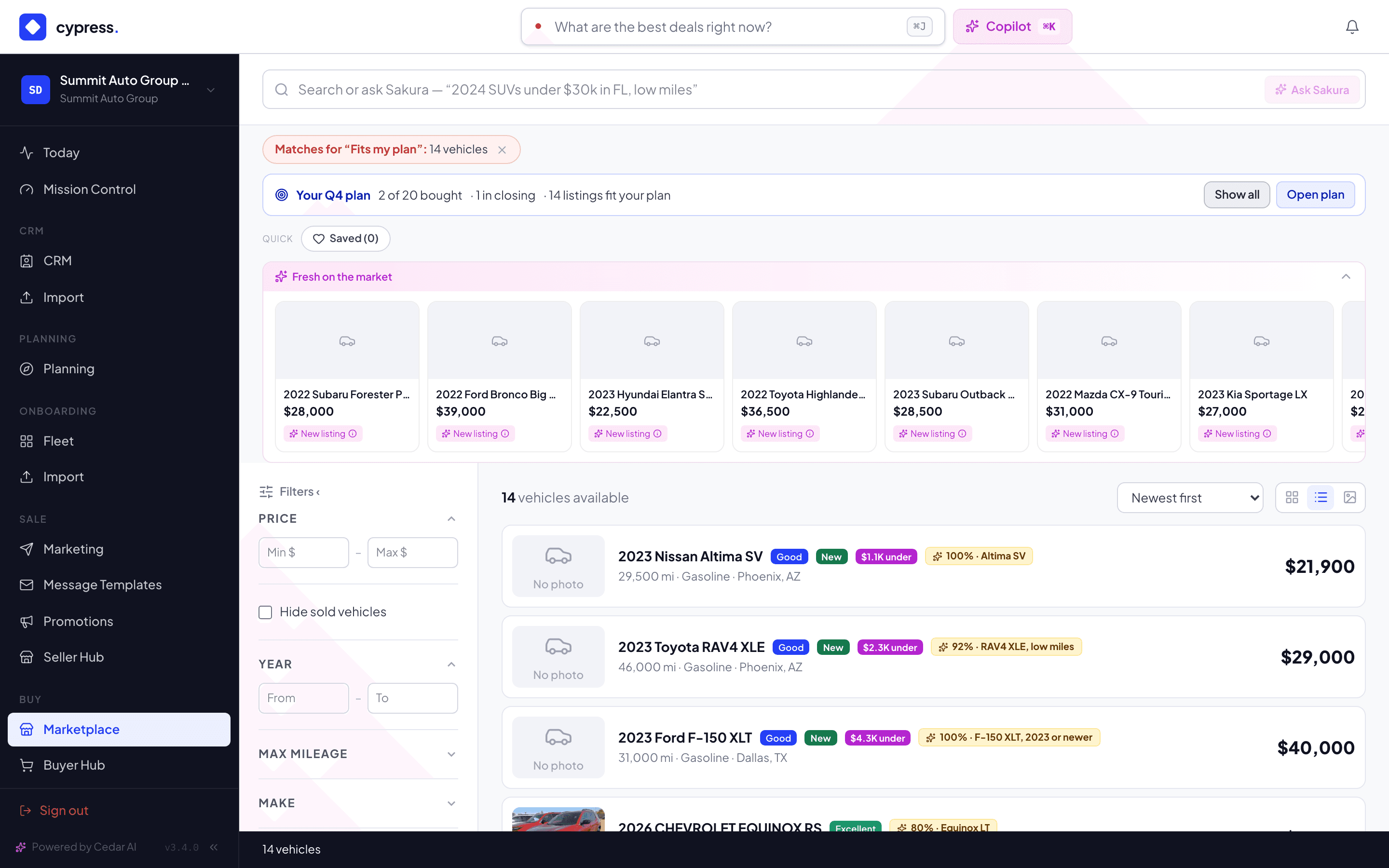
Open Planning, then switch to the Buy plan with the switch beside the title. Read the line under the page title: it counts the open targets you need in the quarter on the bar, the vehicles planned, how many are bought and in closing, and what you have spent against the budget, for example … of $650,000 spent. The quarter bar reads Q4 2026 and Oct 1 – Dec 31, 2026, with the mandate Keep my usual mix, the Default track Aggressive, and the buttons Markets and notices, Edit quarter goal and Approve quarter.
You should see seven tabs, Plan, Targets, Progress, Tasks, Decisions, Market and Review, and Sequoia's market rail on every one.
Select Plan my quarter with Sequoia to see how a quarter is drafted. Pick a mandate and select Next; the button reads Drafting… while Sequoia drafts. Walk the four steps, Mandate, Goal & budget, Draft targets and Markets & notices, and look at what each says. On the last step, Approve this as Q4 2026's baseline starts off, because Summit's quarter is already approved: Q4 2026 was approved Oct 1. Leave this off to keep that baseline. Then leave with Cancel, or Escape, and Discard the draft.
You should see a goal and budget proposed From your purchases and the market, because Summit has a quarter of purchases behind it, and three to eight target cards, each Suggested by Sequoia with its reasons. Nothing is saved until Create plan. Lakeside Motors, whose quarter is not approved, is the one to try the full flow on.
Open the Targets tab. It lists the targets needed in the quarter on the bar, in this example seven: F-150 XLT, 2023 or newer, RAV4 XLE, low miles, Tacoma SR5, Rivian R1T, Equinox LT, Telluride SX and Altima SV. Each has a Track column; Summit's are all Aggressive, in green. The F-150 target has High priority on; on an Aggressive target its hint reads Always alerts instantly. The status chips are All, Open, Filled, Paused, Closed and Ended. The Tacoma reads Filled, because two were bought by hand. Silverado 1500 LT for spring is needed after the quarter ends, so it is not here until you switch on All quarters.
Open a target and select Edit to see the editor and its track picker: Aggressive shows matches from 80% and offers up to your maximum; Balanced from 90% near market value; Conservative exact matches only, at your target. See Tracks and near matches.
You should see the track colors and the Filled chip on the Tacoma.
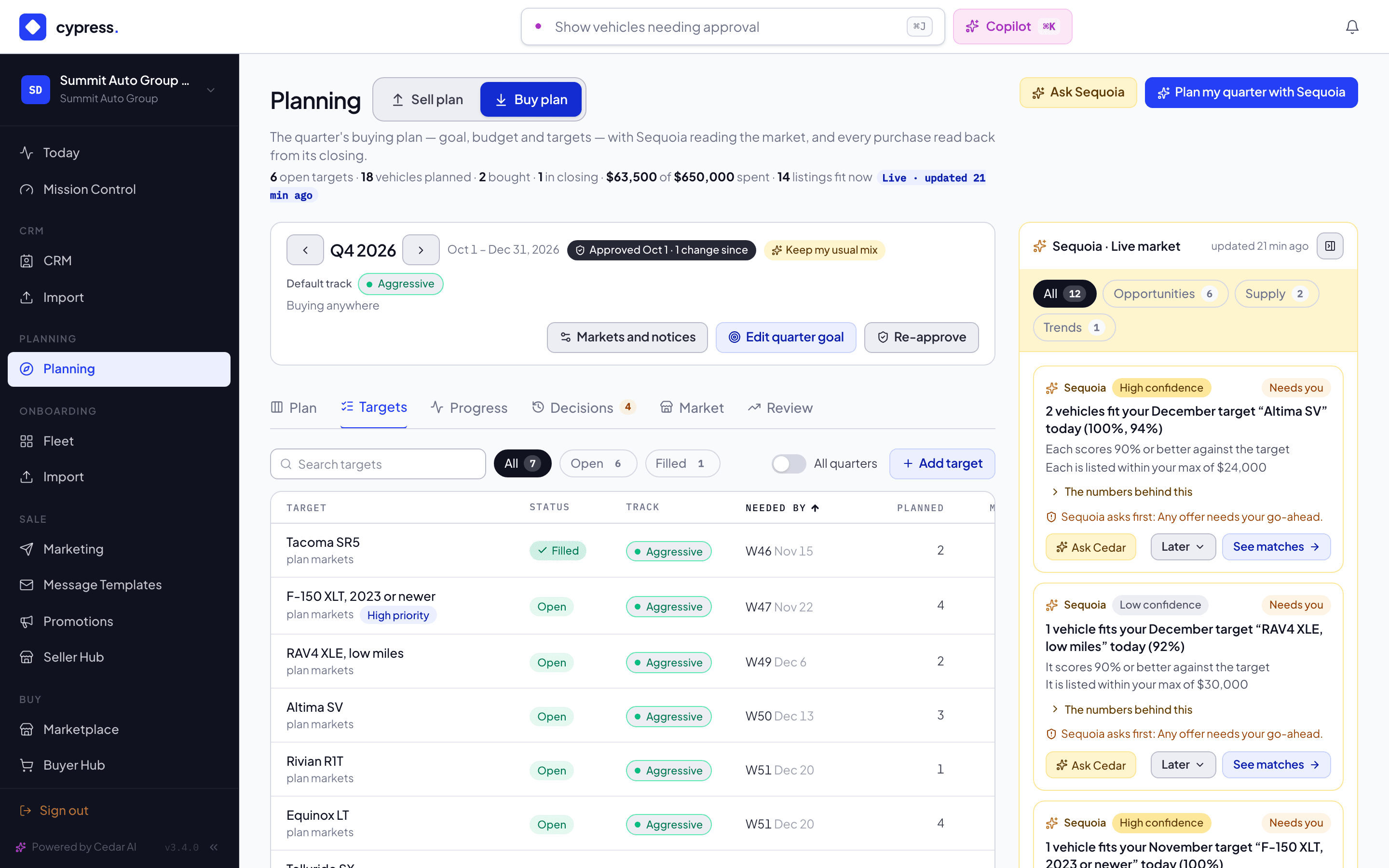
Select the F-150 XLT, 2023 or newer target. Its panel opens with Sequoia's offer for this target, Price guidance, and Live matches. One 2023 Ford F-150 XLT from Northwind Fleet is an exact match at 100%. Its row shows what Sequoia would offer for that listing; because the listing asks less than Sequoia's Aggressive price would pay, it reads Buy at the ask. Sequoia never offers more than a seller asks, and it never sends an offer on its own.
Then open RAV4 XLE, low miles. Redwood Leasing's 2023 RAV4 XLE is a near match: the row says what it misses, the mileage over the maximum, with a score in the 90s. A Conservative target would not show it at all: Lakeside Motors has the same RAV4 target on Conservative and sees nothing.
You should see the exact match first, then the near one, each with its match and what it misses.
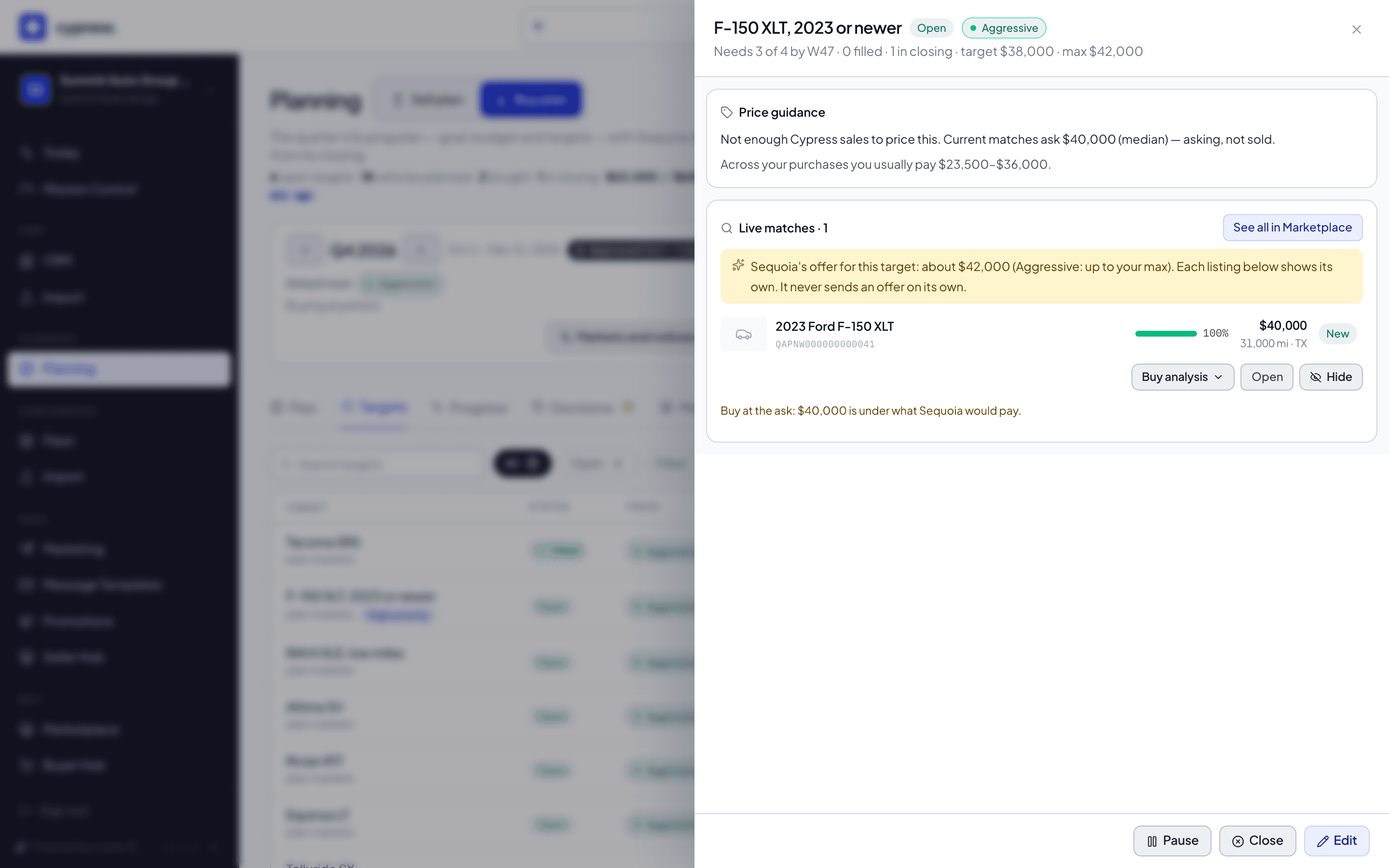
On the RAV4 match, select Buy analysis. The row opens four blocks, read when you open it: Market position, with the public ask beside Cypress's market value; Price to your need-by, the market value carried along the Cypress trend to the week you need it, or No Cypress trend yet — fewer than 5 … when Cypress has too few sales of it; Buy now or wait, with how many other live listings fit, what sellers plan before you need it, and how long the listing has been up; and Fit and budget, with the match, what it misses, and what the purchase leaves of your budget, for example Leaves … of your Q4 2026 budget. The same card sits on the listing's vehicle page in the Marketplace, under the specifications.
You should see a read of one listing against your target and budget. It is yours alone: the seller never learns it was opened, and nothing in it carries the seller's limits.
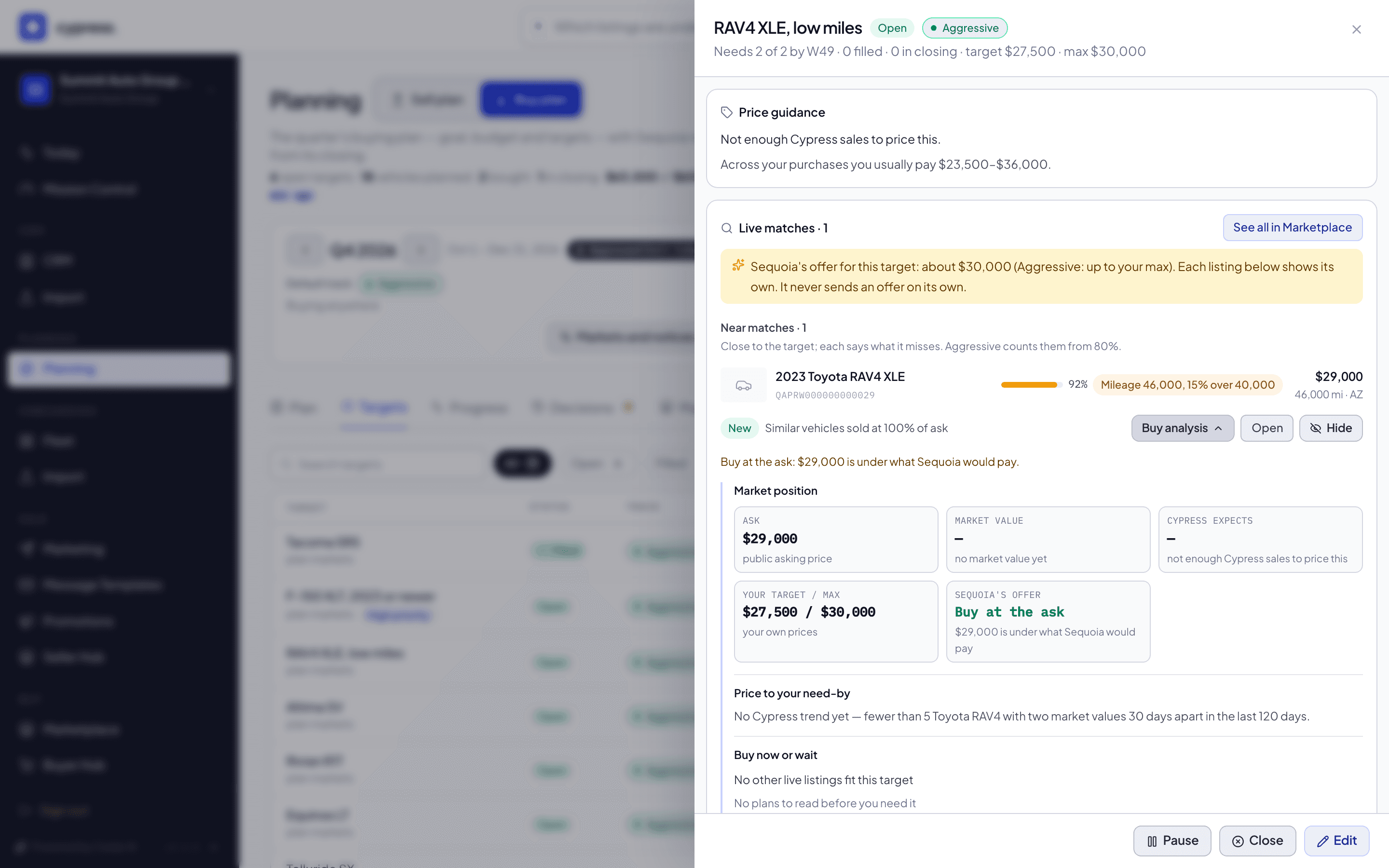
Open the Marketplace. The strip above the results reads Your Q4 plan, with … bought, · 1 in closing and · N listings fit your plan. Select Show only these: the banner reads Matches for “Fits my plan”. Listings that fit wear the amber badge with the score and the target, such as 100% · F-150 XLT, 2023 or newer. Open the F-150: the line under the title reads Fits your target F-150 XLT, 2023 or newer (100%) · N still needed by W##, with Open target beside it, then the price guide and what Sequoia would offer, and the Buy analysis card.
You should see the same listing in three places, the target's panel, the Marketplace and its own page, saying the same thing about it. See Planning inside remarketing.
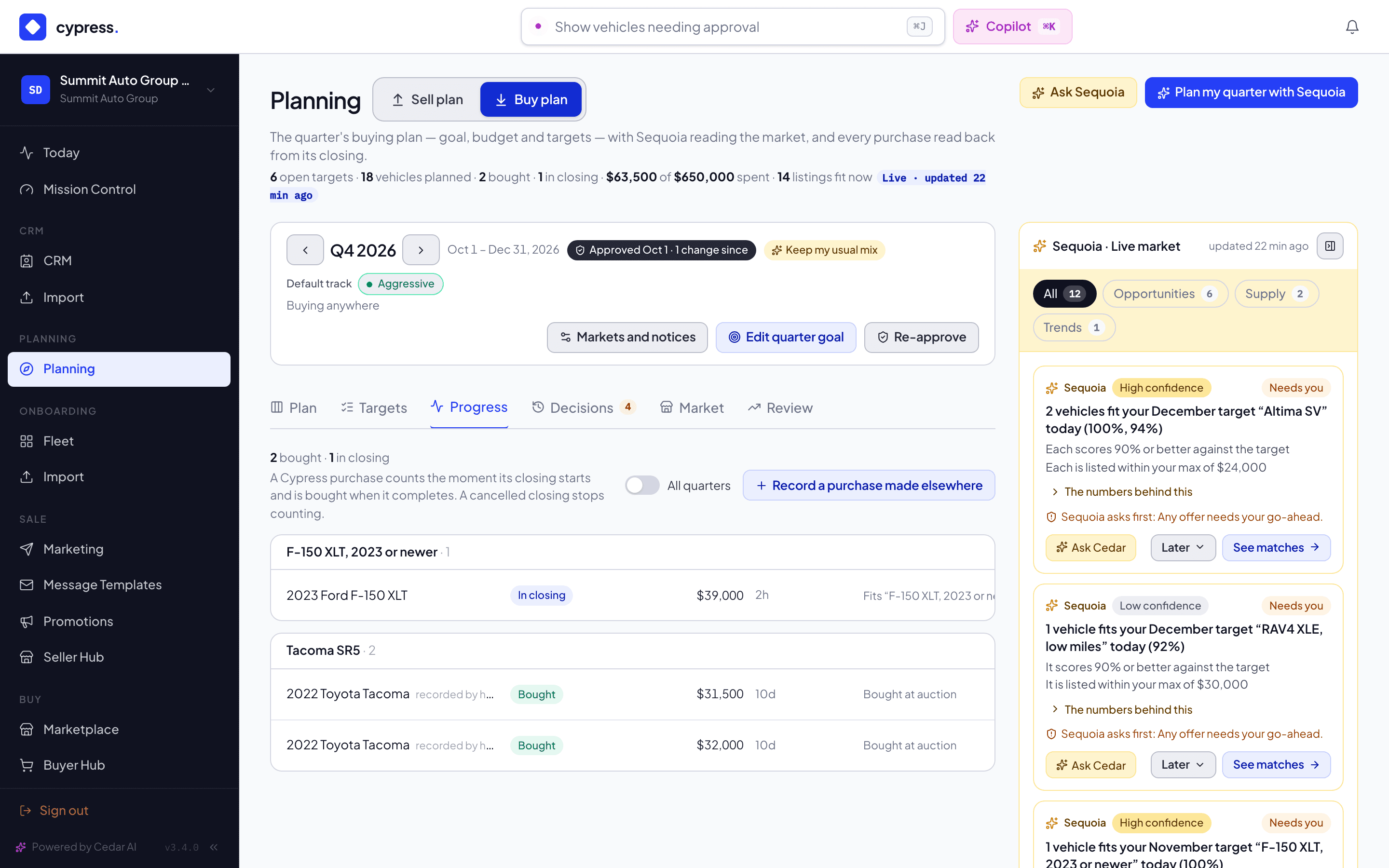
Open the Progress tab. It lists the purchases of the quarter on the bar, grouped by the target each counts toward, each with its state: the two Tacomas Summit bought at an auction, recorded by hand with Record a purchase made elsewhere, are Bought; the F-150 it is closing on with Northwind Fleet is In closing. Counts toward on a row moves a purchase to another target or Outside the plan. The line at the top reads 2 bought · 1 in closing, the same count as the header.
You should see the closing counted apart from the money: the header's spent figure is the two Tacomas, about $63,500, not the F-150.
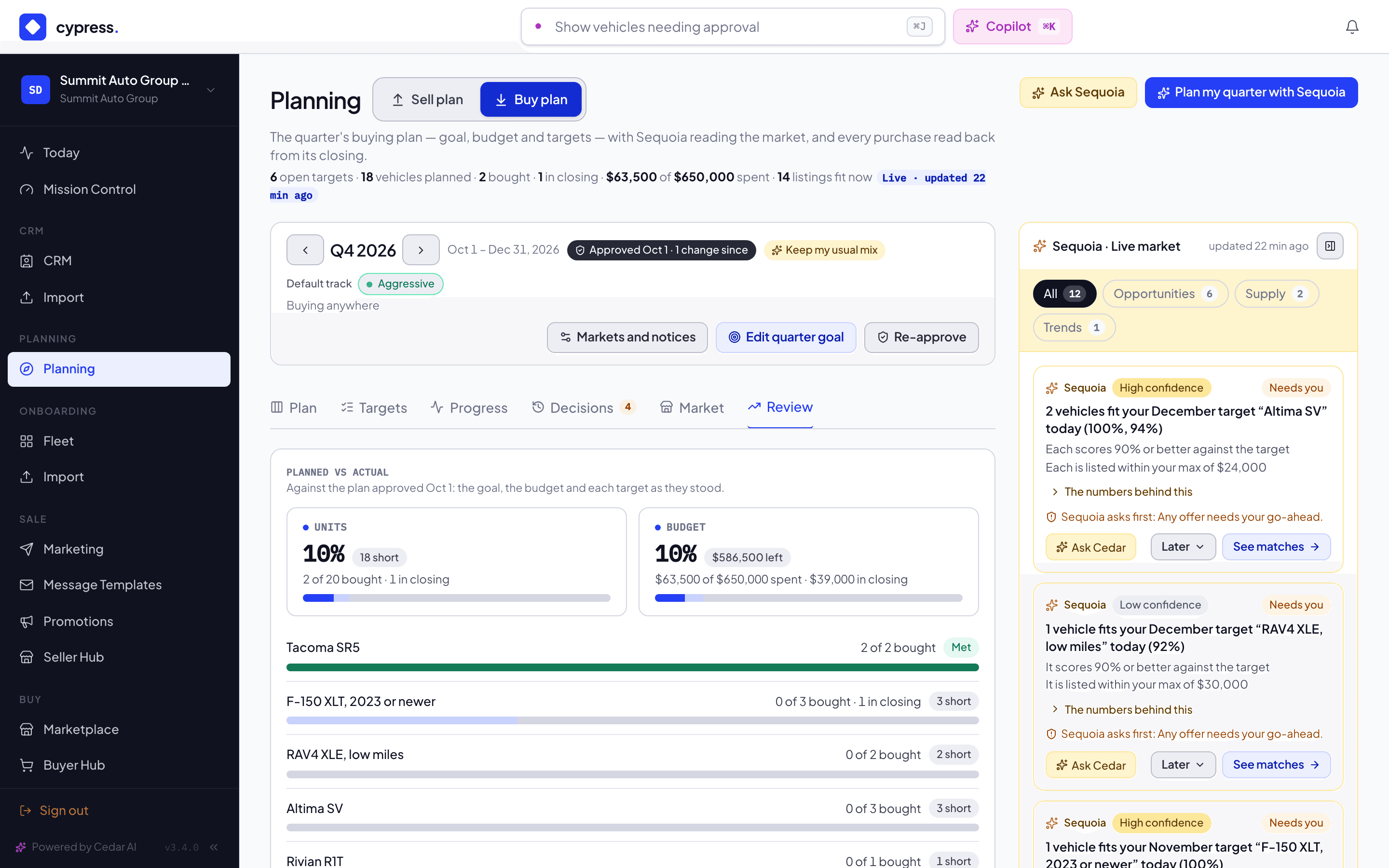
Open the Review tab. Planned vs actual compares the quarter with the baseline Summit approved: a Units card, a Budget card (the spent figure against the $650,000 budget, with a chip such as $586,500 left), and a row for each target. Changes since approval lists what moved: Summit added one F-150 after approving, so it reads F-150 XLT, 2023 or newer: quantity 3 → 4. Under Week by week, the table gives each week Planned (running), In closing (this week), Bought (this week) and Bought (running total), and a week with purchases opens to list each one.
Select Re-approve in the quarter bar to move the baseline to the plan as it stands. The confirmation asks Approve Q4 2026? and says Review will compare what happens against this plan. Select Approve, and the bar reads Approved with today's date and no changes since. That moves the baseline: Review now compares against the plan as it stands.
You should see Approved, off, in place of Re-approve once nothing has moved since.
What happens next
Summit's next steps are the ones the plan keeps asking for: the Rivian has nothing to match and nothing planned, the Equinox has two sellers planning vehicles that are not listed yet (see Coming to market on the Plan tab and Next weeks in the rail), and the Telluride has only one seller planning it, which Cypress shows a dealer nothing for. When a match lists, Aggressive targets alert Summit within the hour, and the Daily summary email covers the rest.
Ask Cedar
- Targets due soon
- What Sequoia sees
Related
Approve and review the quarter
Approve the quarter to keep a baseline, then read the Review tab to see what you achieved against the plan you approved, week by week.
A closed quarter's history: Summit Auto Group, last quarter
Read a finished quarter in these examples as the record it is: what a closed quarter lets you do, how targets read once it is over, and how Review sets planned against actual, over budget and over the goal.