Tracks and near matches
How a target's track sets which matches count, how Sequoia would price an offer and how you hear about matches; and how near matches are scored.
TL;DRAI summary
This chapter explains how Cypress sorts potential vehicle matches for you using tracks, which control how closely a vehicle must match your criteria and how you are notified. It helps you understand how you'll receive relevant listings.
For: Dealers · Cypress Managers
Tracks
Every target rides one track. New targets start on your plan's default track, set under Markets and notices; each target can change it.
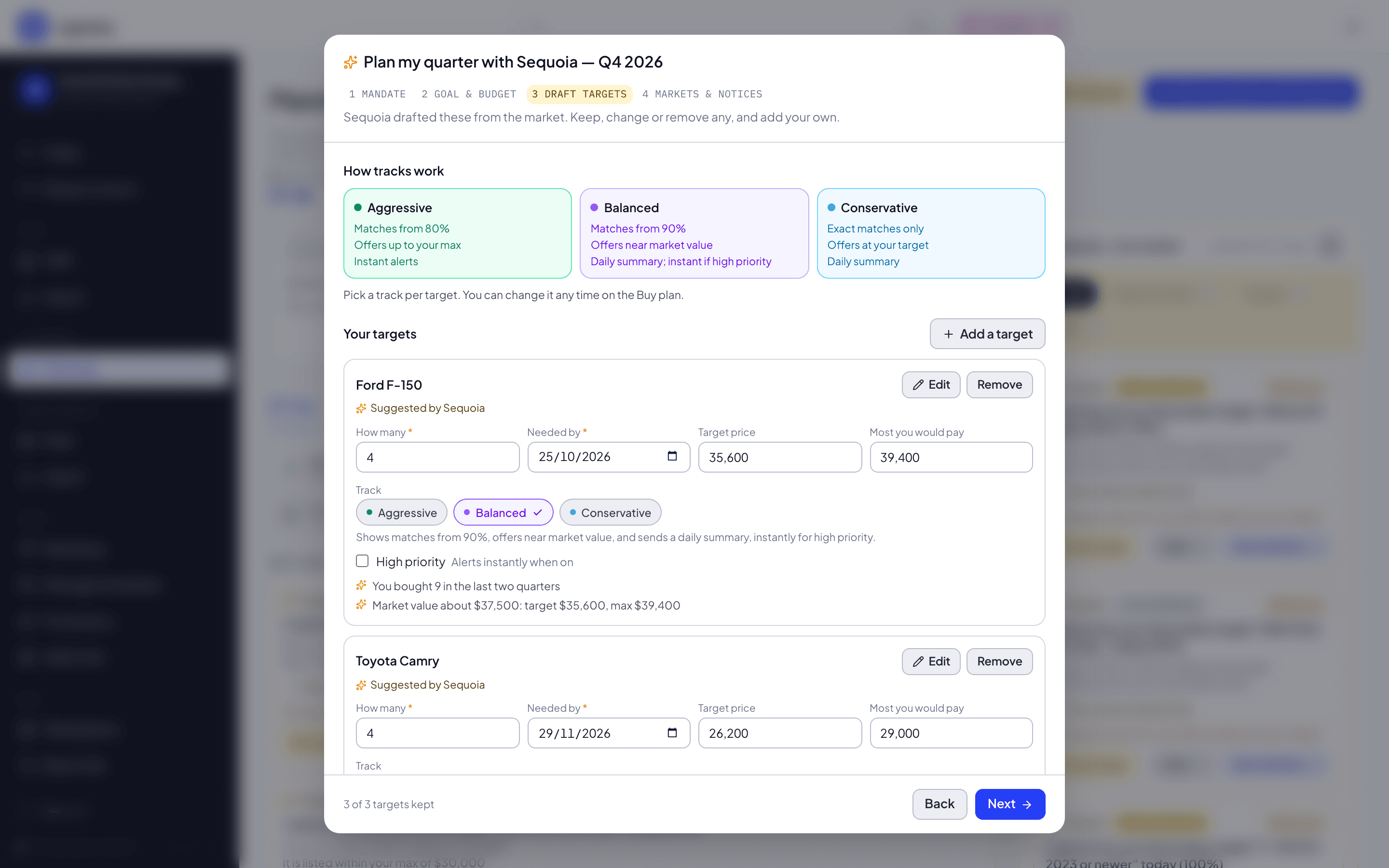
| Track | Matches from | Offer posture | Notices |
|---|---|---|---|
| Aggressive | 80% | Up to your maximum | Instant alerts |
| Balanced (the default) | 90% | Near market value | Daily summary, and instant alerts for a high-priority target |
| Conservative | 100% (exact only) | At your target | Daily summary |
Each track has its own color wherever it shows: Aggressive is green, Balanced is violet and Conservative is blue. The track picker, the Targets tab, a target's panel and the plan's default track all use them, and the picker lists the same three lines for each track: how near a match must be, where the offer sits and how you are told.
The offer posture sets the price Sequoia would offer for the target, shown at the top of its panel as Sequoia's offer for this target, and on each match as what Sequoia would offer for that listing, for example "Sequoia would offer about $24,800". A listing that asks less than that price reads Buy at the ask instead: Sequoia never offers more than a seller asks. Near market value never goes below your target or above your maximum; an Aggressive price can sit above your target, and never above your maximum. Sequoia never sends an offer on its own; you make every offer.
Notices
Two notices decide how you hear about matches. Both are set under Markets and notices, and both start on for a new plan:
- Instant alerts: When a listing matches an Aggressive target, or a Balanced target marked high priority, your admins and fleet managers get a Cypress notification and an email within the hour. A Conservative target never alerts at once, marked high priority or not.
- Daily summary email: Every morning around 8 AM Eastern, when there’s something new, one email and Cypress notification list the new matches you weren’t already alerted about, for every open target, Conservative included.
High priority on a target decides whether a Balanced one alerts at once. The hint beside the box says what it does on the target's track: Always alerts instantly (Aggressive), Alerts instantly when on (Balanced) or Daily summary only (Conservative).
With Instant alerts off, an Aggressive target's matches wait for the summary like any other. With the summary off, a match that is not alerted at once is not announced; it still shows on your plan and in the Marketplace.
Under the two, a line says what your choice means for your targets. For five targets, two of which alert at once:
| Instant alerts | Daily summary email | The line says |
|---|---|---|
| On | On | 5 targets: 2 with instant alerts, 3 in the daily summary. |
| Off | On | 5 targets: all in the daily summary. |
| On | Off | 5 targets: 2 with instant alerts. The other 3 won’t notify you; their matches still show on your plan and in the Marketplace. |
| Off | Off | You won’t be told about new matches. They still show on your plan and in the Marketplace. |
In Plan my quarter with Sequoia the line counts the targets the plan will be created with; in Markets and notices on the Buy plan, it counts the plan's open targets, of every quarter, because the notices belong to the plan.
Near matches
A vehicle that fits everything a target asks for is an exact match, 100%. A vehicle that misses a detail is a near match: Sequoia takes points off for each miss and says what it missed, for example "Trim LE, not XLE". A detail Cypress does not have for a vehicle counts as a miss too.
| Miss | Points off |
|---|---|
| A trim not in the target's list | 8 |
| A model year outside the range | 6 for each year |
| Mileage outside the range | 1 for every 2% outside it, at most 15 |
| A different fuel | 10 |
| A different body | 12 |
| A condition outside the list | 8 for each grade away |
Some differences are never near:
- a different make, model or vehicle class;
- a vehicle outside the target's states (or your plan's markets);
- mileage more than 30% over the maximum.
A match counts for a target when it scores at or above the track's floor, and a score exactly at the floor counts. An Aggressive target lists exact matches and near matches of 80% or more. A Balanced target lists exact matches and near matches of 90% or more. A Conservative target lists exact matches only.
Where scores show
- The target panel lists exact matches first, then near ones, each with its match and what it misses.
- See all in Marketplace opens every live match for the target, near ones included.
- The target editor's Live preview counts exact and near matches as you edit.
- Live matches on the Plan tab counts both for the targets you need in the quarter on the quarter bar, and says how many of each.
- Sequoia's market rail raises Near matches when exact matches cover less than the target still needs, and Due, no match when nothing reaches the track's floor close to the needed-by date.
Related
The Buy plan, tab by tab
What each part of the Buy plan page shows: the header, the Plan tab, Targets, Progress, Tasks, Decisions, Market and Review, and where each is explained step by step.
Planning together
What the Sell plan and the Buy plan share — the closed loop between them, Sequoia and its rail, the Market tab, the quarter bar, the places Planning reaches into Remarketing, and the Cypress desk that brokers a fit.