A closed quarter's history: Summit Auto Group, last quarter
Read a finished quarter in these examples as the record it is: what a closed quarter lets you do, how targets read once it is over, and how Review sets planned against actual, over budget and over the goal.
TL;DRAI summary
This chapter shows you how to review a completed quarter's vehicle purchasing plan and actual results. You can see what was planned versus what actually happened, helping you understand past performance and inform future decisions.
For: Dealers (org admins, fleet managers) · Cypress Managers acting for a dealer that delegates to Cypress
A quarter whose last day has passed is history. It cannot be changed, and it keeps what it said it would do next to what happened, so the next quarter can learn from it. This walkthrough reads one: Summit Auto Group's previous quarter, Q3 2026, seen from Q4 2026. Summit is a fictional dealer used in these examples.
Before you start
- A closed quarter is any quarter whose last day has passed; here it is Q3 2026.
- What happened in Summit's Q3: Summit planned to buy 18 vehicles on a budget of $500,000, with three targets, and approved that plan on the quarter's first day. It bought 20 and spent $653,000.
- Everything in this walkthrough is read-only. Nothing needs undoing.
Steps
Open Planning, then the Buy plan. In the quarter bar, select the left arrow once. The bar reads Q3 2026 and Jul 1 – Sep 30, 2026, wears a slate Closed badge with a lock, and offers Go to Q4 2026, the last button on the right, which brings you back to the quarter in progress. The goal button is gone, because a closed quarter's goal is what Review compares the quarter against.
You should see the same bar on every tab, with the same height, so nothing moves when you change tabs.
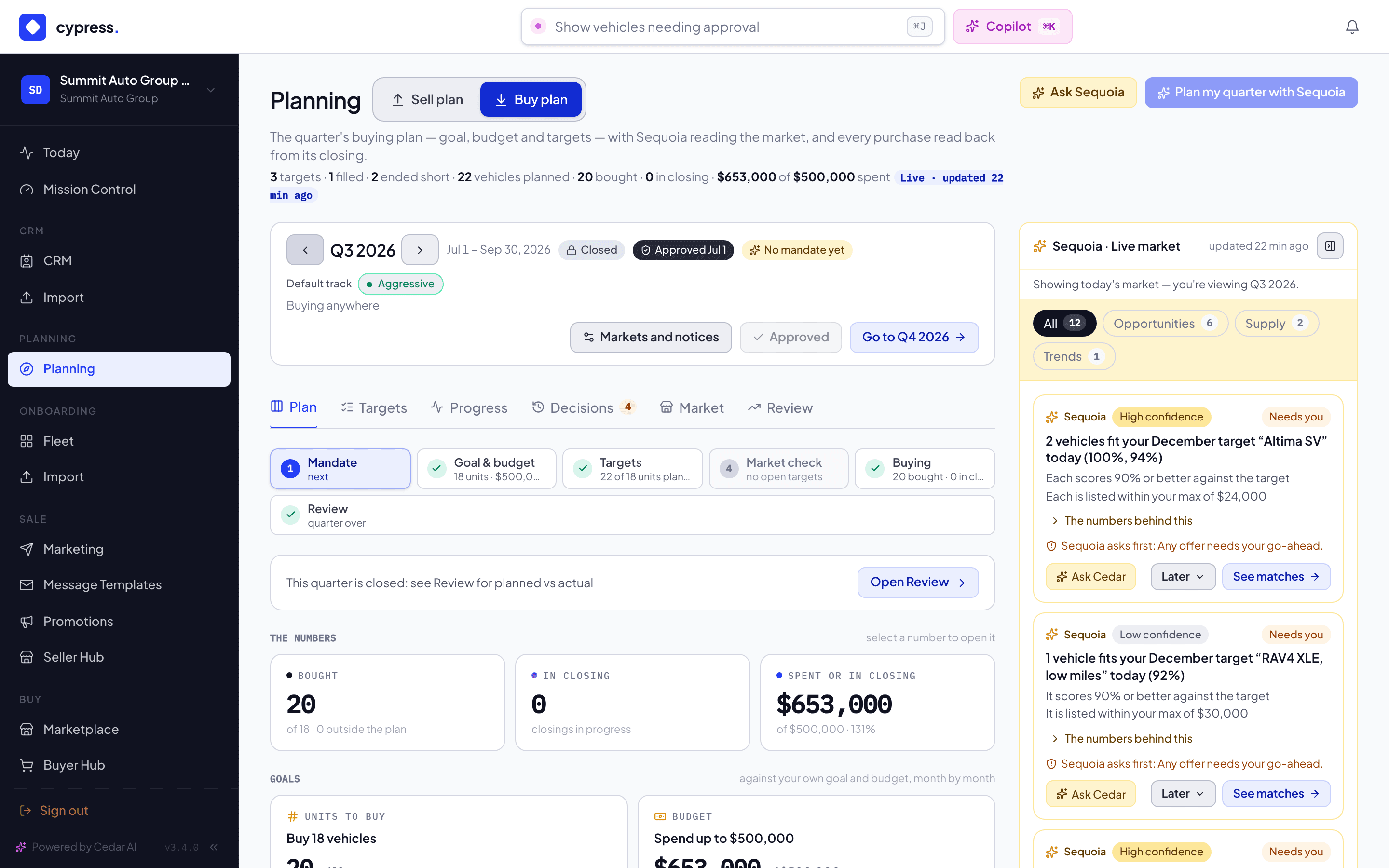
On the Plan tab, there is no What needs you, Live matches or Coming to market: they read the market as it is today. One line stands in their place, This quarter is closed: see Review for planned vs actual, with the button Open Review. The two goal cards, Units to buy and Budget, stay and say what was set. The rail beside the plan says it is today's market: Showing today's market — you're viewing Q3 2026.
You should see a quarter that reads as a record, with Sequoia's rail still there on the right and clearly about now.
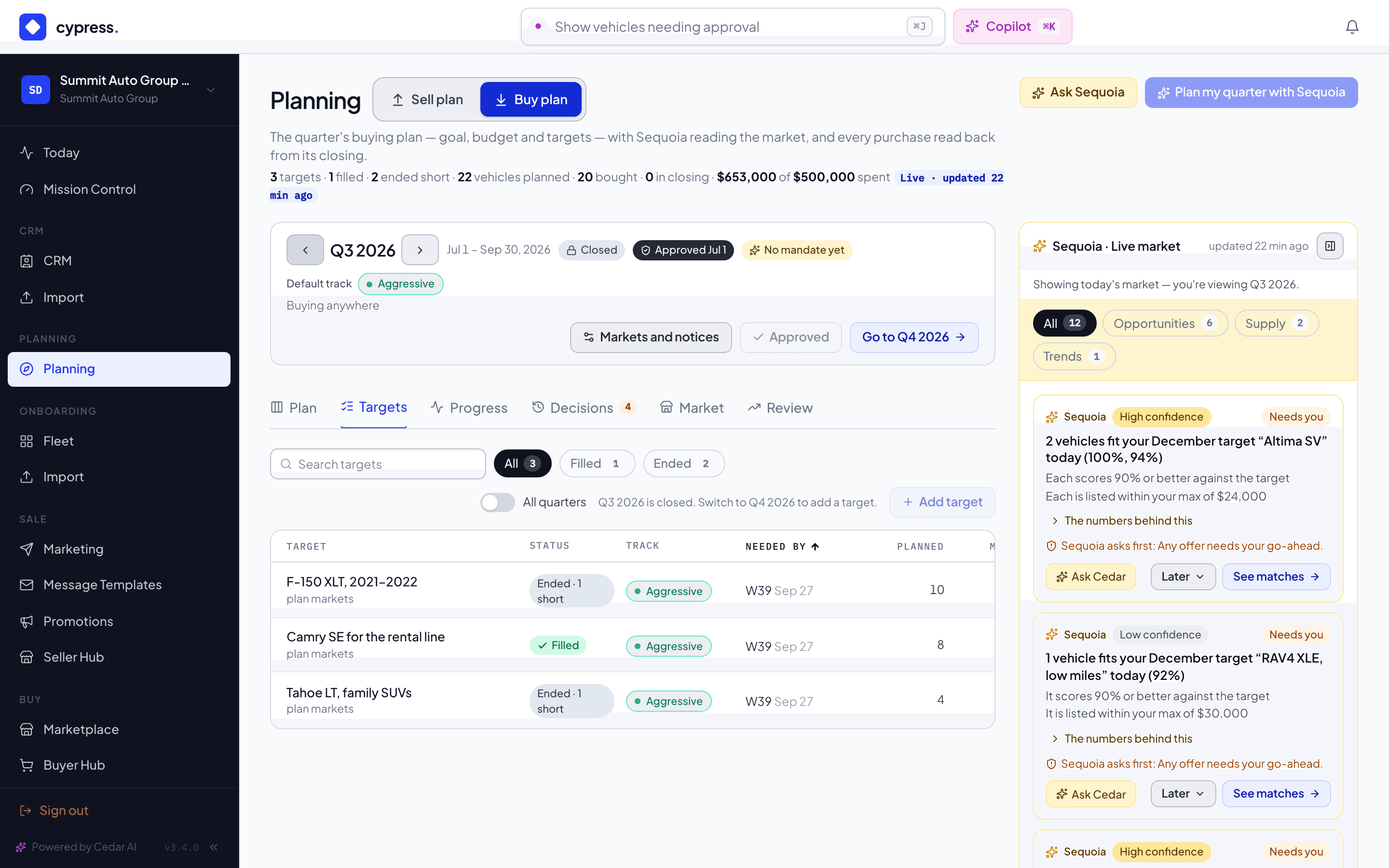
Open Targets. The three targets read what they became: Camry SE for the rental line is Filled, because all eight were bought, while F-150 XLT, 2021–2022 and Tahoe LT, family SUVs read Ended · 1 short: the quarter closed with one vehicle each never bought. The stored status you set, Open, Paused or Closed, is not changed. Add target is drawn but off, and says why: Q3 2026 is closed. Switch to Q4 2026 to add a target.
You should see that a closed quarter's buttons are shown with their reasons rather than hidden, and that a target that ended gets no more matches or alerts.
Open Progress. It follows the quarter bar, so it lists Q3's purchases, grouped by the target each counts toward: 9 F-150s, 8 Camrys and 3 Tahoes. They are the other side of the Sell plan's history: Northwind Fleet sold Summit the F-150s and the Camrys, and Redwood Leasing sold it the Tahoes. Record a purchase made elsewhere still works on a closed quarter, because a purchase may be recorded late.
You should see the header's count for the quarter and this tab's count agree.
Open Decisions. On a closed quarter it reads What Sequoia suggested for Q3 2026, and what became of it., with no Open button on any past item, because there is nothing left to decide. When nothing was suggested that quarter it says No decisions in Q3 2026. Switch on All quarters to see others. The Guardrails row is folded to one line.
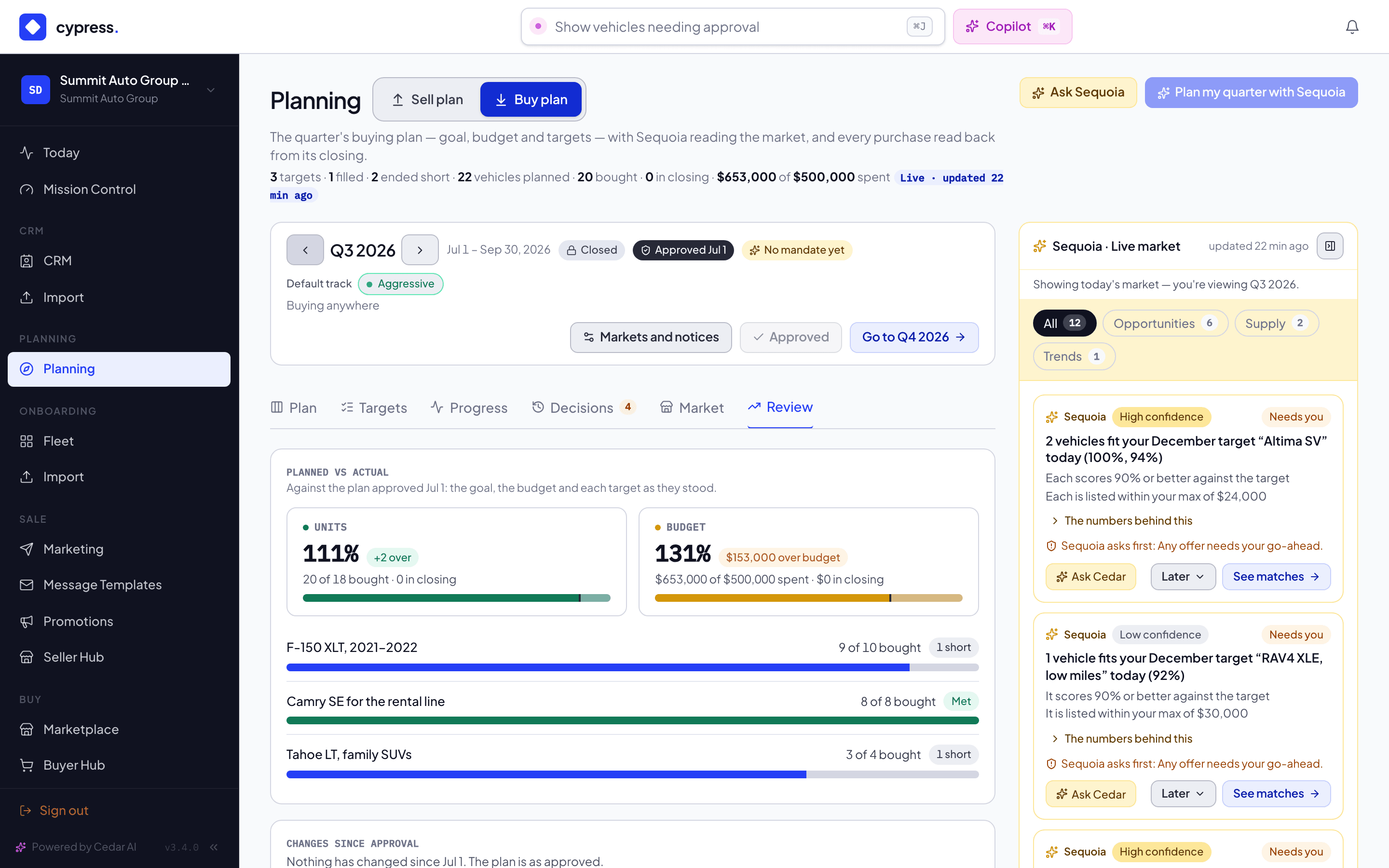
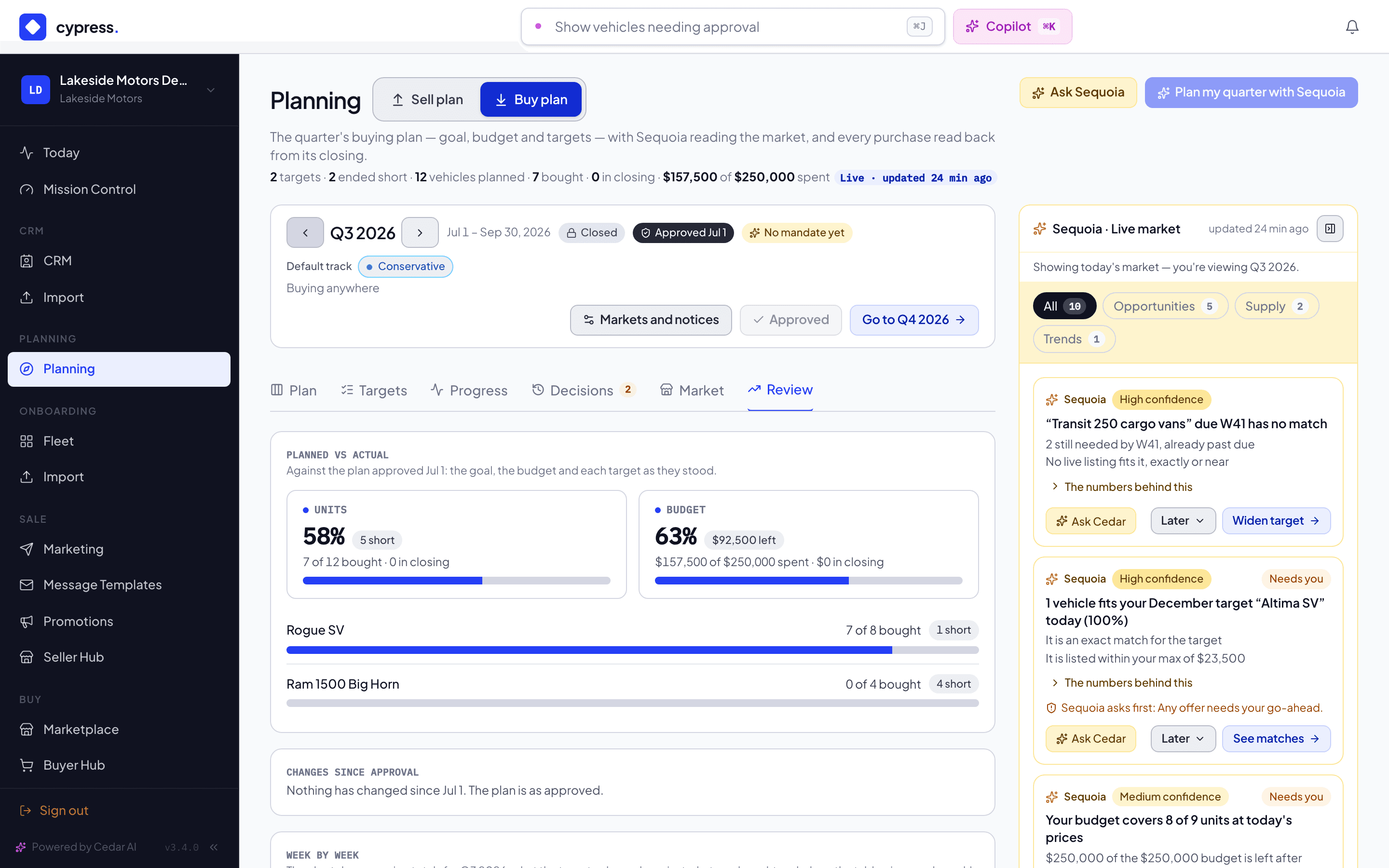
Open Review. Planned vs actual sets the quarter against the baseline Summit approved:
- Units: 20 of 18 bought, with the chip +2 over in green: meeting or beating the goal is good news.
- Budget: $653,000 spent against $500,000, with the chip $153,000 over budget in amber: spending more than planned is never shown as a success.
- Each target: the F-150 planned 10 and filled 9, the Camry 8 and 8, the Tahoe 4 and 3.
A bar past its plan keeps a dark mark where the plan ends and draws the rest beyond it, so 20 of 18 reads as over. Changes since approval has nothing to list: Summit did not edit the plan after approving it. Under Week by week, the chart marks Quarter starts Jul 1 and Quarter ends Sep 30, and the table gives each week Planned (running), In closing (this week), Bought (this week) and Bought (running total). A week with purchases opens to list each one: the vehicle, its price, its target and when its closing started.
You should see a quarter that bought more than it planned and spent more than it budgeted, which is the honest reading, with the weeks that did it.
For contrast, sign in as Lakeside Motors and open the same Review. It planned 12 vehicles on a budget of $250,000 and bought 7: the Units chip reads 5 short, the Budget chip shows money left, and its Ram 1500 Big Horn target, which got nothing, reads Ended · 4 short on the Targets tab. Two dealers, one quarter, and the same screen tells each story.
What happens next
This history is what Sequoia reads when it drafts the next quarter: Summit's purchases of the last two quarters are what Plan my quarter with Sequoia drafts from, and the Q3 baseline never changes under it. See A buying quarter: Summit Auto Group.
Related
- The quarter bar and closed quarters
- The buy plan
- A selling quarter: Northwind Fleet, which sold Summit most of these vehicles
A buying quarter: Summit Auto Group
Follow a fictional dealer through a buying quarter: draft the plan with Sequoia, read its targets and tracks, open a match and its Buy analysis, see Buy at the ask, follow purchases, then approve and review planned against actual.
The buy plan
What a buy plan holds, how matching and progress work, and what sellers and Cypress can see.