Read matches and the Buy analysis
Open a target to see the live listings that fit it, near ones included, and open the Buy analysis to decide whether to buy now or wait.
TL;DRAI summary
This chapter shows you how to find vehicles that match your buying targets and analyze if you should buy them now or wait. It helps you decide what offer to make based on market value, your budget, and how soon you need the vehicle.
For: Dealers (org admins, fleet managers) · Cypress Managers acting for a dealer that delegates to Cypress
Every hour Cypress checks each open target against the live listings. A target's panel lists what fits, and the Buy analysis answers the next question: buy this one now, or wait? Sequoia suggests; you make every offer.
Before you start
- You have at least one open target; see Add and edit a target.
- A target's track sets how near a match must be, and how you hear about it. See Tracks and near matches.
See what fits a target
Open the Targets tab.
You should see the targets you need in the quarter on the quarter bar, with the status chips All, Open, Filled, Paused, Closed and Ended. A quarter with none says No targets needed in Q2 2027. Switch on All quarters to see others.
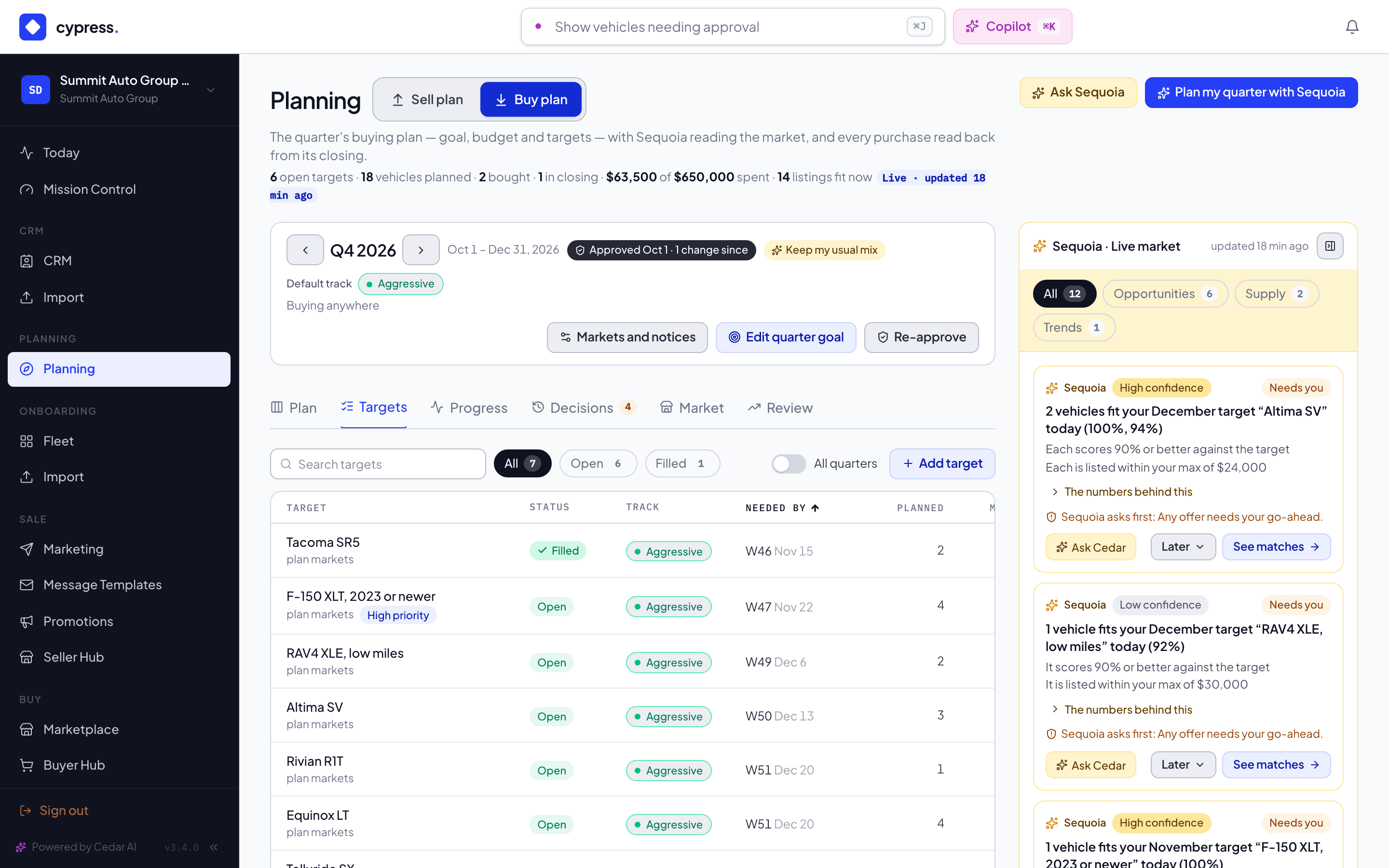
Select a target.
You should see its panel: the target's name, a line that says what it still needs, Price guidance from Cypress sales, and Live matches with a count. With nothing to show, the panel says Nothing on Cypress fits this target right now. New listings are checked every hour.
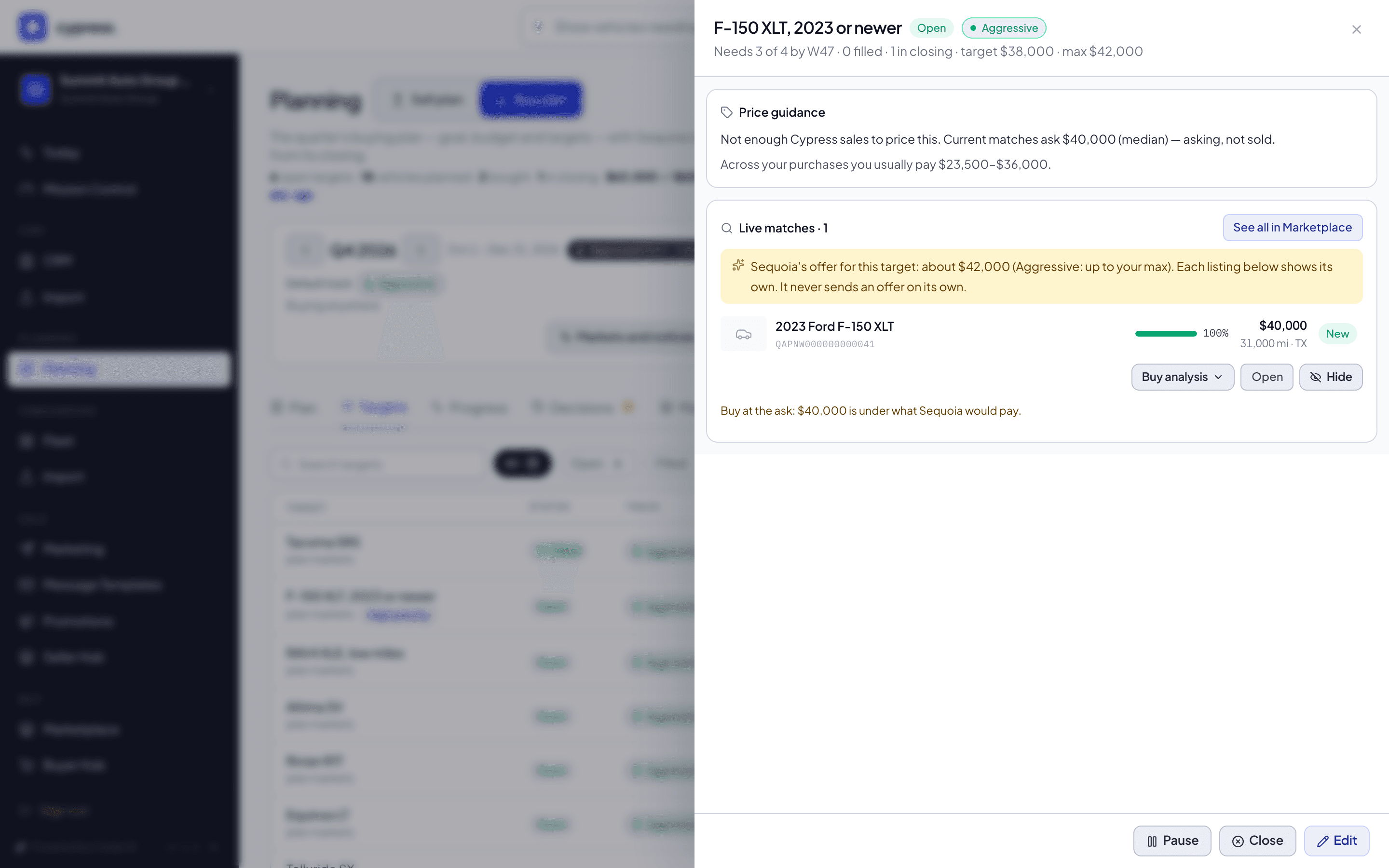
Read the matches, exact ones first and then the near ones.
You should see each match with a score bar, amber chips for what it misses, its ask, its mileage and its state. A near-matches heading says how close a match must be: Close to the target; each says what it misses. Balanced counts them from 90%.
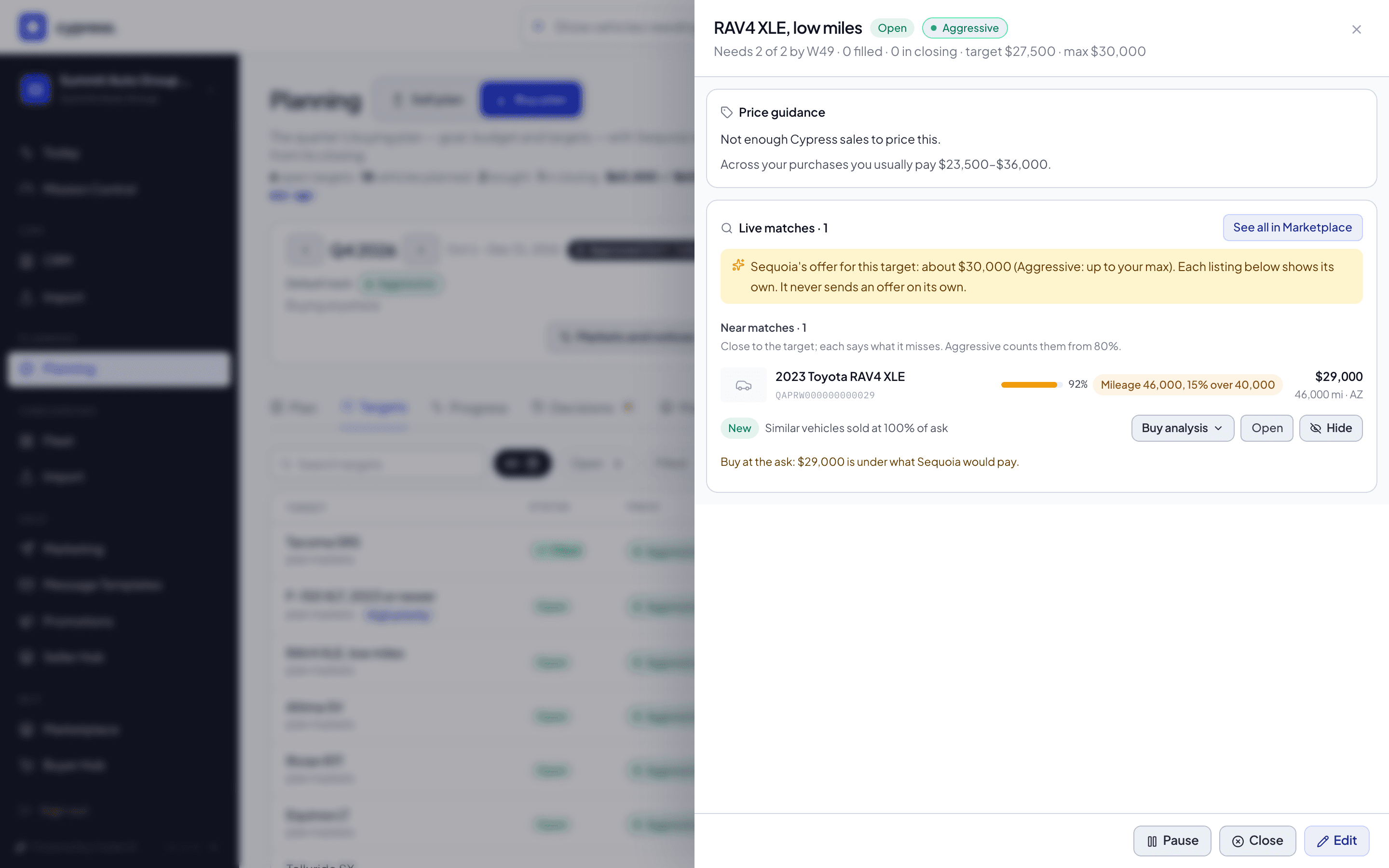
Select Buy analysis on a match to open its analysis.
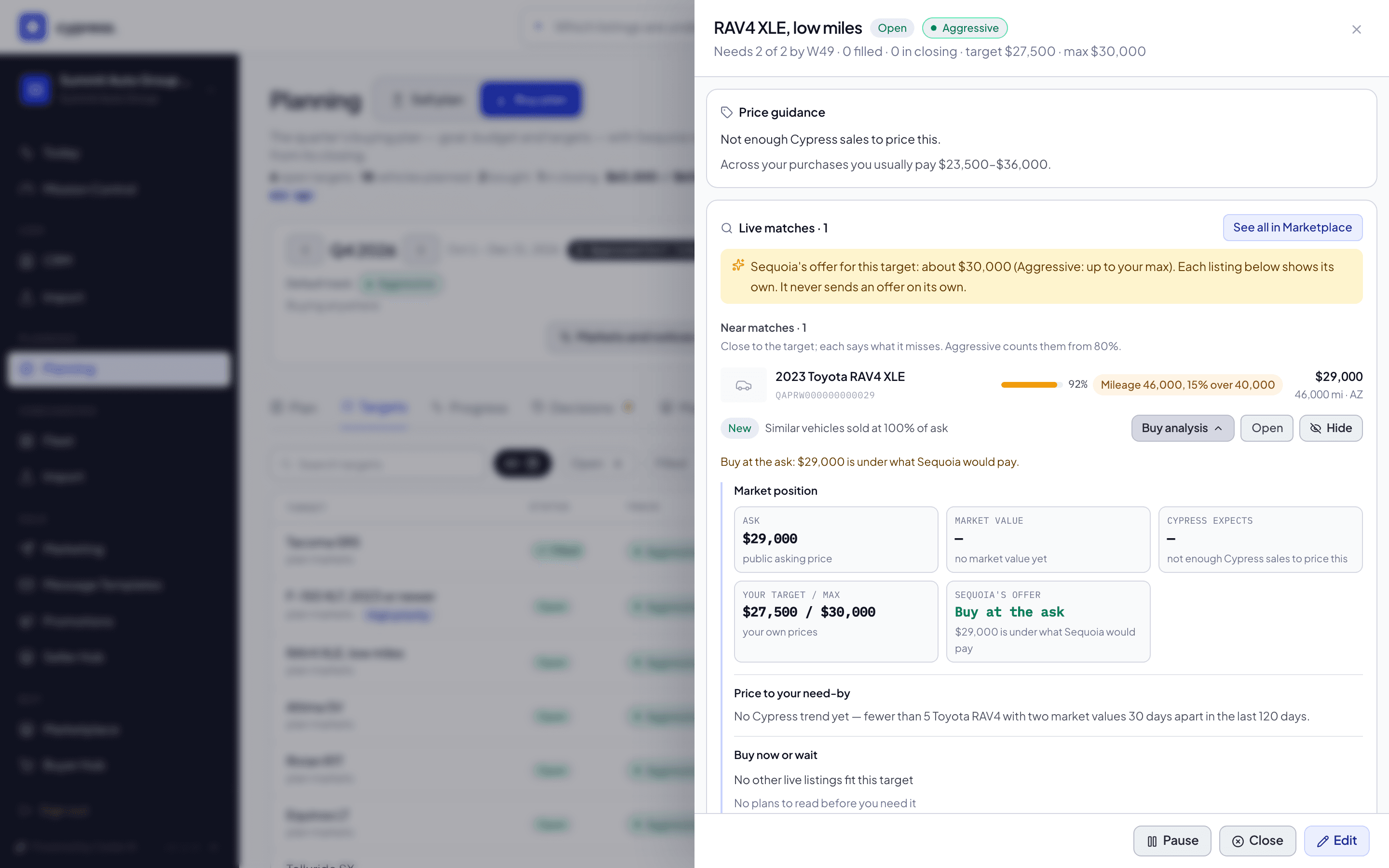
You should see four blocks open under the row in a compact form: Market position, Price to your need-by, Buy now or wait and Fit and budget. They are read when you open the row, not before.
To act on a match, select Open to see the listing in the Marketplace, where you make the offer. Select Hide on a match you do not want, or See all in Marketplace to browse every live match for the target.
You should see Open take you to the listing's own page, and the message Hidden from this target when you hide one.
What the panel lists
The panel lists the live Cypress listings that fit:
- exact matches first, then near matches, each with its match and what it misses;
- several vehicles from one seller grouped (select Ask Cypress to bundle to have Cypress work them as one deal);
- Sequoia's offer for this target, from the target's track and the market value, at the top of the list, and under each listing what Sequoia would offer for that listing, never more than its seller asks. Sequoia never sends an offer on its own.
It also shows the Price guidance from Cypress sales. Select Buy analysis on a match to open its analysis, Hide on a match you do not want, or See all in Marketplace to browse every live match for the target, near ones included.
Buy analysis
Buy this one now, or wait? The Buy analysis answers it for one listing that fits one of your targets, with the depth the Sell plan gives a vehicle you own. You find it in two places:
- On the vehicle page in the Marketplace, in a Buy analysis card under the specifications, when the listing fits one of your open targets. If it fits several, the card reads the target the plan line names, the best fit. A listing that fits nothing has no card, and an organization without Buy planning never sees one.
- In a target's panel, on each match: select Buy analysis on the row to open the same four blocks in a compact form. They are read when you open the row, not before.
It is yours alone. It reads your own targets, prices, purchases and budget and what every buyer can see of the listing; a seller never learns it was read.
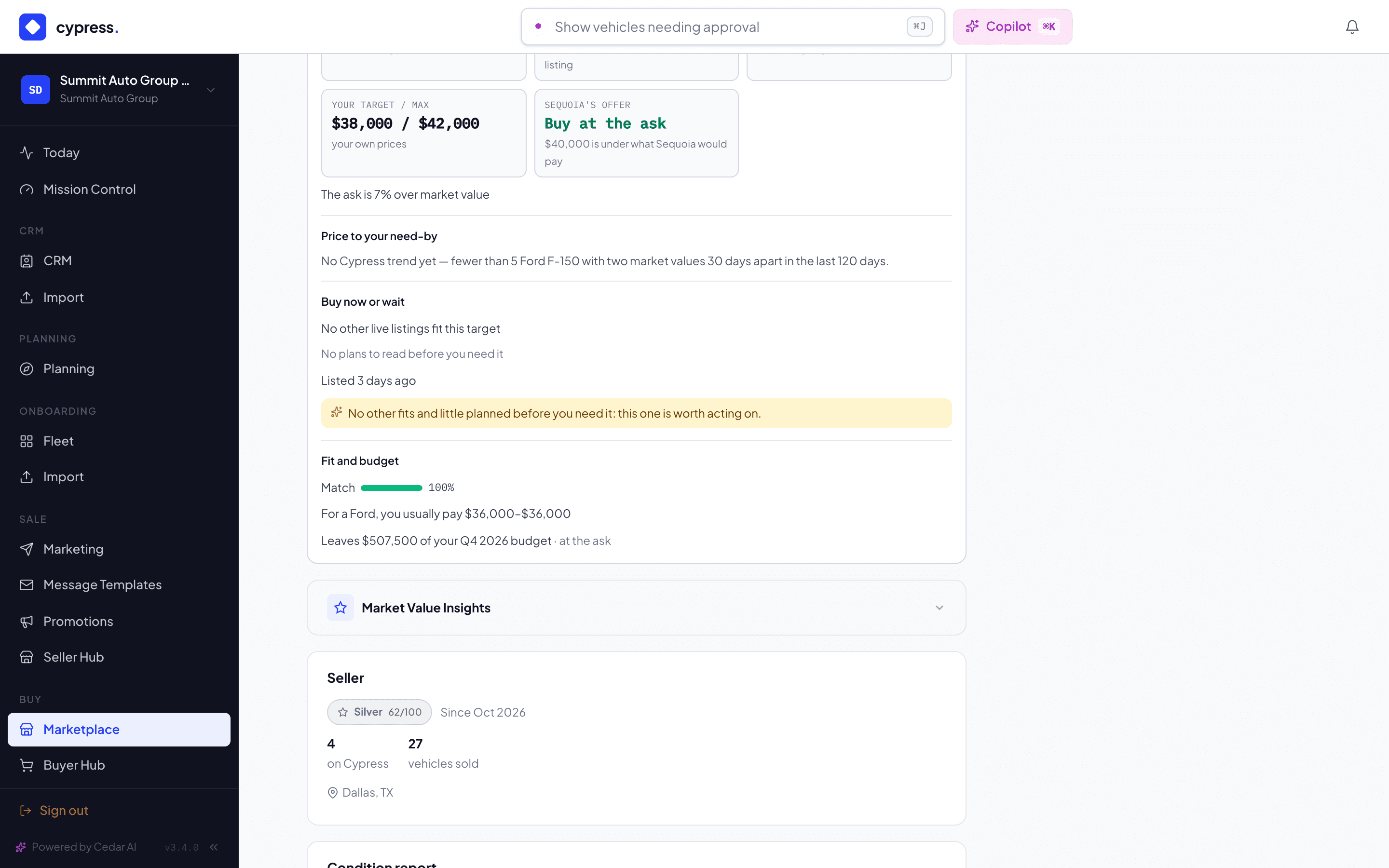
Market position. Five tiles: the Ask (public), the Market value (the one your target's price guidance uses, with what it is based on), Cypress expects (the range and middle that Cypress sales of similar vehicles realize), Your target / max and Sequoia's offer. A line says how the ask sits against market value, for example The ask is 5% under market value. When a listing asks less than Sequoia would pay for the target, the tile reads Buy at the ask: Sequoia never offers more than a seller asks.
Price to your need-by. A chart of the market value carried along the Cypress trend for the model, or its class when the model has too few sales, week by week, to the week you need it, and a line such as Waiting until W47 likely saves about $350, or costs when the market is rising. The trend moves the price by at most 10% either way, as the price guidance does. It is a read of the market and not a promise. With too few sales to read a trend, the card says so, in the words of the Sell plan (No Cypress trend yet — fewer than 5 …), and draws no chart.
Buy now or wait. How many other live listings fit the target; what sellers plan to bring to market before you need it, as the ranges of Next weeks in the rail (for example Next 2 weeks · a few), shown only when at least two sellers plan it, and No plans to read before you need it when none shows; and how long the listing has been up. Sometimes Sequoia adds one line: No other fits and little planned before you need it: this one is worth acting on. or Others fit and more is planned before you need it: you can compare before you offer. Neither is a promise, and the first needs a need-by week far enough out for the forecast to have shown something before it: a target needed this week gets neither line.
Fit and budget. The match and what it misses; For a Jeep, you usually pay $22,000–$26,000, from your own purchases of that make once you have bought at least two (the target panel's price guidance says Across your purchases you usually pay about everything you have bought); and Leaves $126,350 of your Q4 2026 budget or Over your budget by $13,650, counted at the ask, after what you have bought and what is in closing. With no budget set, that line is not shown.
While the analysis loads the card shows a gray outline of the four blocks. If it cannot be read it says Could not load the analysis. with Try again.
What happens next
Make your offer on the listing's page. When a listing asks less than Sequoia would pay, the analysis says Buy at the ask. A closing that starts counts toward the target at once and appears in Progress; see Record a purchase made elsewhere for purchases made outside Cypress.
If something goes wrong
- The analysis says Could not load the analysis. Select Try again. It reads your own targets, prices, purchases and budget, so it needs a moment on a busy day.
- A target shows no matches. Nothing on Cypress fits right now. A Conservative target lists exact matches only; an Aggressive one also lists near matches of 80% or more.
Ask Cedar
- Near matches worth a look
- Targets due soon
Related
Add and edit a target
Say what you need, how many, by when and at what price, pick a track, and then pause, close, reopen or change the target as the quarter moves.
Record a purchase made elsewhere
Follow the quarter's purchases on the Progress tab, record a vehicle you bought outside Cypress, and move a purchase to the target it really fills.