The buy plan
What a buy plan holds, how matching and progress work, and what sellers and Cypress can see.
TL;DRAI summary
Your buy plan helps you manage vehicle purchases. It lists what vehicles you need, how many, and your target prices, and matches them to available listings. It also tracks the progress of your purchases and helps place them correctly within your plan.
For: Dealers · Cypress Managers
What it holds
| Part | What it is |
|---|---|
| Quarter | A mandate (what Sequoia favors), units to buy and a budget, per quarter. |
| Target | What you need (one make and model, or a class), how many, needed from and by (calendar weeks), a target and a maximum price, a priority, and a track. A target is open, paused or closed as you set it; the plan also shows it as Filled when nothing remains to buy and as Ended · N short when its quarter is over with N units never bought (a target you closed yourself stays Closed). |
| Markets | The regions and states you buy in by default (set under Markets and notices); a target can name its own. |
| Default track | The track new targets start on. |
| Purchases | The vehicles you bought, each counted toward one target or bought outside the plan (the Progress tab). |
| Approval | The plan is live, and approving a quarter keeps a baseline: your goal, budget, mandate and the quarter's targets as they stood. The quarter bar counts the changes since, and Review compares what happens against it. |
How matching works
Every hour Cypress checks each open target whose needed-by date has not passed, and whose quarter is not over, and that still needs vehicles, against the live listings. A listing that fits everything the target pins is an exact match. One that misses a detail, such as a trim or a year, is a near match, and it counts when its score reaches the target's track level. Your own organization's vehicles are never matched, and a listing you hide stays hidden from that target.
A target's track sets how near a match must be. An Aggressive target also lists near matches of 80% or more, and a Balanced one 90% or more, each with what it misses; a Conservative target lists exact matches only. See Tracks and near matches.
- An Aggressive target, and a Balanced one marked high priority, send Instant alerts to your admins and fleet managers when a match lists, within the hour (at most three vehicles per target in one hourly check), if you keep Instant alerts on under Markets and notices.
- Every other new match arrives in the Daily summary email, around 8 AM Eastern, if you keep it on under Markets and notices. A Conservative target always waits for the summary. See Tracks and near matches.
- A target you have already bought in full is left alone until it has room again.
- When several matches come from one seller, they are grouped, and you can ask Cypress to bundle them.
Price guidance
The target panel prices each target from Cypress's own sales, and says which basis it used:
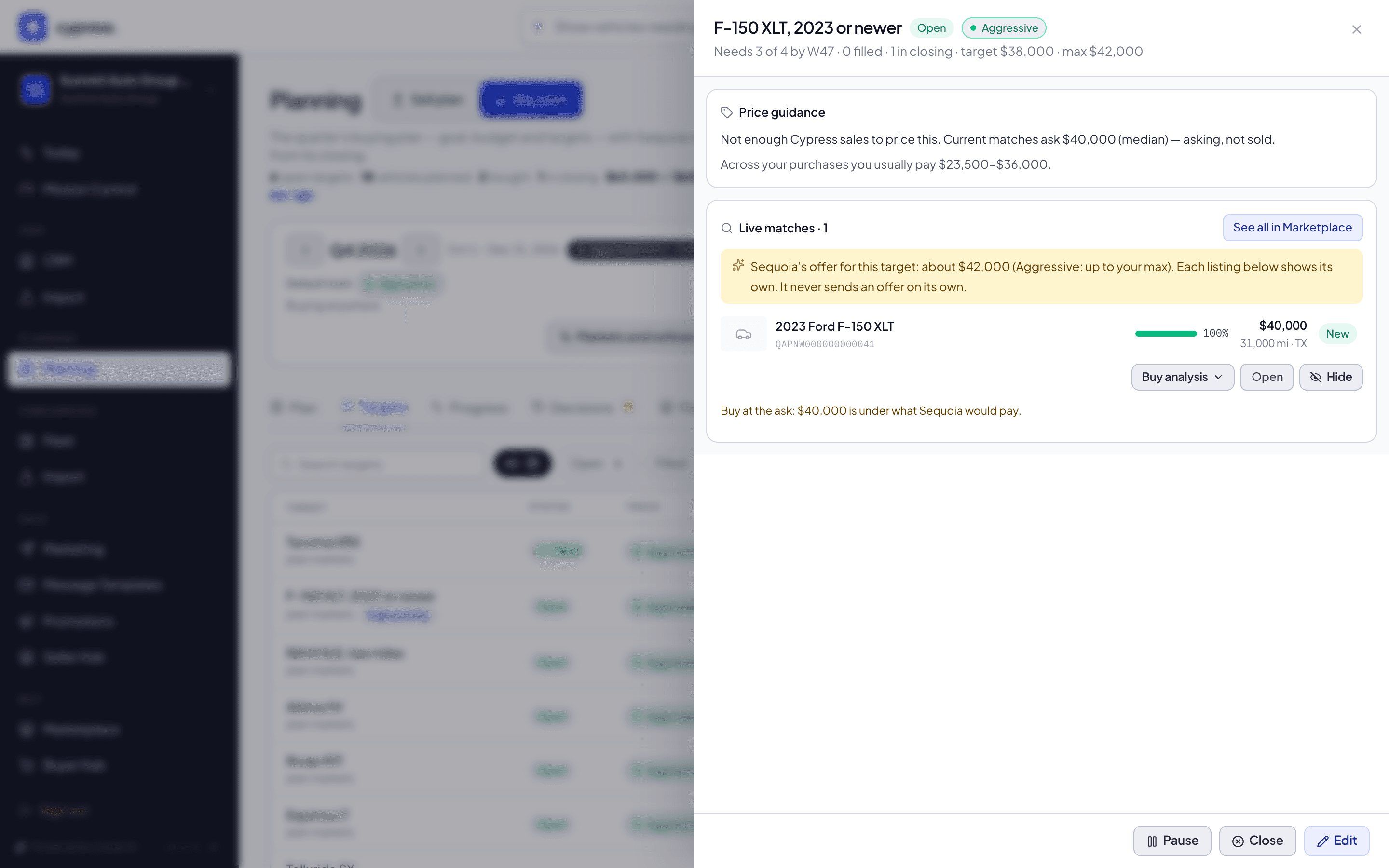
- Cypress sales of this spec: at least five sales in the past year, sold by at least two companies, so the range is never one seller's own prices. The range is the middle half of those prices, with the middle price beside it.
- Otherwise, market value × what Cypress sales of that model or class realize. The same rule holds here: the sales behind it come from at least two companies, so a model that one company alone has sold is read from its class.
- Otherwise, not enough Cypress sales to price this. The median asking price of the live matches is shown, labelled as asking, not sold.
Where it can, the panel also carries the market trend to your needed-by date, says whether your target and maximum fall below, inside or above the range, and shows the band you usually pay. It never uses a seller's limits. The same two-company rule holds for every price Cypress reads from sales for you: the line Similar vehicles sold at 96% of ask on a match, and the prices Sequoia drafts for a quarter.
How a target fills
A target's life, from open to filled, with the two steps back and the way it ends when the quarter closes short:
| State | When |
|---|---|
| Matched | A live Cypress listing fits the target exactly right now. Near matches are listed beside it and do not count here. |
| Committed | You accepted a deal and its closing started. |
| Filled | The closing is complete and the vehicle is delivered. |
A closing counts toward a target as soon as it starts. If a closing is cancelled, its purchase stops counting; it stays listed on the Progress tab as Cancelled. If a completed closing's delivery is reversed, the purchase goes back to committed and is marked Delivery reverted.
How purchases are placed
When a closing starts on a deal you made as the buyer, Cypress places the purchase on a target, the same way every time:
- Which targets are eligible. An open or paused target that fits the vehicle, still has room, and whose dates (from the needed-from date, or from when you created the target, to the needed-by date) are within 14 days of the purchase.
- Which eligible target wins. The one whose dates contain the purchase, then the earliest needed-by, then the most specific, then high priority, then the oldest.
- No eligible target. The purchase shows as bought outside the plan, and its row says why: no open target fits, it was bought outside the target's dates, or the target is already full.
Further rules:
- Lookback. Closings that started up to 30 days before you created your buy plan count too.
- Reassigning. The rule places a purchase once and never moves it again. On the Progress tab, Counts toward on a row moves it to another target, or out of the plan, and your choice stays.
- A purchase made elsewhere, such as an auction, can be recorded on the Progress tab. It counts as bought on the day you give. A purchase from a closing follows its closing and cannot be removed by hand.
- Targets that stop counting. A closed target takes no more purchases; the quarter counts it only for what it already bought.
Who sees what
- The baseline is part of your plan, so it is yours alone: it holds your goal, budget, mandate and targets, and no match, purchase or seller.
- Sellers never see your name, your targets or your prices. They may see that several dealers plan to buy vehicles like theirs, as a count, only for their own vehicles, lots and sale windows, and only when at least two dealers do.
- Dealers never see a seller's limits. What sellers plan to bring to market reaches you only as an anonymous count, and only when at least two sellers plan it.
- Cypress staff see your plan and a Cypress desk across dealers, a tab marked Cypress only that comes last, after Review: each dealer's open targets, what each still needs, how many live matches fit, the best deal fit for the target, and matching stock not yet listed. Cypress uses it to find a price that works for both sides. The desk, its columns, its three actions on each row and the reasons one is off are in The Cypress desk.
Related
- Planning inside remarketing: the Marketplace strip, the badges, the Buyer Hub card and the notices, and what a seller sees of dealers' plans
- The Buy plan, tab by tab
- Add and edit a target
- The Cypress desk
- Tracks and near matches
- Sequoia's market rail
- Sequoia's decisions
A closed quarter's history: Summit Auto Group, last quarter
Read a finished quarter in these examples as the record it is: what a closed quarter lets you do, how targets read once it is over, and how Review sets planned against actual, over budget and over the goal.
The Buy plan, tab by tab
What each part of the Buy plan page shows: the header, the Plan tab, Targets, Progress, Tasks, Decisions, Market and Review, and where each is explained step by step.