A selling quarter, end to end: Northwind Fleet
Follow a fictional fleet through a whole selling quarter: read the plan, see dealers' planned demand on the Schedule, read what the market means, pull a lot forward, hand a window to Sell and review last quarter.
TL;DRAI summary
This chapter walks you through the entire vehicle selling process, from planning your quarter to reviewing past performance. Learn how to manage your inventory, schedule sales, and use market insights to sell vehicles effectively, helping you meet your sales goals.
For: Sellers (fleet managers, org admins) · Cypress Managers acting for a delegating org
Northwind Fleet is a fictional fleet used in these examples. It sells, and only sells. This walkthrough takes it through a selling quarter on the Sell plan, and each step says what you should see. Your own plan reads the same way, with your vehicles, lots and goals.
Before you start
- The example is dated in Q4 2026: the quarter in progress is Q4 2026 and the closed quarter before it is Q3 2026. Yours follow the quarter you are in.
- The move in step 5 and the hand-off in step 7 change the plan; on your own plan, do them when you mean to.
- Northwind has last quarter's story behind it: a goal of 30 vehicles, 24 sold, three CR-Vs that were scheduled and never handed over, and three Explorers handed over in the last window that sold only in this quarter. This quarter it has a goal of 20.
Steps
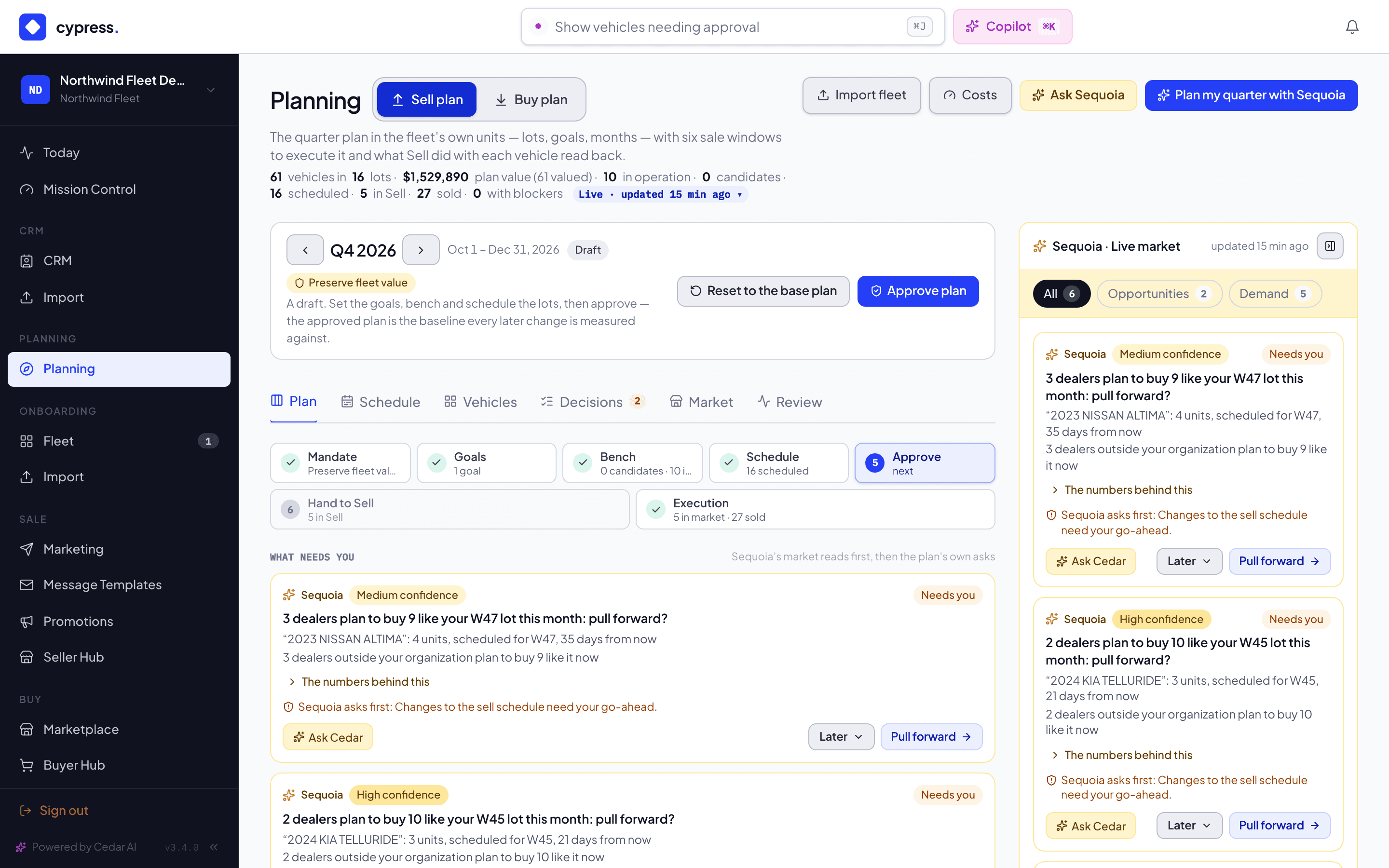
Open Planning. Above the tabs, the quarter bar reads Q4 2026 and Oct 1 – Dec 31, 2026, with the status Draft: Northwind has not approved this quarter. Its buttons on the right are Reset to the base plan and Approve plan. The page header's buttons read, in this order, Import fleet, Costs, Ask Sequoia and Plan my quarter with Sequoia.
You should see seven tabs, Plan, Schedule, Vehicles, Tasks, Decisions, Market and Review, and Sequoia's market rail on the right, on every tab.
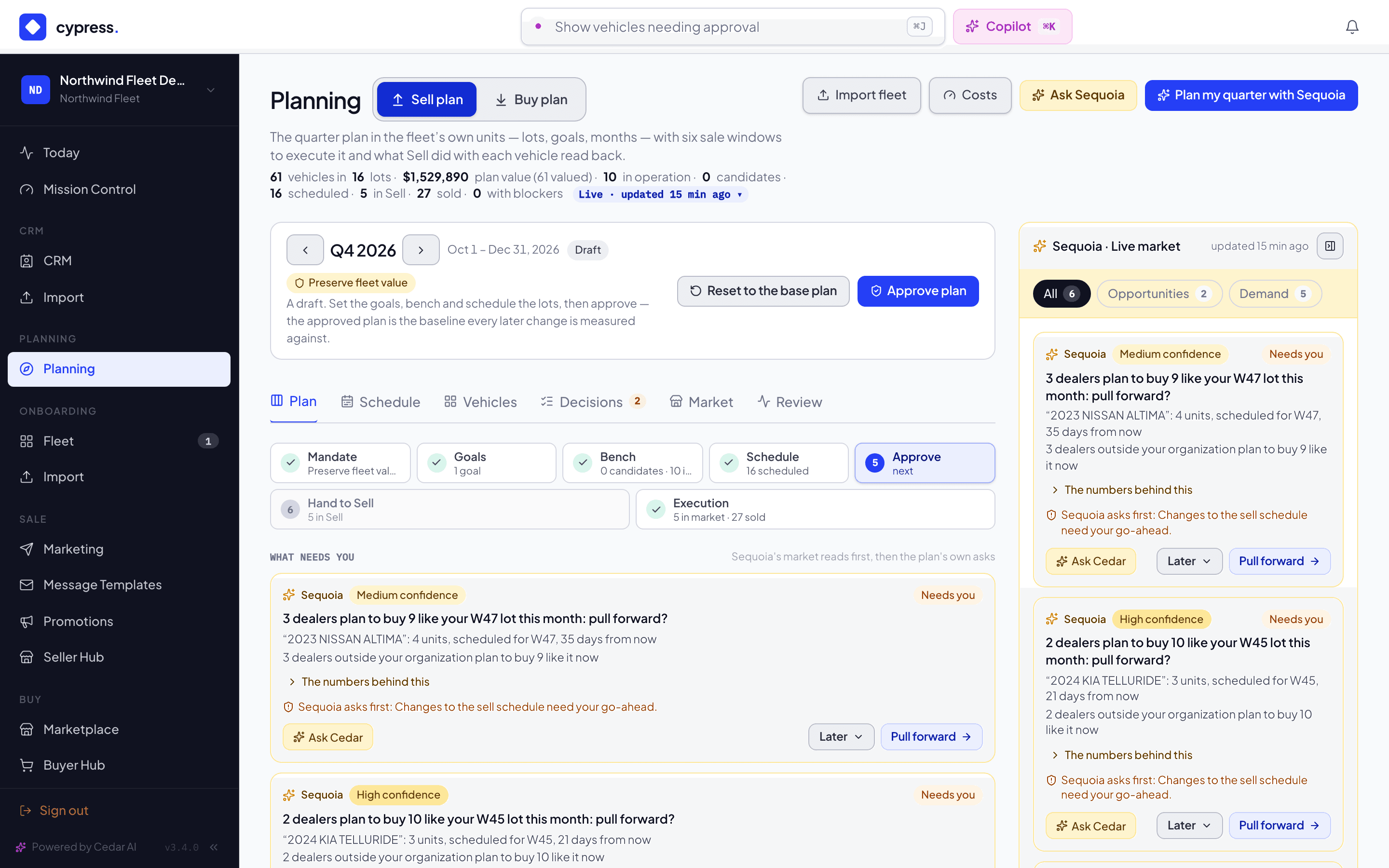
On the Plan tab, read the row of seven steps: Mandate, Goals, Bench, Schedule, Approve, Hand to Sell and Execution. Done steps are quiet and have a check. Under it, What needs you puts Sequoia's cards first and the plan's own asks after them. The numbers show Market value, In operation, Candidates, In windows, In Sell and Sold; select one to open those vehicles on the Vehicles tab. Goals — what this quarter must deliver shows the Units goal of 20.
You should see Approve lit as the next step, because the goal and the schedule exist and the quarter is still a draft.
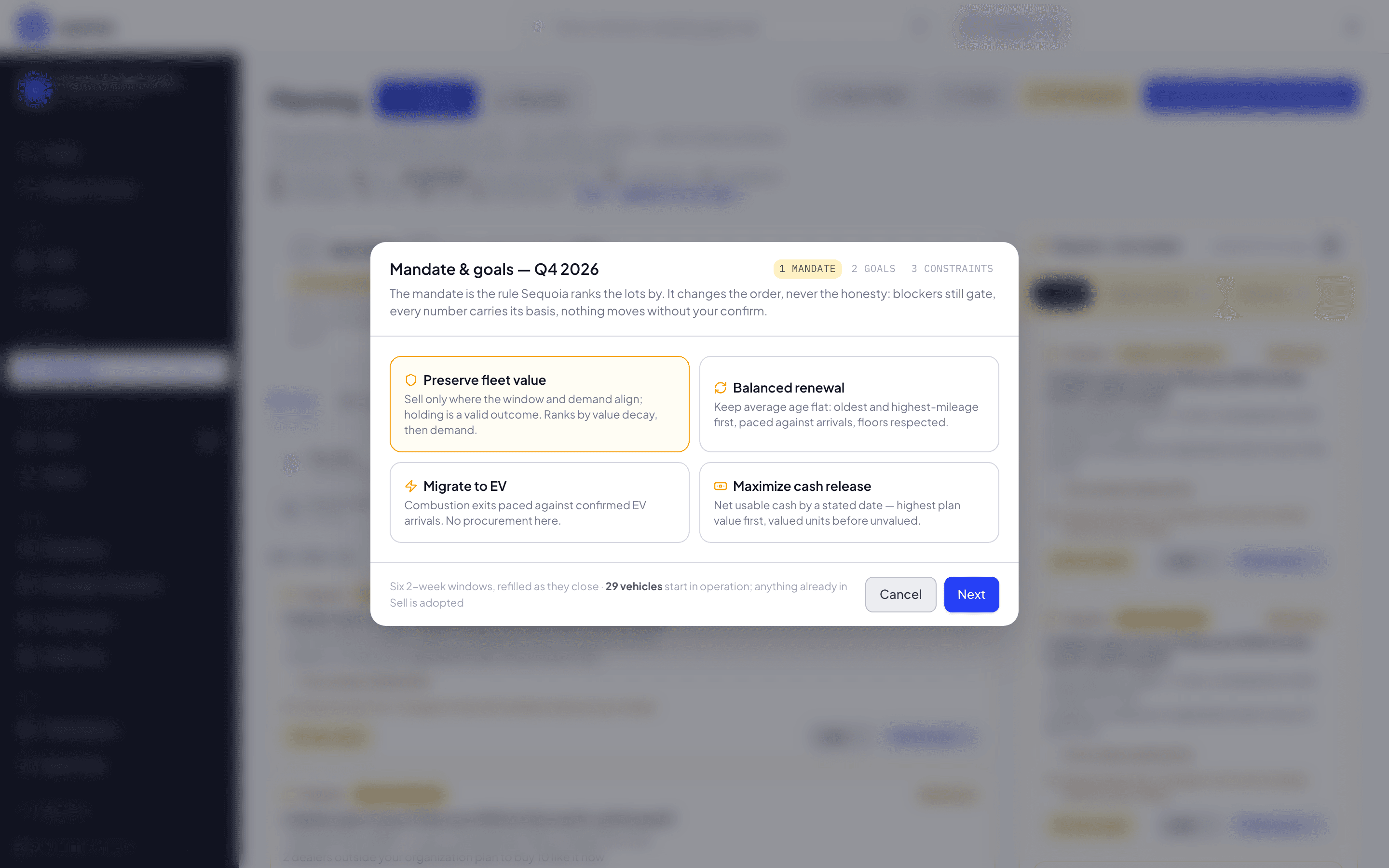
Select Plan my quarter with Sequoia. The Mandate & goals — Q4 2026 window opens on its first step, Mandate, then Goals and Constraints. Pick a mandate to see that the choice is a bias for how Sequoia ranks a lot, never a label, and look at the Goals step. Northwind already has its goal, so close the window with Cancel instead of applying anything.
You should see the three steps and the four mandates. Nothing in the plan changes if you cancel.
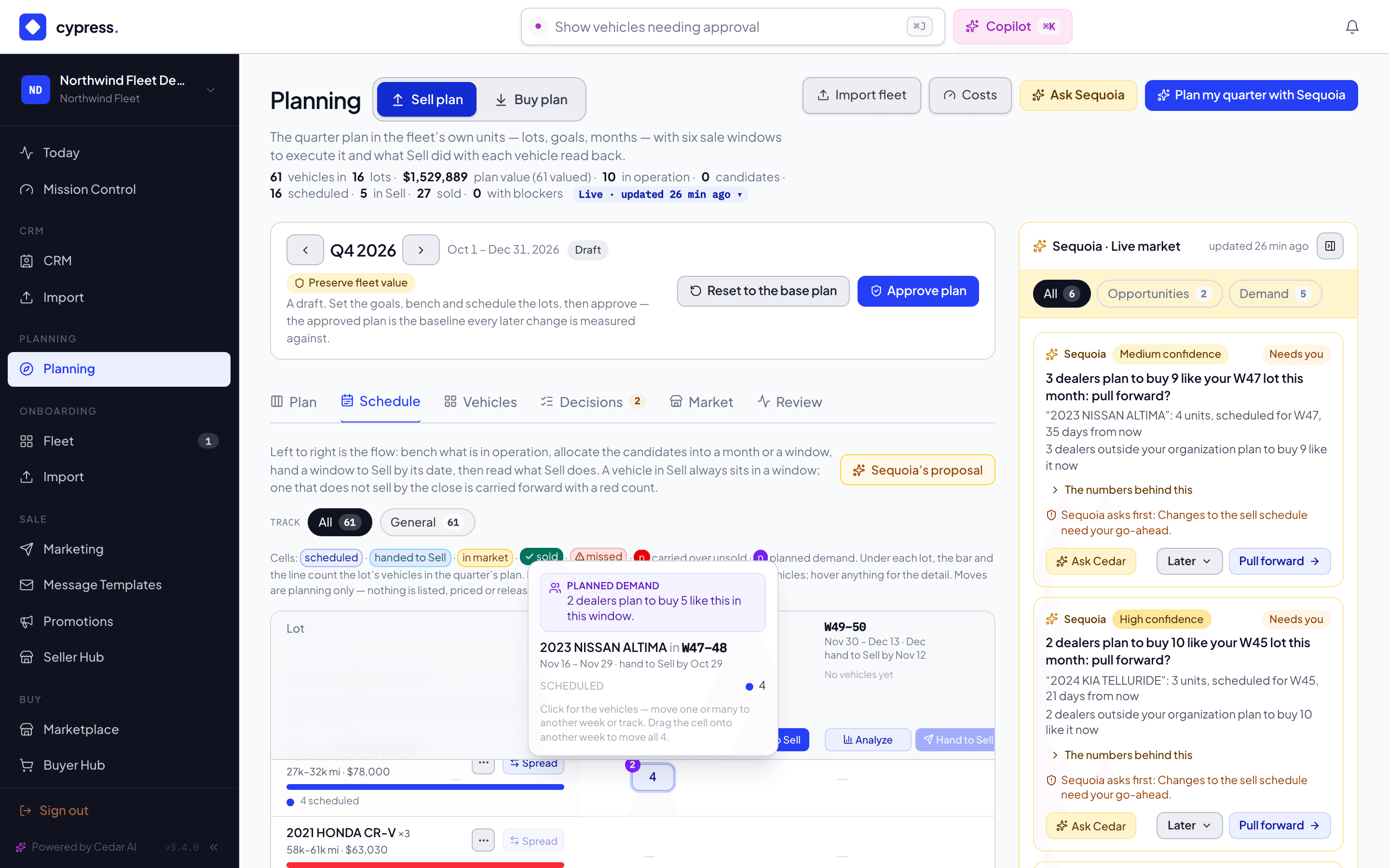
Open the Schedule tab. Rows are lots (year, make and model), and columns are the six two-week sale windows plus the bench. Under each lot's name sits a bar and one line, for example 3 scheduled. Look for the lots Northwind staged for this quarter: Equinox LT (three), Telluride SX (three), Altima SV (four), and two it holds for the Market tab, Santa Fe and Outback.
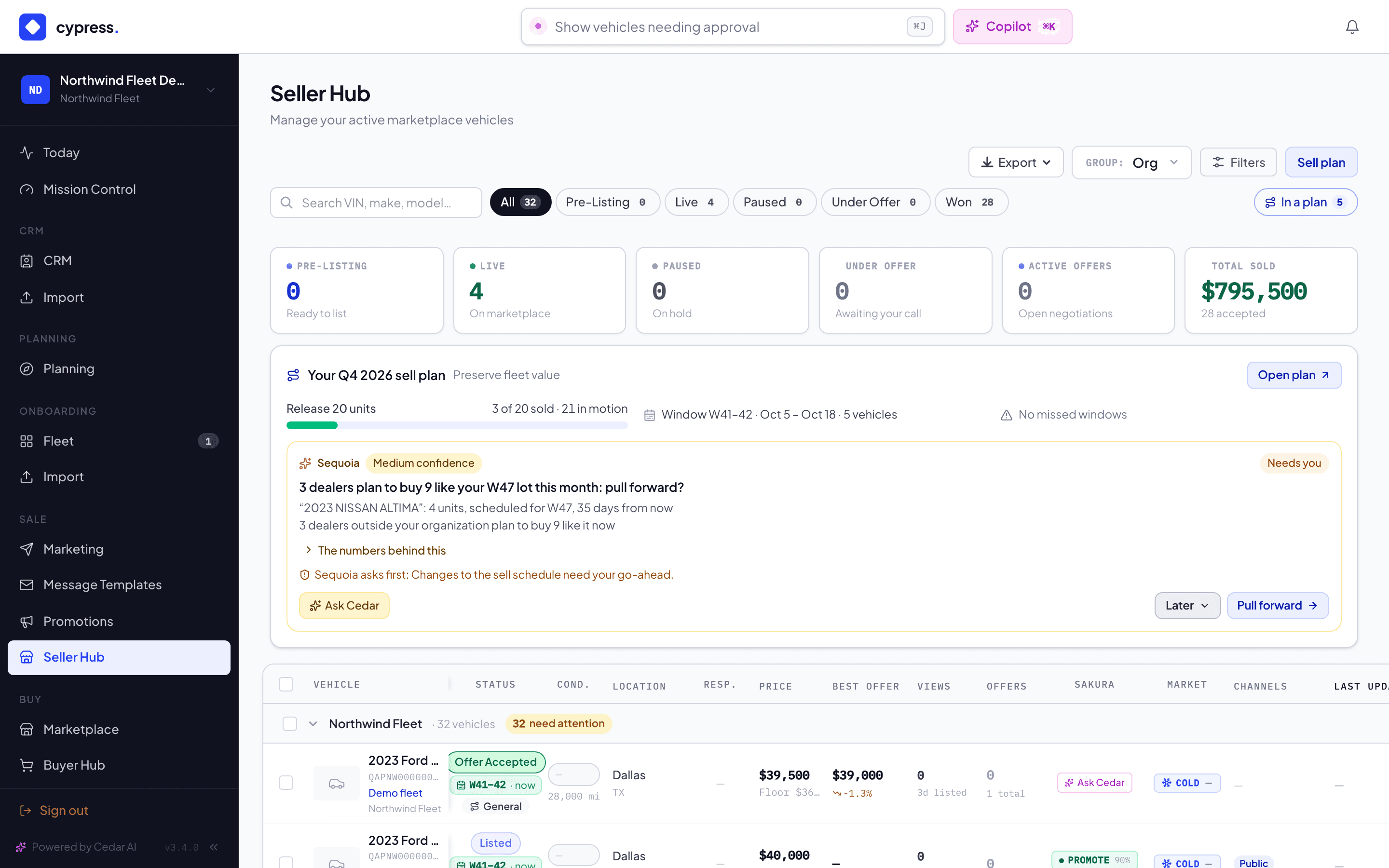
Find the Altima SV row. Its cell in a later window (the third one that starts after today) carries a small violet dot on its top left with the number 2. Point at the cell: the tooltip opens on a violet block, 2 dealers plan to buy 5 like this in this window. The Equinox LT and Telluride SX cells have no dot.
You should see demand on the Altima lot only. Two dealers in this example, Summit Auto Group and Lakeside Motors, have an open Altima SV target, with 3 and 2 vehicles still to buy. One dealer wants the Equinox, and one wants the Telluride, and one is below the minimum of two, so Cypress shows a seller nothing for them. No dealer is named anywhere.
Select the Altima cell. The panel opens on Market for this lot, in violet: the same sentence as the tooltip and, when there is enough to say, how much dealers want the lot in the next 13 weeks (Wanted by dealers, next 13 weeks, as a range) and how heavy other sellers' planned supply of it is (Light, Normal or Heavy). Below it, the vehicles, and the toolbar's Move to.
To act on the demand, as Sequoia's pull forward? card suggests, choose an earlier window in Move to and select Move. The message that appears has Undo.
You should see the four Altimas in the earlier window, and the demand dot on the earlier cell instead. Select Undo if you want them back. Moving vehicles between windows never amends an approved plan.
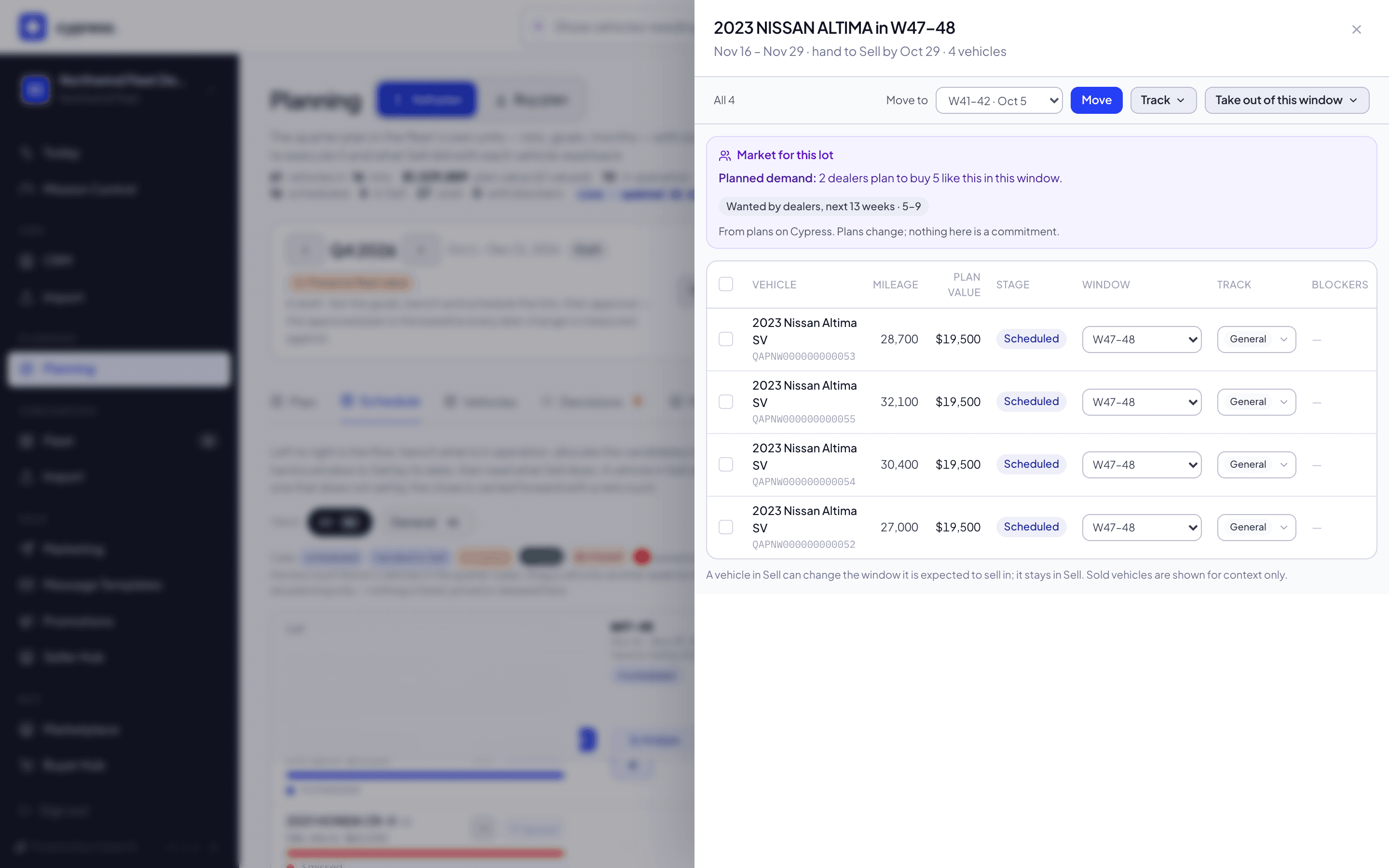
Open the Market tab. It opens with the line Today's market and the same quarter bar as every tab.
- What this means for your plan shows the Sequoia cards the market drove, at most four, each with Ask Cedar, Later and its action.
- Hot on Cypress lists the models selling fastest on Cypress. It is read from Cypress's own completed sales; with too few of them it says Nothing selling fast enough on Cypress to call hot yet.
- What dealers want lists models, with the chip Wanted on Cypress, never how many: among them Chevrolet Colorado, Toyota Highlander, Hyundai Elantra and Honda Accord, each put there by a different kind of signal that the row never names. Honda Civic is not there, because Northwind holds one.
- What sellers plan to bring shows Hyundai Santa Fe with a range (10–19), because three other sellers plan it, and Subaru Outback and Mazda CX-5 as Planned, because fewer plan them. Northwind's own vehicles never count toward its board. The Santa Fe row wears a chip such as You hold 4, the vehicles of that model still in Northwind's fleet.
Select Open my matching vehicles on the Santa Fe row.
You should see the Vehicles tab with Santa Fe in its search box and Northwind's four Santa Fes in the list.
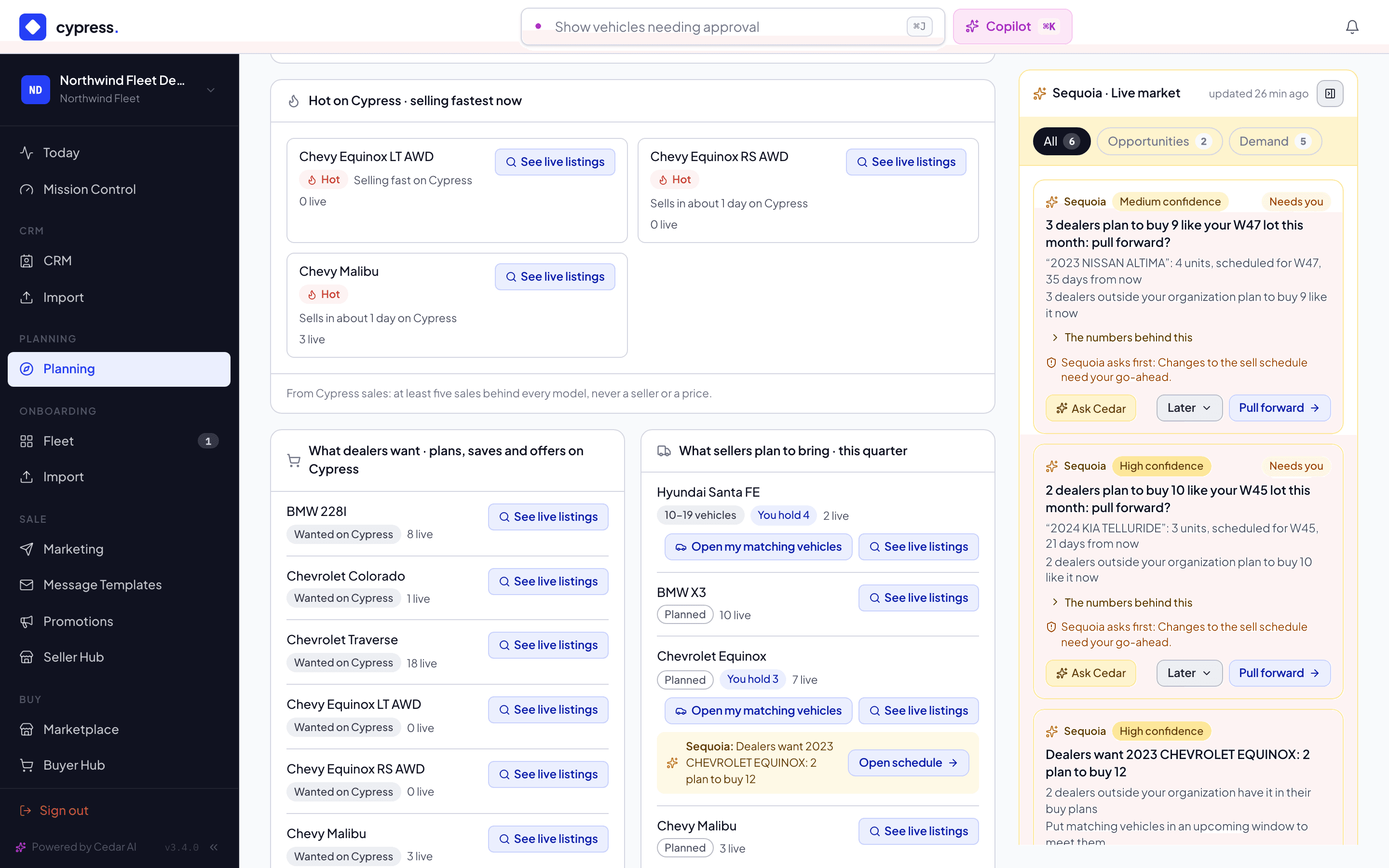
Back on the Schedule, find a window that holds scheduled vehicles and select Hand to Sell on its header. The preview shows the exact set and what confirming does: every vehicle is Will hand to Sell, or waiting on a blocker. Select Hand N to Sell to confirm.
You should see the window's chips read N handed and, once everything in it has been handed, its second button read a disabled Handed. Nothing is listed, priced or sold by this: the vehicles arrive in Northwind's Sell intake as drafts. See Hand a window to Sell.
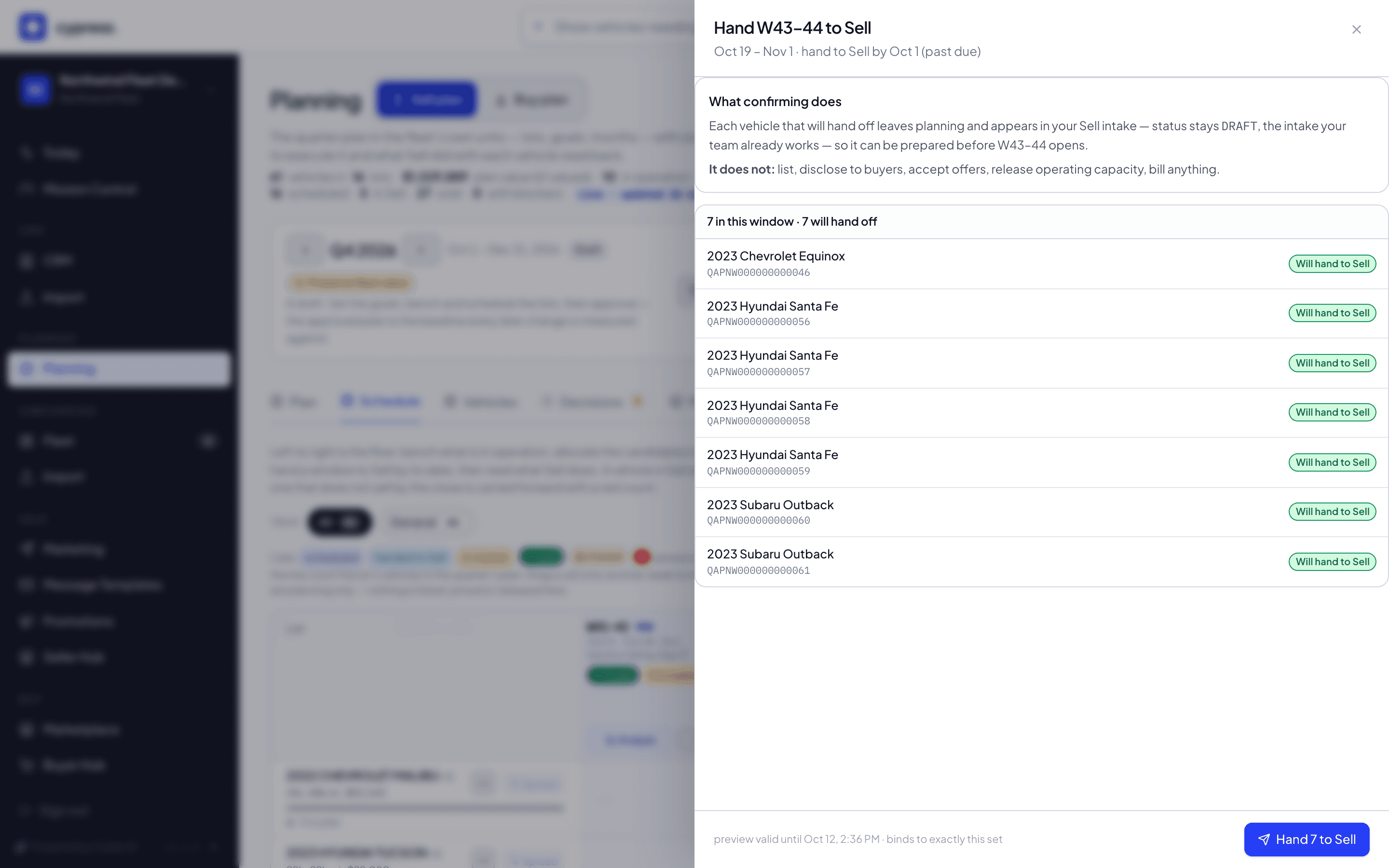
Open the Seller Hub. Under the KPI strip, the sell plan card, Your Q4 2026 sell plan, shows the goal's meter (… of 20 sold), the window open now, and No missed windows or how many vehicles missed. If Sequoia raised the pull-forward suggestion for the Altimas, its card sits under the meters: 2 dealers plan to buy 5 like your W## lot this month: pull forward? Use In a plan to see the vehicles the plan speaks for, with their window chips.
You should see the vehicles you handed over, with a plan chip that names their window. See Planning inside remarketing.
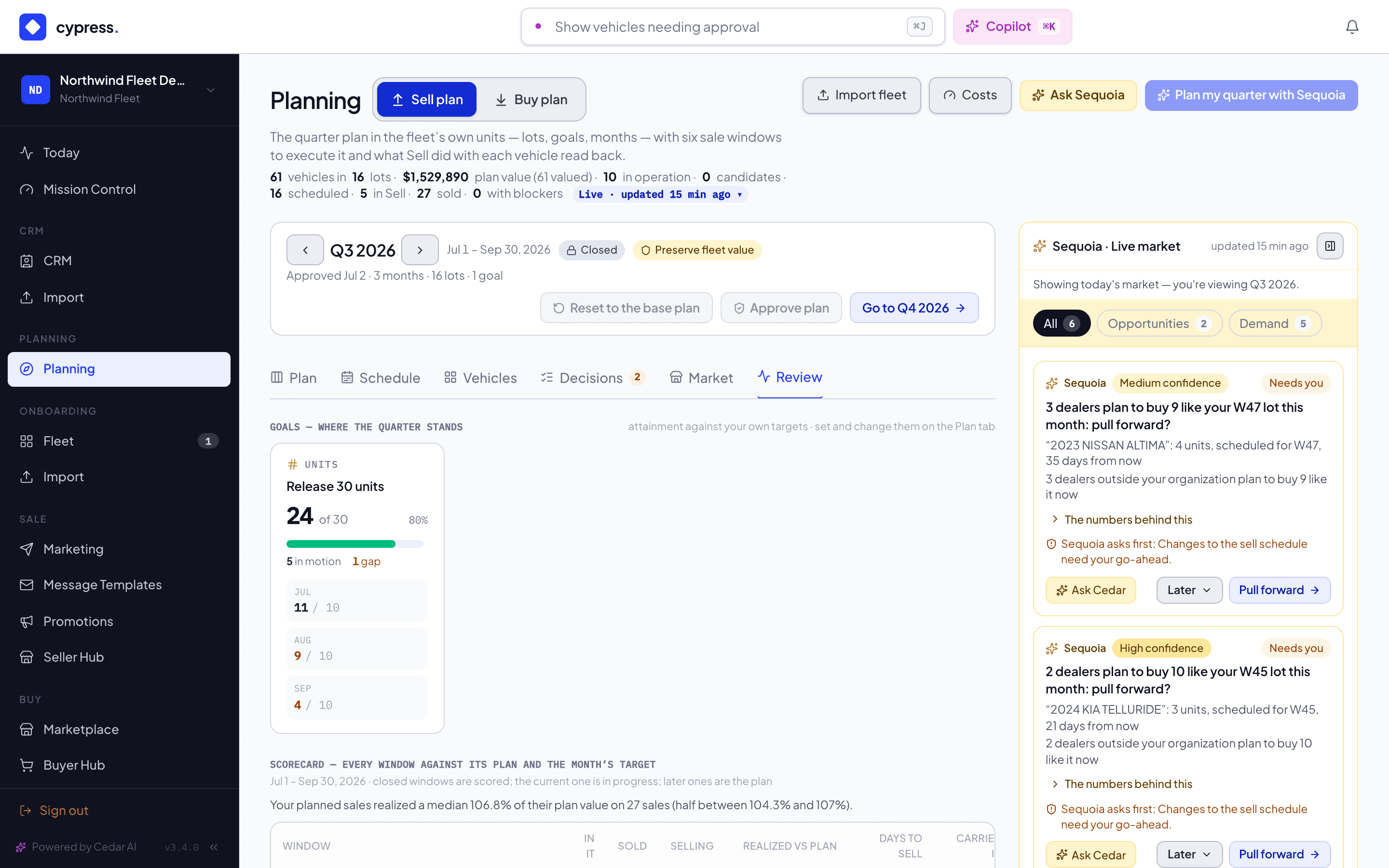
Last, read the quarter that ended. In the quarter bar, select the left arrow to open Q3 2026. A slate Closed badge with a lock appears, and a Go to Q4 2026 button, last on the right. Open the Review tab.
You should see Goals — where the quarter stands with 24 sold against the goal of 30, and the scorecard opening with a tinted row, Quarter starts Jul 1, and closing with Quarter ends Sep 30. A closed window's name, with an arrow, opens its review: each sale reads like a sentence, Sold · N days · NN% of ask, followed by how far it sat from its plan value (the demo sells each vehicle $1,500 over its plan value). Record a verdict, Agree, Partially or Disagree, with your own words if you like. The Q3 plan itself is read-only: its add, move and approve buttons are drawn off, each with the reason Q3 2026 is closed. Switch to Q4 2026 to …
What happens next
The loop closes on its own: the vehicles you handed over are listed and sold in Sell, Planning reads them back, and the next window's review lands on the Review tab when its last day passes. Sequoia learns from your verdicts, in your organization's memory only.
Ask Cedar
- Against the targets
- Pull a lot forward?
Related
- Build the quarter plan
- Schedule a sale window
- The schedule, the hand-off, and what actually happened
- The Market board
- A buying quarter: Summit Auto Group, the dealer who wants Northwind's Altimas
Review how the plan held
Read the quarter's goals against what happened, every window's scorecard, and what a partial sell-through would mean.
Practice: Goals that hold
Pick a goal kind that matches what the quarter actually needs, and read attainment the way the plan measures it — against your own target, never an invented percentage.