Sales channels & commissions
Where a listing can sell, what each surface costs, and how channels get switched on.
TL;DRAI summary
This chapter explains the four sales channels available for your vehicle listings, how you gain access to them, and how commissions are calculated. Understanding these channels helps you reach buyers and manage your selling fees effectively.
For: Fleet Managers · Cypress Managers
One priced listing can sell through four surfaces, each with its own audience and its own commission. Channels are the distribution system — and, because each carries a fee scheme, they're also the pricing of Cypress itself.
The four channels
- Public — the Cypress Marketplace: maximum reach, the full buyer network, Cypress-managed deals end to end.
- Promotion — curated lists and campaigns that spotlight vehicles to targeted audiences.
- Direct — private per-vehicle links you hand to a buyer yourself. Off-catalog, unindexed; the modern handshake deal, with the platform's paperwork behind it.
- Storefront — your own branded catalog at
/s/your-name: your inventory only, your identity, subscriber campaigns included.
Grants — channels are account-level
Public and Promotion come with the platform. Direct and Storefront are opt-in grants — switched on for your org by Cypress, visible on your account. The gates are real: launching to a channel you don't hold fails loudly (naming the channel), whether the launch came from the app, a CSV, or the API. On self-serve channels the deal's paperwork shifts to your team too — see who owns the closing steps.
Commissions
Every channel points at a commission scheme — a flat per-sale fee. The resolution order is snapshot-simple: a per-link override (a direct link can carry its own scheme) → the channel's scheme → the platform default. Two rules make it trustworthy:
- Snapshotted at offer time. The fee rides on the offer from the moment it's created — nothing that happens later (scheme edits, channel changes) re-prices a live negotiation.
- A retired scheme can never price a live deal — inactive schemes are skipped at resolution.
What each deal cost you is on the offer row and the billing invoice line — and never visible to buyers.
Where the controls live
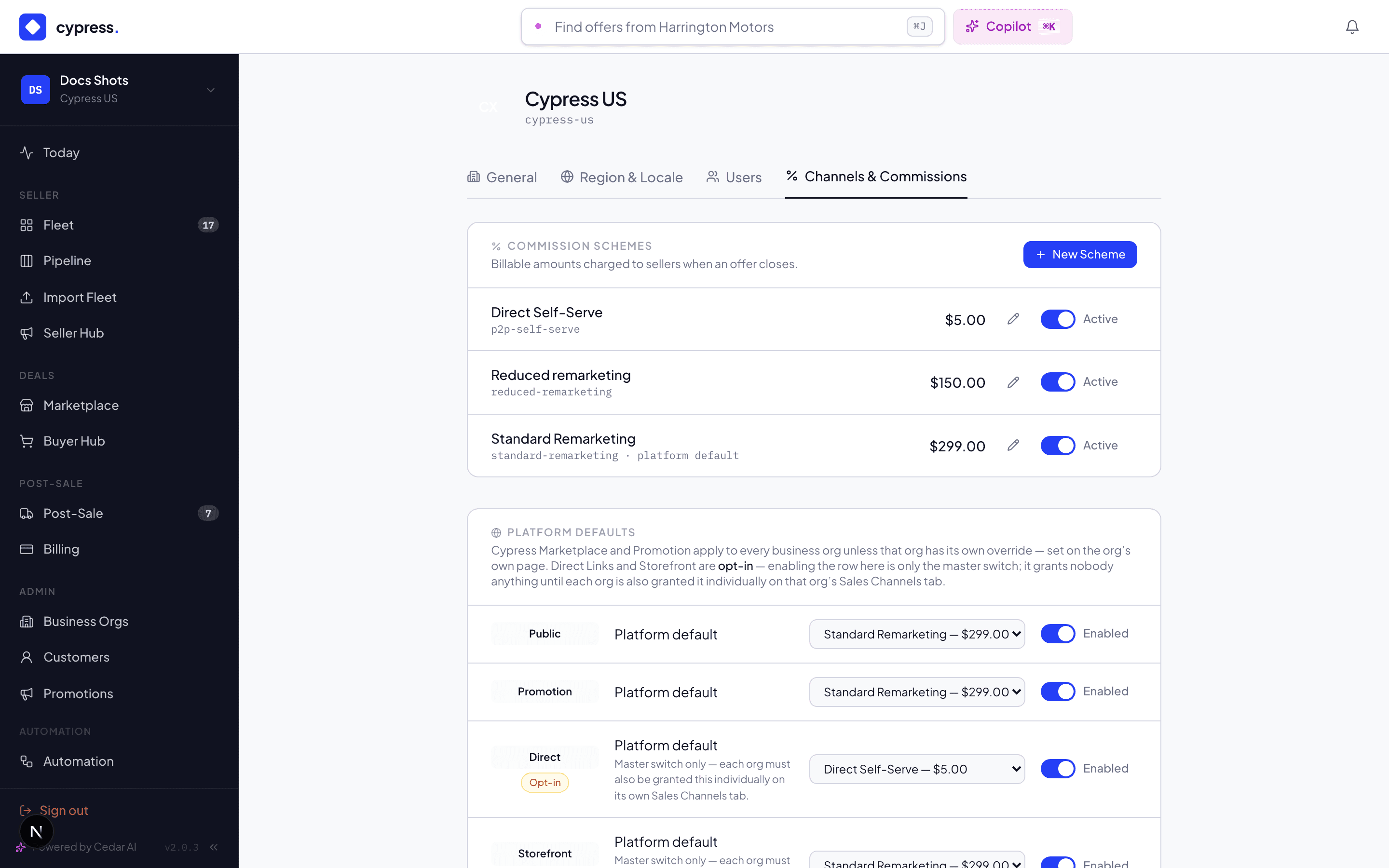
- Your channel status — on your org's account pages; ask Cypress for a grant you don't hold.
- Storefront setup — the Storefront section (branding, slug, inventory, promotions) once granted.
- Direct links — minted per vehicle on the Seller Hub panel's Channels tab: label them ("For Herrera Motors"), set expiry, revoke anytime. A revoked link goes dead everywhere, instantly.
- Platform side (CM) — schemes and channel masters under Admin → Settings; per-org grants on the org's admin page.
Channels in automations
Cypress Managers can build automations that work with channels, in this chapter's words and by its rules:
- Set sales channels is an action that says where a vehicle is sold, by the rule the Integrations API applies. At least one of Cypress Marketplace, Storefront and Direct Links stays on, and the vehicle is reachable exactly on the ones that are on. A channel your company holds no grant for fails the step and names the channel, and a vehicle still in planning is refused. It never lists, prices or launches a vehicle: listing is still its own step.
- Channel conditions let an automation tell offers and vehicles apart. Offer
Received and Offer Accepted take an optional Came through list, an
Offer came through condition tests the same thing inside an automation, and
{{offer.channel}}writes the channel into a notification or email (Public, Promotion, Direct or Storefront, never the buyer or a link). Vehicle reachable on passes when the Seller Hub shows the vehicle on any channel you check.
The steps, the wording of each refusal and a recipe are in Sales channels in automations.
Worked example
The Transit launched to Public + Storefront (Acme's grants). Maria also mints a direct link labeled "Herrera Motors — repeat buyer" and texts it over. Three doors, one listing, one price — but three different fee outcomes had each sold it: standard scheme on marketplace, reduced on the storefront, reduced on the direct link. Dan found it on the marketplace, so when his $29,200 was accepted, the offer carried the standard scheme — snapshotted three days earlier when he first offered, which is the number Acme's invoice shows.
Business rules
- One listing, one price, many doors — channels change reach and fee, never the ask.
- Disabling a channel platform-wide kills that surface everywhere at once — including links already in the wild. The kill switch is real.
- Every offer remembers its door (
channel origin) — that's what makes the channel analytics and per-channel commission honest.
Under the hood
Channels are typed rows with platform defaults and per-org overrides; the
"grant" is the org's own enabled row on an opt-in type. Offers snapshot
channel + scheme + fee at creation. Integrators name channels in
API pushes (MARKETPLACE, STOREFRONT, DIRECT_LINK) — the
developer channels doc maps the
vocabulary.