Promotions, lists & campaigns
Curated lists with a public page and a hero banner — who owns them, and how to read what they earned you.
TL;DRAI summary
Promotions are curated lists of vehicles for sale, used to highlight inventory on the Cypress Marketplace or your own storefront. You can build these lists manually or set them to update automatically, and feature specific vehicles to draw attention.
For: Cypress Managers · sellers with storefronts
A promotion is a named, curated list of vehicles with a public page and a hero banner. It's the platform's merchandising engine — and every click it earns is measured.
Mailing one is a separate question, answered by Marketing: a campaign can carry a promotion, but a promotion is a thing that exists whether or not anyone sends it.
Two kinds of promotion
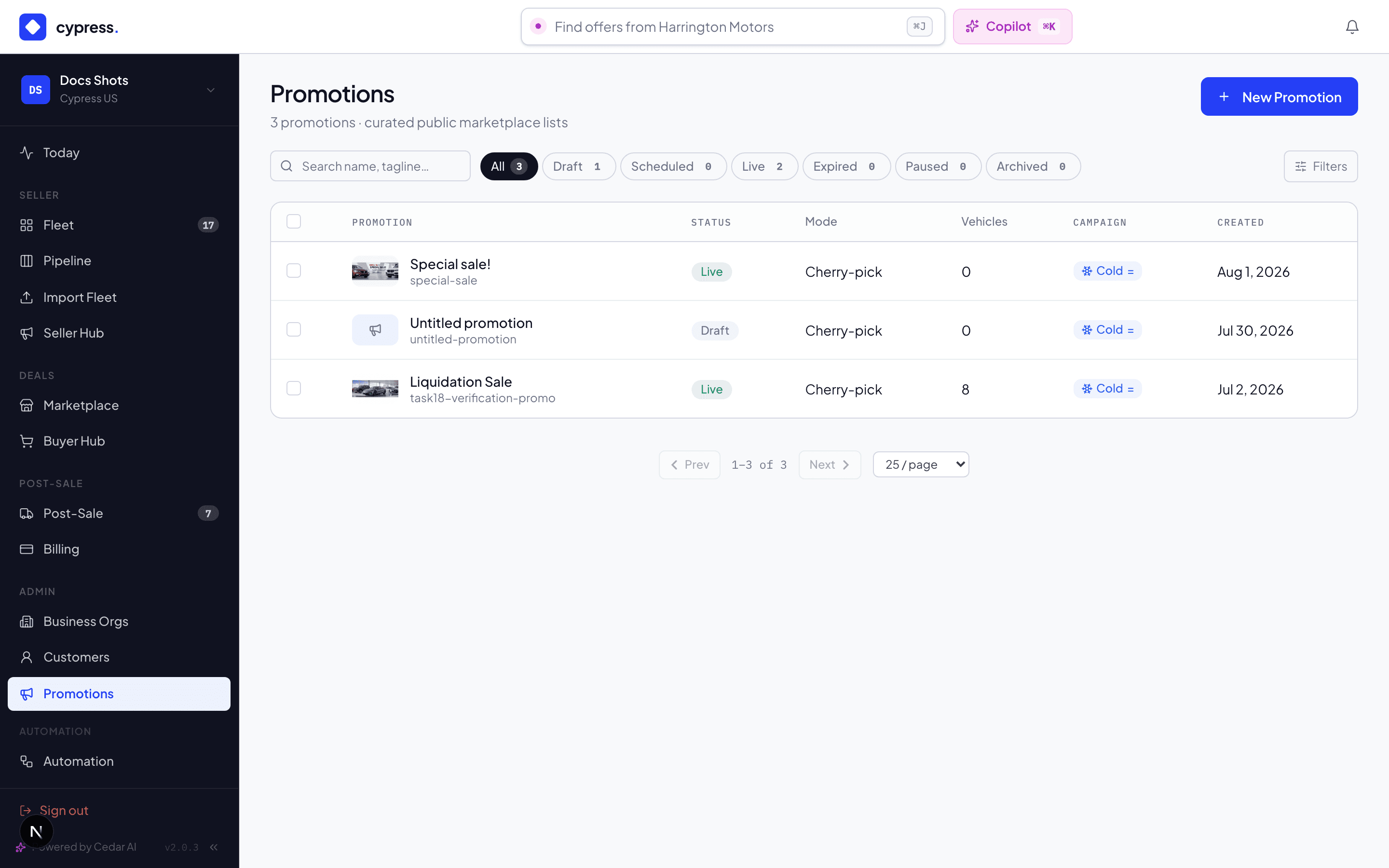
- Platform promotions — curated by a CM from any seller's inventory ("Fleet Vans Under $35k"), shown on the Cypress Marketplace and its hero strip.
- Seller promotions — a storefront-holding seller curates from their own inventory, shown on their storefront.
The separation is strict: sellers see only their own promotions, and can't see (or probe for) platform lists their vehicles appear in — a seller's competitive picture stays their own.
Building one
A promotion is a name, a tagline, a hero image (upload one, or generate one with AI from the name and tagline), a schedule window, and the list — either cherry-picked vehicles or a dynamic query ("all cargo vans under $35k") that keeps itself current. Live means active and inside the scheduled window; an expired promotion drops off the hero strip by itself.
The vehicle workbench
Picking is done in a working table, not a shopping page: a compact filter toolbar (Location, Make, Price, Year and more, as dropdowns with removable chips), one dense results table with a VIN on every row — click the Price, Mileage or Vehicle headers to sort — a page checkbox, and Select all / Deselect filtered for bulk moves. Beside it, a panel keeps what you have picked in view while you browse: Featured on top, In promotion below it, searchable by model, VIN or state, each row carrying the same badges the marketplace shows.
The Location filter speaks market regions — West, Southwest, Midwest, Southeast, Northeast, the Manheim Market Report's own split, derived from each vehicle's state so nothing is ever assigned by hand — as well as individual states, with vehicle counts on every option. Because a dynamic promotion is just a saved filter, "everything in the Southwest" is a promotion that curates itself as inventory arrives and sells.
Featured vehicles
A promotion can feature up to ten vehicles, in an order you set — star any row to add one, drag rows to reorder (or use the arrows). Featured cars are the promotion's editorial voice, and every surface honours the same list in the same order:
- the public page leads with them, each wearing a ★ Featured badge — a visitor who explicitly re-sorts gets the order they asked for, and the badge stays;
- the campaign email opens with them as full-width hero cards, before the compact list of everything else;
- the campaign screen shows them as ranked chips on the promotion card.
Featuring is a highlight, never membership: a starred car is always in the promotion (starring adds it, in cherry-pick mode), and a featured car that stops matching a dynamic promotion's filters simply drops off the featured list with it.
Mailing a promotion
A campaign carries the promotion to an audience on a schedule, highlighting what is new since the last send and leading with the promotion's featured vehicles. The campaign is created from the promotion — that is where it gets the page it carries — and everything about goals, audiences, personalisation and testing is the same engine every other campaign uses.
A recipient who clicks through can answer without an account: see Express offers for how an offer made straight from the email's landing page becomes a deal in your CRM.
Attaching a promotion to a campaign is a way of mailing it, which is why you can only attach one you own: without that rule a seller could point their campaign at a competitor's promotion and send that inventory under their own name.
Reading the results
Every send is tracked end to end: delivered, opened, clicked, then on-site viewed / saved / offered — per recipient and per vehicle. The promotion's analytics panel stacks it up:
- The temperature badge (HOT / WARM / COLD, with trend) answers "is this working" in one glance.
- The funnel — sent → opened → clicked → viewed → offered.
- The Sankey traces flows: which channel → which vehicle → which outcome, with sold deals gilded.
- Geo, device, and per-visitor drill-ins for the "who exactly" pass.
- Sakura's insight — a few sentences on what the numbers say, ending in one concrete next step.
Engagement also flows back to each vehicle's Market History — a promotion appearing in a vehicle's story is measured as an event with a before/after.
Worked example
Alex adds the Transit to the platform's "Fleet Vans Under $35k" — a dynamic query, so it joined the moment it listed under the cap. The campaign sends weekly, Tuesdays at 9am Central, to alert-matched and recently-active buyers: 240 recipients, 31 opens, 6 clicks through to vehicles. One of the six is Dan — his open → click → view → offer chain is visible in the actor report, and when the Transit sells, the Sankey shows a gold thread from Promotion all the way to Sold. Sakura's insight that week: "Vans under $33k are converting at twice the list average — consider adding the two Transits still in Pre-Listing."
Who owns a promotion
Every promotion belongs to a book: a seller's, or the platform's own.
- A seller sees only their own.
- A Cypress Manager sees the platform's and every seller's, with an Owner column in the grid and the same badge on the promotion's own header — because a CM edits many books and they would otherwise look identical.
- A CM acting for an organisation sees exactly that organisation's promotions.
New Promotion names the owner before the promotion exists. It defaults to whichever book you are working in, and Cypress may choose another — choosing one you are not currently acting as is allowed and says so, since every list on screen is scoped to the lens and the new promotion will not appear in any of them.
Business rules
- Campaign emails go only to lawful audiences — subscribers are double-opt-in, unsubscribes are honored permanently and provably, and every send records who, when, and from which list.
- One campaign per promotion — schedule it, don't stack it.
- Counts read "8 available of 11": only vehicles that are listed or under offer can go out in a campaign. See Marketing campaigns.
- Sold and archived vehicles stay linked to the promotions that sold them — history keeps its attribution even after the vehicle leaves market.
Under the hood
Campaign sends fan out through the platform's worker queue with per- recipient tracking tokens; engagement events attribute to the PROMOTION channel, which is what the Sankey, temperature, and Market History correlation all read. Integrators see promotion-originated offers with their channel origin like any other — see the developer docs.