Billing & invoices
The org money page: commission invoices, ACH and bank-transfer cycles, credit limits, and corrections.
TL;DRAI summary
This chapter explains how your organization gets billed for sales, whether through individual payments or consolidated invoices, and how to manage payments and credits. It helps you understand and manage all billing activity and ensure timely payments.
For: Billing admins · org admins — CMs see every org's billing
The Billing page is where an org meets its money: every commission invoice, the ACH batch meter, payment methods, receipts, and corrections. One page, complete history.
Three ways to be billed
- Online — pay-per-sale. Each deal's commission invoices at closing step 1 and must be paid within the payment window for the deal to proceed (the paywall).
- ACH batch billing — the platform's house account model. Sales defer; twice a month everything outstanding settles as one batch against the org's linked bank account.
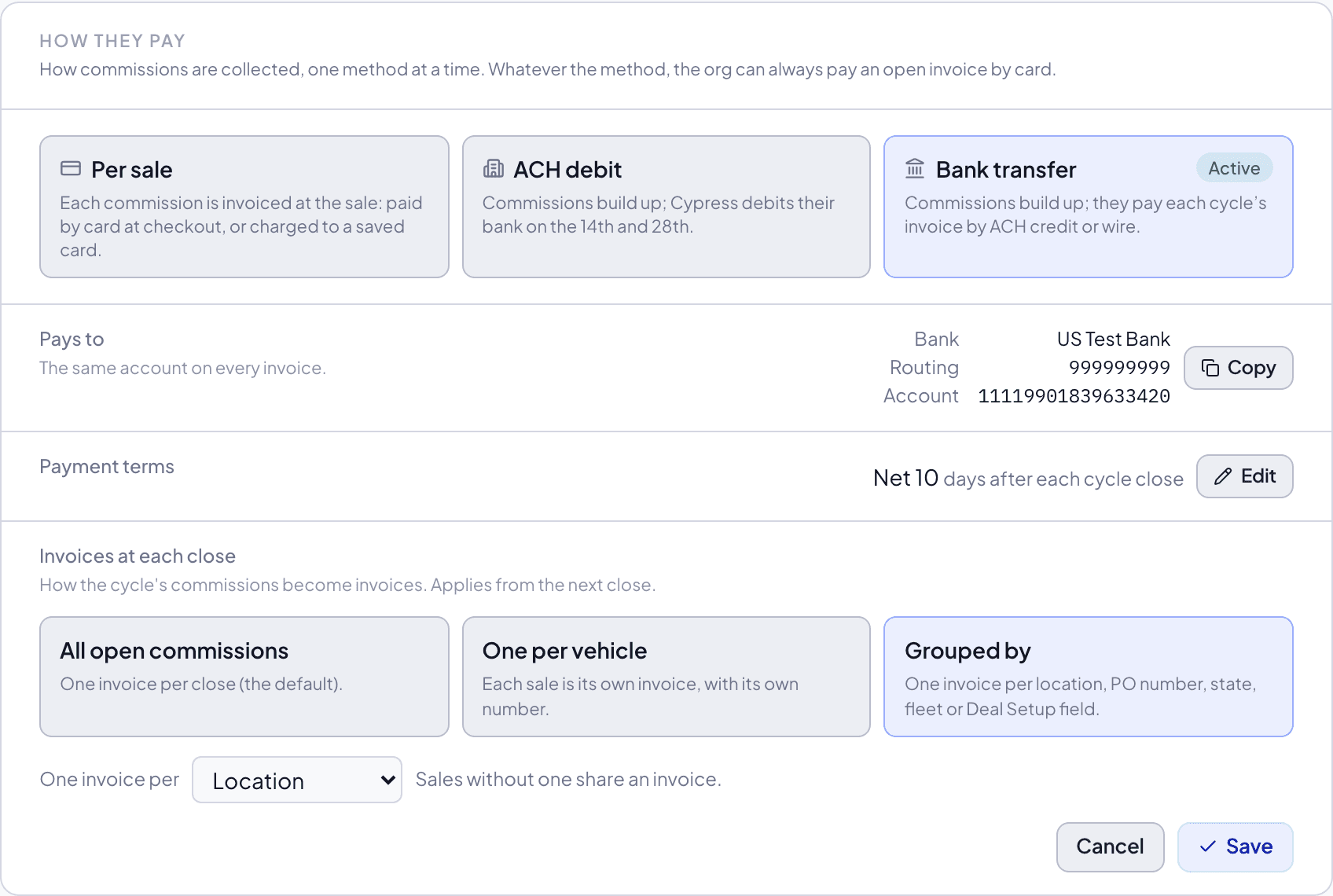
- Bank transfer (pay by invoice) — the same terms as ACH, for an org whose accounts payable sends payments itself rather than letting a vendor debit it. Sales defer; twice a month they are invoiced together with a due date, and the org sends an ACH transfer or a wire to its own account. See Paying by bank transfer.
Which model an org uses — and its ACH mandate — is set up with Cypress; the bank link runs through a verified connection, never routing numbers typed into a form.
The page opens with one line that answers what you owe and when, then:
- How you pay — your one payment method. Paying per sale, it is the Commission Card: saving a card turns invoice-and-pay into automatic charging, with no paywall to meet on each deal, and removing it goes straight back. On ACH, it is your linked bank. On bank transfer, it is the account to pay and what is due on it. Full detail, including what the seller is told before the first charge, is in Payment & commission.
- Credit line — on ACH or bank transfer: how much is used against your limit, the next invoice or debit, and your account credit.
Whatever the method, an open invoice can always be paid now by card. A card saved for automatic charging is used only when you pay per sale: on ACH or bank transfer, a card payment is a one-off and is never saved.
- Billing details — where invoices are emailed, and the address and tax ID they print. Invoices can go to several addresses (an accounts payable inbox and a controller, say): separate them with commas, and every invoice, reminder and receipt goes to all of them. Your organization's admins and billing admins can change them here; tax exemption is set by Cypress. Invoice content, at the foot of the card, shows what each commission line prints, built from your latest sale: by default the vehicle, VIN, Unit #, location and PO number, for example Sale commission · 2021 Toyota Camry · VIN … · Unit 18842 · Fort Lauderdale · PO 4500012345. It also says whether a PO number is required before your side of Deal Setup can be confirmed. Cypress sets both; ask your account manager to change them. When an invoice has one PO and one location, they also print in its header, where accounts payable software looks for them.
Then the invoices and credits.
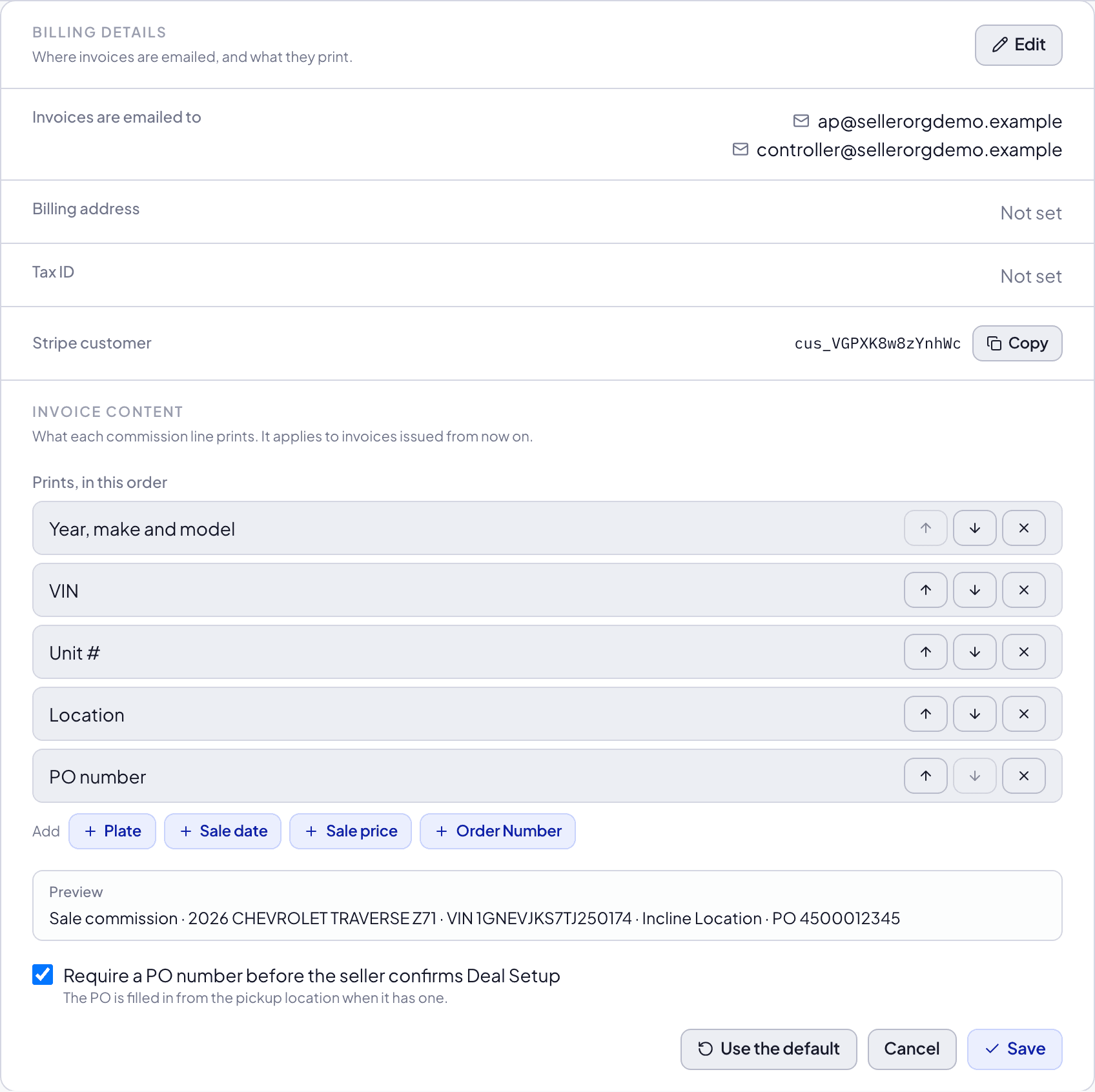
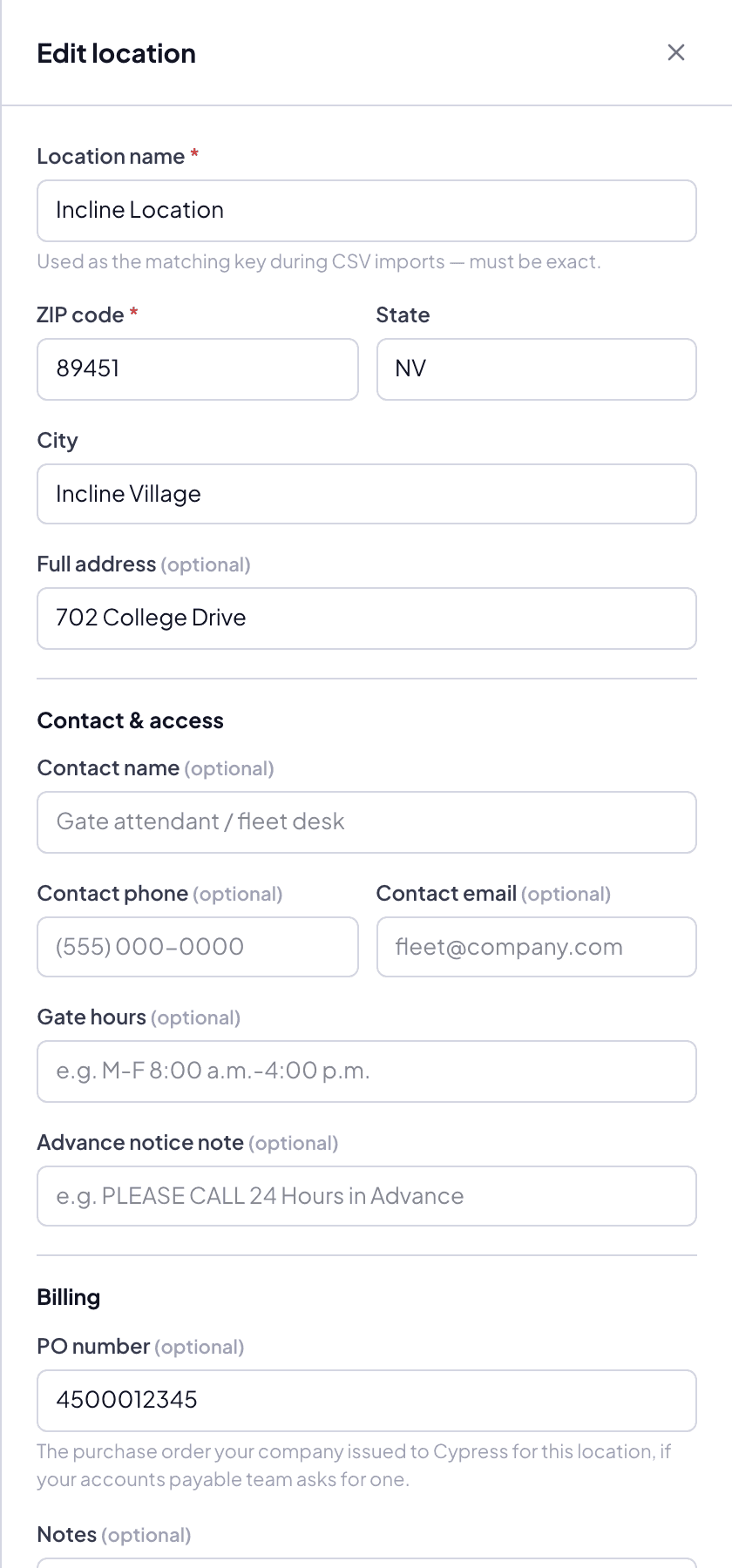
The PO itself lives on each saved location (Settings › Locations, the Billing section of a location), and Deal Setup copies it from the pickup location.
The batch cycle
Cycles close on the 14th and the 28th of every month. The Billing page's meter shows the running balance: deferred fees against the org's credit limit, utilization, days to the next cycle, and the linked account.
Invoices at each close. By default a close puts every open commission on one invoice. Cypress can instead issue one invoice per vehicle, or one per location, PO number, state, fleet or Deal Setup field, for an accounts payable team that books by branch or matches each invoice to a PO. Sales with no value for that field share one invoice ("No PO number"). Each invoice has its own number and, on bank transfer, its own reference; the close still sends one email listing them all, with every PDF and a CSV, and they can be paid in one transfer. On ACH each invoice is its own debit. The Billing page says which way your invoices are issued; paying per sale is always one invoice per sale.
The one billing fact every Fleet Manager must know
Hitting the credit limit pauses your listings. The outstanding balance consolidates for immediate settlement, and new selling waits until it clears. The meter exists so this never surprises anyone — watch utilization, not just the invoice list.
Paying by bank transfer
For an org that pays by invoice, Cypress switches bank transfer on (it is never on alongside ACH). The org gets its own bank account number, the same on every invoice, so its AP team sets it up once.
- On the 14th and 28th, the cycle's sales become one invoice, emailed to the org's billing email with the PDF, the account details and a reference, and due a set number of days later (10 unless agreed otherwise).
- The org sends an ACH transfer or a wire to that account, quoting the reference or the invoice number. When it arrives, Cypress matches it to the invoice and marks it Paid; a receipt follows by email.
- A reminder goes out three days before the due date. A day after it, the invoice is Overdue: the org is told by email and on this page.
- An amount that does not cover a whole invoice is held and Cypress staff follow it up; nothing is applied to part of an invoice.
- Unpaid invoices count against the credit limit until the money arrives.
- Any issued invoice can be paid by card instead, the whole amount at once. The transfer for it is then no longer expected, and the receipt follows by email the same way. An invoice that has already received part of its amount by transfer is finished by transfer.
The Billing page shows the account to pay, each unpaid invoice with its due date, reference, PDF and a Pay by card button, and what the next invoice holds so far.
The invoice list
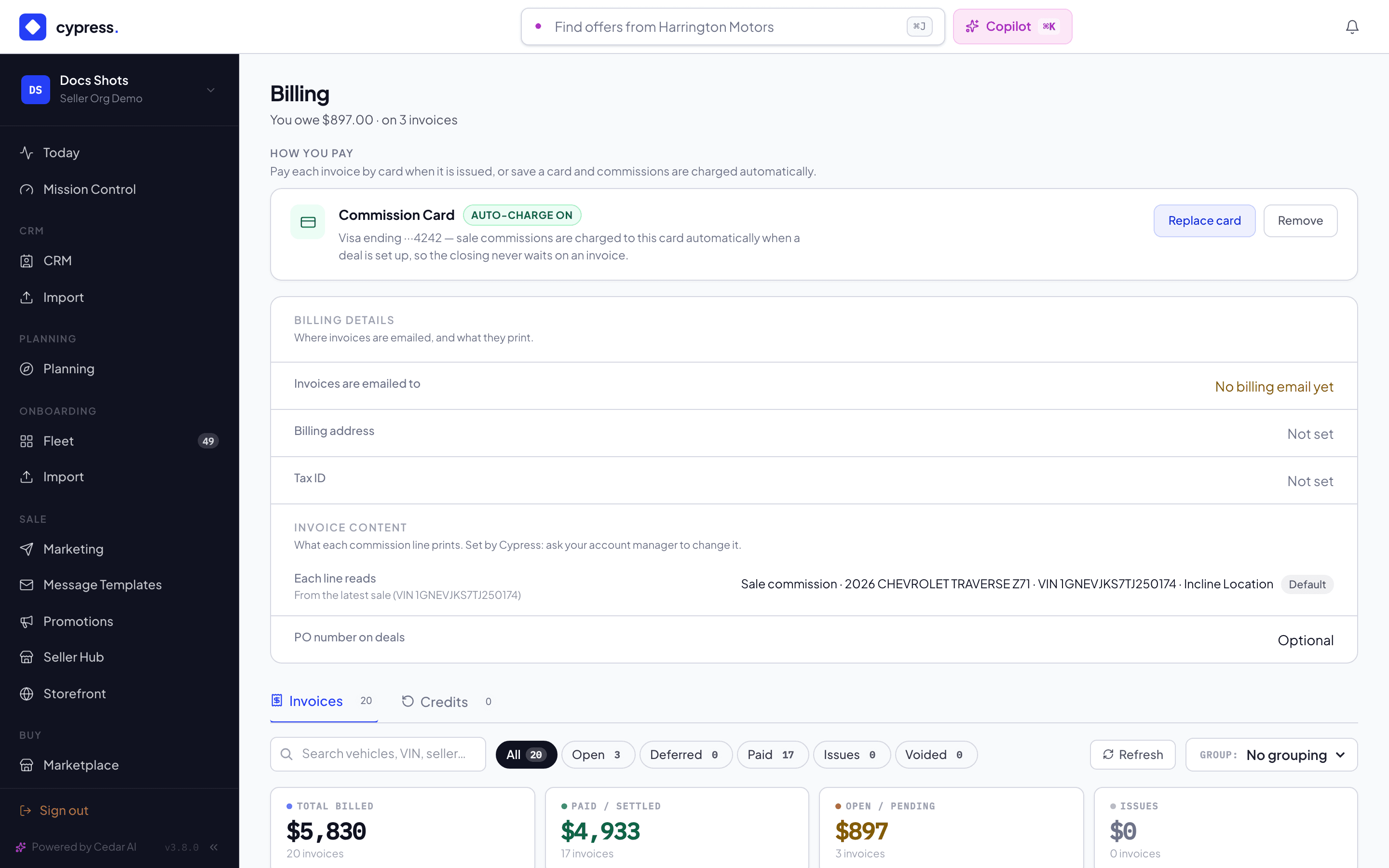
Billing has two tabs: Invoices, and Credits for the corrections against them and the balances they create.
Invoices are filterable by state: Open (issued, payable now), Deferred (riding to the next batch; each says how it will be collected, ACH debit or bank transfer, and the day its invoice is issued: "Invoice Oct 28 · due Nov 7"), Paid, Issues (escalated or expired — needs attention), and Voided. Each row carries its deal — the line item reads like a receipt ("2022 Ford Transit 250 — VIN … — sale price $29,200"), never like a database row. PDFs generate automatically and attach to the row; batches get a batch receipt on top.
The amount column answers what is still owed, not just what was billed: the net of any credit notes, then what remains due, then how the rest was settled — credited, paid from balance, or paid in cash. An invoice reduced by a correction or part-paid never reads at its full figure.
Paying an open invoice happens right on the page — embedded checkout, no redirect to a third-party portal. CMs can also record a manual payment against an invoice (wire received offline, for instance) with the proof attached.
Did you know?
The commission on every deal was snapshotted the moment the offer was created — scheme changes, channel edits, and repricing later never touch a live negotiation's fee. What lands in your batch is the number the offer carried all along, which is why the invoice never surprises.
Corrections
Money mistakes get credit notes, not deletions: a duplicated charge, a cancelled deal billed in flight, a goodwill adjustment — each issues a note tied to the original invoice. The invoice history stays intact; the correction is its own record.
Issuing one. Open the invoice from the Billing list and choose Issue Credit Note (CMs and admins only, alongside Record Manual Payment). Pick an amount — up to whatever is left uncredited — and a reason. Several notes can ride on one invoice; each is capped at the remainder, so the same money can never be credited twice.
Where the money goes — three outcomes, and which one applies is decided by whether the invoice had been paid, not by preference:
- Off the invoice. On an invoice nobody has paid yet, the note simply reduces the bill. Nothing is handed back and nothing is held, because nothing was ever collected. This is the cancelled-deal-billed-in-flight case, and it is the most common one.
- Returned outside Stripe. The money was collected and wired back.
- Credited forward. The money was collected and kept, becoming account credit the organisation can spend against future invoices.
The last two only appear once an invoice has actually been paid — that is the only situation where there is money to return or keep.
Finding them afterwards. The Credits tab on Billing is one timeline of everything that has happened to credit — notes issued, credit granted, credit spent — newest first, filterable by kind and groupable by organisation. A seller sees their own; a CM sees every organisation's.
Click any row for its side panel: what happened, the invoice it corrected (with a link straight to it), the balance it created if any, and who issued it and when. Documents hang off the same panel.
What cannot be credited. An invoice already voided has nothing left to reduce. An invoice that was escalated to a later one has handed its balance to a successor — credit that successor, or the correction lands on a balance nobody owes. And an invoice raised before the Stripe cutover has no Stripe document to credit; it says so rather than failing quietly, and those are corrected in the accounting record directly.
An invoice credited down to nothing is voided automatically. Everywhere the amount appears — the invoice list, batch totals, revenue reporting — it reads net of its credit notes, so Cypress and Stripe never disagree about what a deal earned.
Account credit
Credit an organisation holds with Cypress, spendable against future invoices and never paid out in cash.
Don't confuse it with the credit limit on the same page. The limit is how much commission may accrue before an ACH sweep collects it; account credit is money the organisation already has. The two share a word and nothing else.
Where it comes from. Two places only:
- A credit note on an already-paid invoice, settled credited forward.
- A credit grant, which a CM issues from the Credits tab for goodwill, an incentive, or a negotiated rebate.
A grant is deliberately not a credit note. A credit note corrects a specific invoice and reduces the commission earned on it — Stripe cannot even issue one without an invoice to attach it to. A grant corrects nothing: it is a cost Cypress chooses to bear, and the invoice it eventually settles still earns its full commission. To reverse a specific charge, credit that invoice; to hand an organisation money to spend, grant it.
It is Cypress's ledger, not Stripe's — and that is a deliberate choice with a sharp edge behind it. Stripe applies its own customer balance automatically to the next invoice it finalises, and never to the payments Cypress actually collects. Credit parked there would quietly shrink a future invoice while Cypress went on charging full price, and the seller would be billed for an invoice Stripe already considered settled. Ours is visible, and spent only when we say.
Seeing it. The Credits tab shows balances held above the timeline, and every movement in it — credit arriving from a note, granted by hand, or spent against an invoice — with the balance each one left behind.
Spending it. Open an invoice that is still owed and choose Apply credit, or simply press Pay Now — on Billing or at the closing's fee step — and Cypress offers the credit before taking any money.
Applying credit issues a real credit note against that invoice. This is the part that matters: a grant cannot be a credit note when it is granted, because Stripe cannot issue one without an invoice to attach it to — but when the credit is spent there is an invoice, so that is the moment it becomes one. Stripe then reads the invoice as billed in full, credited by the note, and paid for the rest, which is exactly what happened. Without it Stripe's books would show the whole amount arriving as money when only part of it did.
It follows that the invoice earns its net: a grant is a discount recognised when it is used, not an expense booked when it is given.
If the credit covers the balance the invoice settles then and there — closing released, Stripe document reconciled. If it does not, the remainder stays owed and payable as normal.
Paying an invoice
Paying while holding credit asks first. Pay Now offers to apply the credit before taking any money, so nobody pays cash for something their own balance already covers.
An invoice does not have to be settled in one go. Pay Now collects whatever is still outstanding, and a CM recording an off-platform wire can enter any amount. Either way the invoice stays open, showing what has been paid and what is left, until nothing is outstanding.
The invoice panel shows the whole picture: invoiced, less credit notes, less account credit, less payments, leaving what is outstanding — with each payment listed by date, method and reference.
When a commission is settled
An invoice is settled when nothing is outstanding — not when a payment arrives. Cash, credit notes and account credit all count towards it, in any combination, and the closing's fee step releases only at that point. A part-paid commission is still an unpaid commission.
The same is true when nothing is left to pay for a different reason: an invoice credited down to zero owes nothing, so its closing releases too. A deal sitting at the fee step with a fully credited invoice was stuck for no reason anyone could act on.
Batched invoices are no exception — an ACH sweep or a consolidated card payment releases every closing in the batch.
Documents
Three, and they answer different questions:
- Credit note — issued by Stripe against a specific invoice, and the proof that the invoice was reduced. Every credit note has one.
- Credit advice — issued by Cypress for a movement of account credit: credit granted, or credit spent. Grants and applications have no Stripe document and never could, so this is their record. It states plainly that account credit is not redeemable for cash.
- Settlement statement — the whole story of one invoice in one page.
The settlement statement
Download Statement on any invoice produces a one-page PDF of how it came to be settled: what was invoiced, what each credit note took off and where that money went, every payment by date and method, and what is left.
It exists because a Stripe receipt only evidences the part Stripe collected. An invoice cancelled by credit notes has no receipt at all — Stripe never moved money, so there is nothing for it to receipt — and one settled by a mix of credit note, account credit and card leaves three partial records with nothing tying them together. The statement is the document that does, and it says so in as many words when no payment was collected.
Worked example
Acme's cycle closes on the 28th with three sales riding: the Transit ($299), a box truck ($299), and a promoted sprinter on a reduced scheme ($199). One batch invoice for $797 settles against Acme's operating account on the morning of the 29th; the receipt lists all three VINs. Acme's meter drops back to zero — comfortably inside its $5,000 limit. Nobody at Acme did anything except sell three vehicles.
Business rules
- Fees are keyed per deal, not per vehicle — a re-sold vehicle bills once per sale, and a cancelled deal's fee is corrected by credit note.
- Batch settlement failures escalate to the Issues filter and notify billing admins — silence is never how you find out.
- Cypress-managed (house) orgs can be exempt from commission entirely; the exemption is explicit configuration, visible to CMs.
- An invoice is Paid only when nothing is outstanding — not when a payment arrives. Part-payments, credit notes and account credit all count towards it, and the closing's fee step waits for the last of them.
- Account credit is never paid out. It is spent against invoices or it sits there; there is no path that turns it back into cash.
- Bank transfer pays whole invoices. A transfer is applied only to an invoice it covers in full; short or extra money waits for Cypress staff.
Under the hood
Stripe holds the invoice of record and the payment rail: embedded checkout,
ACH mandates via Financial Connections, and a per-organization virtual bank
account for bank transfers. Batches are one payment per cycle per org.
Cypress keeps its own copy of every document and collects through its own
flows, which is why everything is visible on /billing rather than in a
third-party portal.