The 6-step closing
Everything between “accepted” and “sold”: Deal Setup, the six steps, and who owns each one.
TL;DRAI summary
This chapter explains the six steps to complete a sale after an offer is accepted. You'll learn the purpose of each step, who is responsible for it, and what happens at each stage to ensure money, paperwork, and the vehicle are properly exchanged.
For: Everyone in a deal — sellers, buyers, and the CM who runs it
Acceptance is not the sale. Money must move, paper must be signed, a title must physically travel, and a vehicle must be released. Cypress runs all of that as a fixed, six-step closing in the Post-Sale hub — every deal, same rail, so everyone always knows whose turn it is.
The rail
Deal Setup — the gate before step 1
Deal Setup is deliberately not a step — no number, no SLA, no progress count. It is the card above the rail where each side picks the facts every later document depends on: the seller chooses the pickup location, bank account (or lender) and confirms the plate; the buyer confirms the title address and names the transporter. The buyer's phone and contact come from their profile and can be adjusted in optional inputs. A seller with two or more published Bills of Sale also picks which one this deal uses; the organization's default is preselected. Selecting copies the record onto the deal — editing your library later can never rewrite a signed contract. The pickup location also brings its PO number (Settings › Locations), which the seller can correct for this deal; it prints on the commission invoice and the buyer never sees it. If Cypress requires a PO for your organization, the seller's side cannot be confirmed without one.
Asking for all of it here is the point. Every fact a document needs is collected once, before anything is generated, so nobody is typing a plate number or a hauler's name while a driver stands at the gate.
Confirming it does two things. Step 2 stays locked until both sides confirm, and the commission is invoiced at that moment — not when the deal opened. That ordering exists for one reason: a commission scheme can only be corrected until its invoice exists, so billing waits for the point where a human has actually reviewed the deal. The card shows the scheme and says plainly whether it can still be changed; once invoiced, correcting it means a credit note.
A closing whose Deal Setup nobody confirms is therefore a deal nobody has billed. The Post-Sale hub carries an Awaiting Setup filter so those cannot sit unnoticed.
Confirmed is not frozen
Facts stay correctable after both sides confirm. A pickup address really does change, and a platform that refuses the correction just moves the problem to a phone call.
What a late correction costs is a regeneration, so Cypress makes that impossible to miss rather than forbidding the edit: any document already generated from a fact that has since moved carries a banner naming each change — "Pickup address — was 1 Old Rd, now 9 New Rd" — and points at Regenerate. If signing links are already out, it tells you regenerating will cancel them. No approval, no lock; just nothing happening quietly.
If you switch the Bill of Sale after one has been generated, use Generate from template on the Bill of Sale step to replace it. That voids any signing links already sent. Ticking "I understand the links already sent will stop working" keeps the modal open and goes ahead, so a correction (a fixed mileage, say) is not lost.
The six steps
-
Commission Fee (seller · 1h) — Cypress's fee for the deal, raised once both sides confirm Deal Setup. ACH-billed orgs defer it to batch billing; card-billed orgs must pay before the rail unlocks — see Payment & commission.
The step releases when nothing is outstanding, whatever got it there: paid in full, part-paid to zero, settled from the organisation's account credit, collected in an ACH or card batch, or credited away entirely. A fee nobody owes never blocks a deal. If the organisation holds account credit, Pay Now offers to use it before taking any money. An org with a card on file has later commissions charged automatically.
-
Bill of Sale (seller · 72h) — generated automatically from the facts both sides confirmed, then signed by both parties in this one step — seller first, buyer second. The order, and whether each signature is electronic or in ink, come from the document template itself, so the step asks for exactly what that document says it needs. It completes when the last signature lands. See Documents & e-sign.
-
Confirm Receipt (seller · 24h) — the buyer pays by the instructions on the Bill of Sale; the seller confirms the funds arrived and records whether they came by ACH or cheque. Money is never "assumed received". Confirming here also writes the gate pass automatically, so the release paperwork is waiting at step 4 rather than sitting behind a button.
-
Gate Pass (seller · 24h) — the release document that lets the buyer's transporter through the gate. It is already generated from the pickup details confirmed at Deal Setup; the seller's signature issues it and completes the step.
-
Title Transfer (seller · 24h) — the title ships, FedEx tracking on the step. If the buyer paid by cheque, this step waits out the 10-day hold until somebody confirms the funds cleared.
-
Vehicle Pickup (buyer · 72h) — the transporter signs for the vehicle, keys change hands, and completing this closes the process. The vehicle is SOLD.
Steps move LOCKED → PENDING → IN PROGRESS → COMPLETED; a rejected
submission returns to PENDING with the reason attached, never silently.
Signatures finish steps — approvals don't
Neither the Bill of Sale nor the gate pass waits for Cypress to approve it. Both are generated by Cypress from facts both sides already confirmed, so a review would be Cypress checking its own arithmetic — a VIN from the vehicle record and an address from Deal Setup, read back off a document built from exactly those. The signatures are what complete the step.
When the buyer pays by cheque
The 10-day hold sits on Title Transfer (step 5), which comes after the gate pass. So on a cheque deal there is a window where the vehicle can be released on money that has not landed.
Cypress does not block that release — a seller who chooses to hand over the vehicle on trust is making a commercial decision that belongs to them. What it does is make sure the decision is a decision: from the moment a cheque is recorded, the gate pass and pickup steps carry the question "Has the buyer's cheque cleared?" with a button to answer it. Answering releases the title's hold and the question disappears — the same fact recorded when somebody actually knows it, instead of waiting for a step that has not come round yet.
When the deal happened somewhere else
A vehicle sold at a physical auction, or agreed directly between two parties who never opened Cypress, still needs a record here — and walking it through six steps that already happened helps nobody. A Cypress Manager records it instead, from Deal Setup: the commission is settled, any paperwork attached, and each step attested to individually. See Deals closed off-platform.
Who owns the paperwork — the channel decides
On Marketplace and Promotion deals, Cypress's team drives the paperwork steps. On Direct link and Storefront deals the seller's own team owns Bill of Sale, Gate Pass, and Title Transfer — those are self-serve channels, and the ownership shifts to match. The step card always names whose turn it is, and the hub's Your Turn filter (and the sidebar badge) do the remembering for you.
Where Sapele checks your back
Every bill-of-sale-class document in your closing gets Sapele's automatic read — mismatched mileage, missing dates, wrong names. Its summary on the closing refreshes as the deal moves, so it describes where the deal is now rather than where it was. In Copilot mode on Post-Sale, "what's waiting on me?" is the fastest way through the hub: Cedar reads Your Turn and walks you to each step.
Tracking a deal
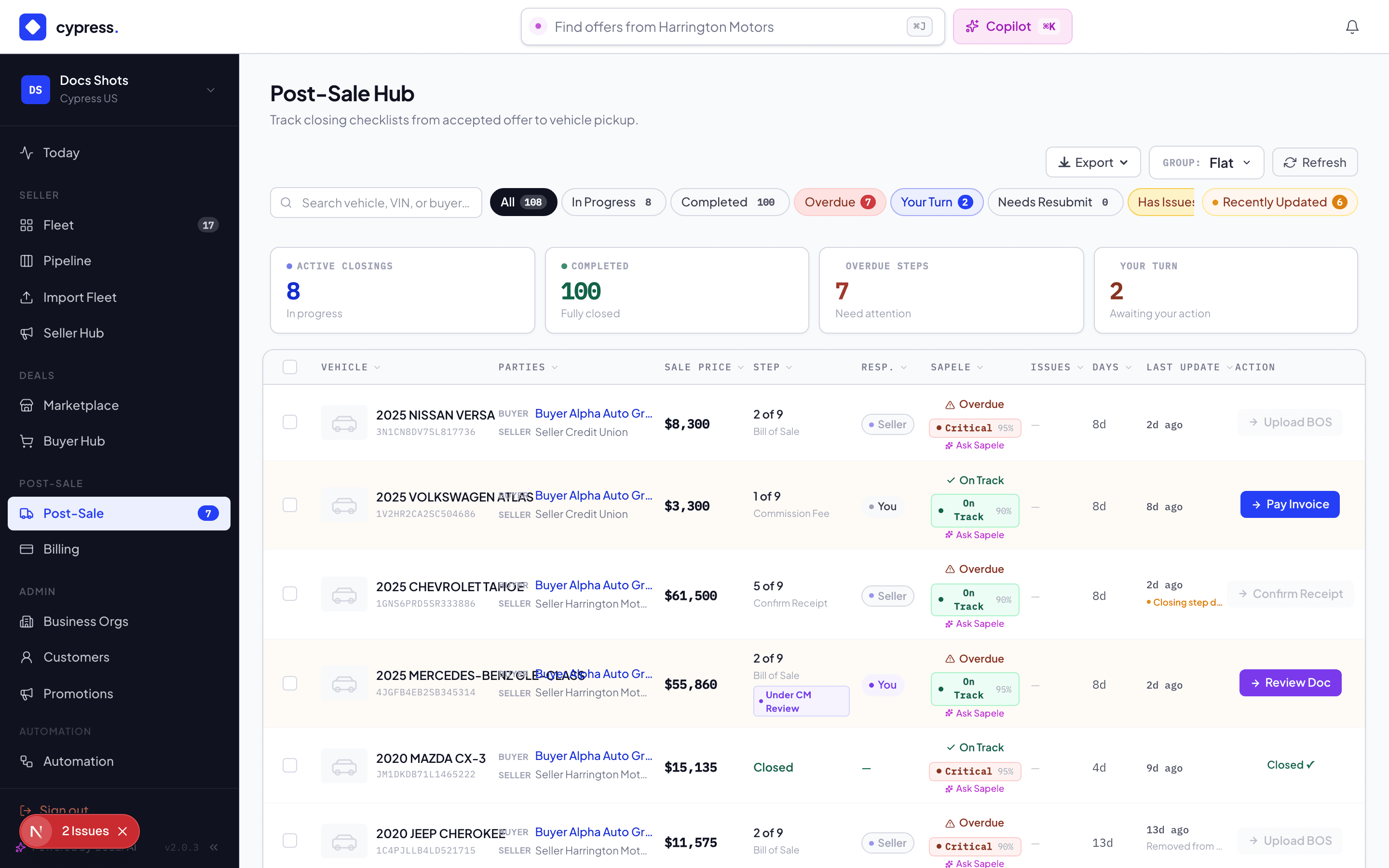
The Post-Sale hub lists every closing with its step position; the detail panel carries five tabs — Overview, Documents, Issues, Activity, Updates. Milestones (started, each step completed, cancelled, sold) also land on the vehicle's own Updates feed, so a deal never goes quiet.
Worked example
The Transit's closing opens the evening Maria accepts $29,200. Deal Setup: Maria picks Acme's Austin lot, its operating account and confirms the plate; Dan confirms Birchwood's title address and their hauler. Acme is ACH-billed, so step 1 self-completes and defers the fee. The Bill of Sale generates from Acme's template; Maria signs Tuesday and Dan signs Wednesday, which completes step 2. Dan mails a cheque Thursday. Maria confirms the funds the following Tuesday (step 3) — and the gate pass is written for her in the same moment. She signs it Wednesday (step 4). Her bank clears the cheque on Friday and she answers the cleared-funds question on the spot, releasing the title's hold early; the title ships with tracking (step 5). Birchwood's hauler signs for the Transit and rolls it off the lot on day 14 (step 6). Status: SOLD.
Business rules
- One closing per accepted offer — a vehicle re-sold after a fallen deal gets a fresh closing; only one can be open at a time.
- Accepting the offer already declined every competitor; the closing never has to race another deal.
- Buyers never see the seller's commission figures — the fee is between Cypress and the seller.
- SLA clocks are visible on every step; breaches surface in the hub, they don't cancel anything by themselves.
- A step reminds whoever owns it twice at most: Closing step due soon when its deadline is 12 hours away, and Closing step overdue once it has passed, each at most once a day. On a self-serve channel the seller's Fleet Managers and admins hear it; otherwise Cypress does, through the organisation's account manager. Closings opened before the six steps keep their own deadlines (Buyer signature 48h, Payment 24h, Title receipt 48h, Pickup address 24h among them).
- Each side reads its own signing links: a buyer never sees the seller's link or address (see Documents & e-sign).
Under the hood
The closing is a fixed state machine (FEE → BOS → CONFIRM_FUNDS → GATE_PASS → TITLE → PICKUP) with per-step owners resolved from the deal's sales channel
at creation. Deals closed before this shape shipped keep their original nine
rows until they are migrated; the platform keys every decision off each row's
step key, never its number, so both shapes run side by side. Integrators
receive the entire rail as webhooks — every step completion, document, and
payment — under CLOSING.* in the
developer event catalog.