Notifications & staying informed
How the platform tells you what needs you — in-app, by email, and on the surfaces that remember for you.
TL;DRAI summary
This chapter explains how Cypress keeps you informed without overwhelming you. You'll learn about the different ways you receive updates, from in-app notifications and email to special badges and your personal AI assistant. This helps you quickly act on new offers, closing steps, or other important events.
For: Everyone
Nothing on Cypress happens silently. The platform's job is to make sure the right person hears about the right event at the right moment — without burying anyone. This chapter maps the layers.
The layers, outside in
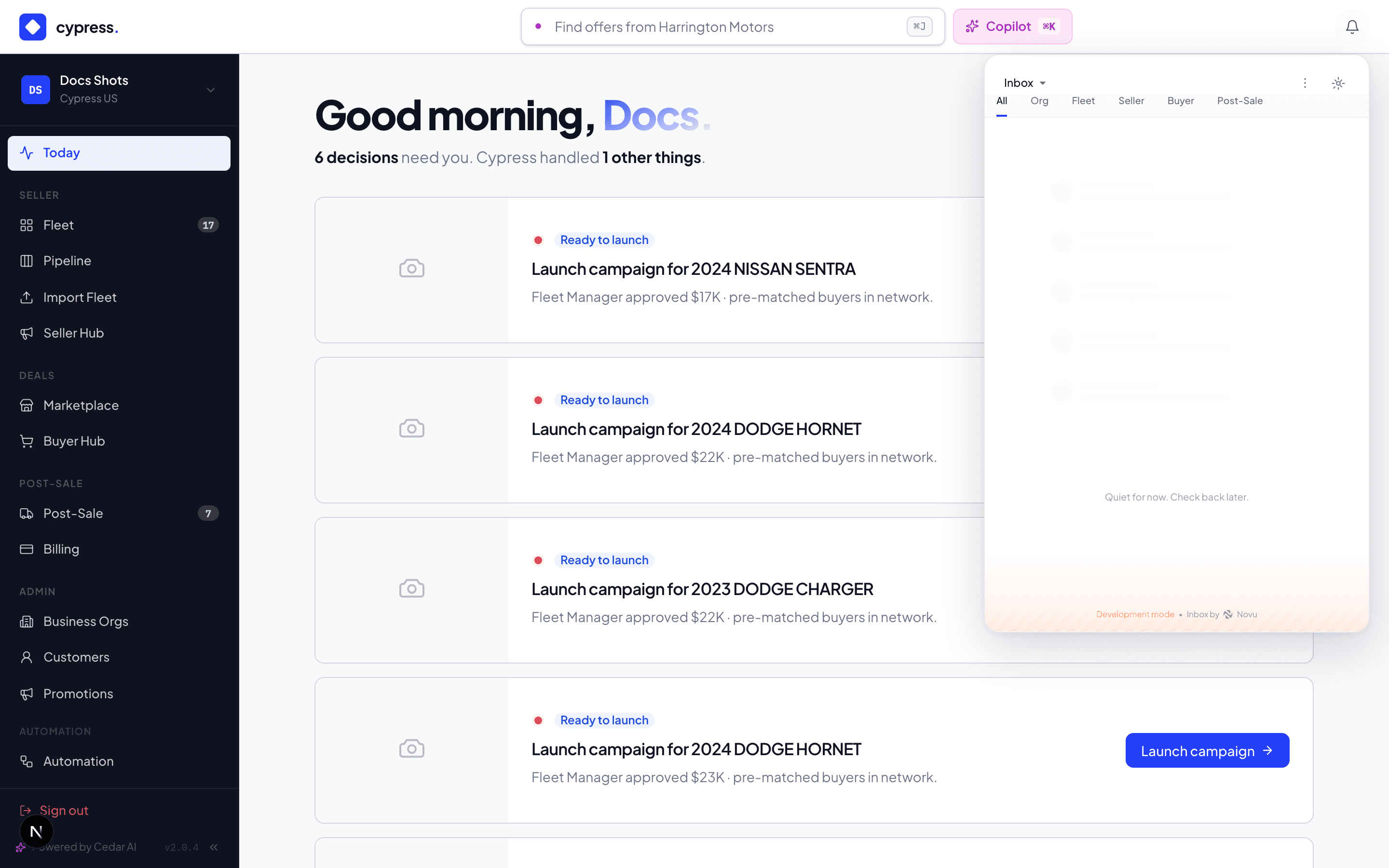
- The bell — in-app notifications, newest first, each one clickable straight to the exact screen it's about: the offer awaiting you, the closing step that unlocked, the invoice that failed. Unread state syncs across your tabs.
- Email — the same events, delivered to your inbox for the moments you're not in the app: a new offer on your vehicle, a counter about to expire, a closing step now yours, billing outcomes, onboarding activation. Every email links back to its screen.
- Badges — the sidebar remembers so you don't have to: Fleet carries the needs-action count, Post-Sale carries Your Turn — the number of closing steps waiting on you specifically.
- The Updates feed — per-vehicle narrative (the audit chapter covers it): price changes, launches, deal milestones, audience-aware.
- Cedar — the layer that answers back. "What needs me today?" is a question, and on Telegram the notification can carry the action: a proposal you confirm from your pocket.
Who gets told what
Notifications are role-routed, not broadcast:
- A new offer → the Fleet Manager (and the CM screening it). A below-floor offer says so, urgently.
- An accepted deal → both sides, plus every declined bidder ("vehicle sold to another buyer").
- A closing step unlocking → whoever owns that step — seller steps to the seller's team, buyer steps to the buyer, review steps to the CM.
- Billing events → billing admins (invoice issued, paid, failed, batch settled, credit warnings).
- Onboarding activation → every admin, Fleet Manager, and billing admin in the org.
- Automation outcomes → whoever the automation's notify action names, plus the CM queue for anything staged.
One email for a bulk action
When something happens to many vehicles at once, you get one email, not one per vehicle. Every notification about a specific vehicle waits about 30 seconds after the last one of its kind for the same person (five minutes at most), then goes out together: "Vehicle Listed — 121 vehicles", with a table of vehicle, VIN, Unit #, what happened, and a link. The table shows the first 50 rows, then "and N more" with a link to see them all.
- It does not matter what caused it. Bulk buttons, automations, the partner API, imports and scheduled reminders all bundle the same way. Buyers matching a saved alert get one "new matches" email instead of one per vehicle.
- A single notification arrives exactly as before, straight away.
- Your preferences still apply. A bundle is sent as the notification type it bundles, so the email and in-app settings you chose for that type govern it.
- Some mail is never held: the express-offer confirmation, fee invoices, and anything that carries an attachment go out immediately.
If Cypress cannot hold a notification for bundling, it sends it at once instead; bundling never costs you a message.
Notifications meant for Cypress
Some notifications are for the Cypress team rather than the seller: a vehicle pending approval, a stale review, pending labels, stuck inventory, a due-diligence deadline, an e-signature notice, the Cypress copy of a fleet import or a valuation change. These go to the account's assigned account manager. For accounts with no account manager assigned, they go to the Default account manager, a person a Cypress Manager names in Admin → Settings → General. Anyone who received these before still does, and nobody gets the same notification twice.
Reminders about a vehicle go out at most once per day for each reminder type.
Counter clocks and quiet hours
Time-sensitive events escalate rather than repeat: a counter nearing its 48-hour expiry warns the party whose move it is; a closing step warns its owner once when its deadline is 12 hours away and once when it has passed (at most once a day each), and otherwise waits in the hub's attention filters rather than spamming inboxes hourly. The design rule throughout: one event, one notification, one link — and the badge keeps the score if you miss it.
Worked example
The Thursday Dan counters at $29,200: Maria's bell rings and her email carries the number and a link straight into the thread. Friday morning, Alex approves — Maria's "awaiting your consent" notice lands with the Sequoia context inline. She accepts from the notification's link in two clicks. Sixteen days of closing follow, and neither side ever checks a status page unprompted: six "your turn" notices route each step to its owner as it unlocks, and the Post-Sale badge counts down to zero.
Under the hood
Notifications flow through one pipeline (in-app + email from the same event), with links absolutized and audited per delivery. Integrator webhooks are the machine sibling of this system — same events, signed and delivered to your endpoint instead of an inbox.