Archive & dispositions
The end of every vehicle’s story — clean or messy — and the record that survives it.
TL;DRAI summary
Archiving a vehicle removes it from the marketplace while keeping its full history, unlike deleting it. Cypress Managers can archive vehicles immediately, but if a seller archives a vehicle with an open offer or sale in progress, a Manager must review and approve it.
For: Cypress Managers · a seller's archive takes effect at once, unless a buyer is involved; then a CM decides
Every vehicle's story ends in the archive. Archiving is record-keeping, not deletion: the listing history, deals, documents, and analytics attribution all survive — what changes is that the vehicle is off the market for good, with a record of why.
The roads in
-
The direct ending: a Cypress Manager archives from the fleet panel or Seller Hub (any active phase). Applies immediately — the CM is the reviewer.
-
The seller's ending: a seller archives — from the fleet panel, from Seller Hub, via a CSV (an archive or sold-elsewhere row, or a vehicle left out of the file), or the API (including a full-inventory push that leaves the vehicle out). Every door follows the same rule, and the rule reads the buyers:
- Archived at once when no buyer is involved: planning stock, and any Sell vehicle with no open offer and no sale in progress — draft, in review, approved, pre-listed, listed, on hold, even Under Offer when no offer is actually open. The same cleanup an approval runs happens right away.
- A CM decides when a buyer is involved: an open offer (archiving would decline a valid offer, and a car leaving while a buyer waits is how a sale moves off the platform) or a sale in progress (offer accepted, due diligence, ready to deliver; approving cancels the closing). The seller's archive becomes a request for CM review, and nothing is archived until a CM approves.
CMs still see every seller archive. One that took effect at once lands on Archived Vehicles with its CM decision Pending, so an org that onboards, values, and immediately archives inventory (using the platform as a free appraisal desk) still shows up there. Since 3.9.0; before it, every seller archive waited for a CM.
-
The messy ending: a cancelled closing whose disposition sends the vehicle out (sold elsewhere, removed) rather than back to inventory.
One road that does not exist: SOLD never becomes ARCHIVED. A completed sale is its own terminal state and stays there — the sales analytics counting rule reads sold-then-archived as "the deal fell through after the fact", so archiving a sold vehicle would erase the sale from the numbers. Both archive endpoints refuse a SOLD vehicle for exactly this reason.
Who archives, and when it takes effect
| Who, from where | What happens | Meanwhile |
|---|---|---|
| CM — fleet panel Archive | Immediate, one shot. Outcome captured in the modal: disposition, reason; in Post-Sale also responsible party + decision toward the seller. | — |
| Seller (FM or org admin) — fleet panel Archive | No open offer and no sale in progress, or planning stock: archived at once, full cleanup. An open offer or a sale in progress: a pending archive request a CM approves (cleanup runs then, with the CM's decision) or rejects. One open request per vehicle. | Archived at once: nothing waits. A request: a live listing pauses immediately (no new buyer exposure; existing offers stay open until the decision); a rejection resumes it. The vehicle shows an Archive requested banner until decided. |
| Seller (FM or org admin) — Seller Hub Archive vehicle | Same rule as the fleet panel (a request notes it came from Seller Hub). | Same as above: a request pauses a live listing, shows the banner, and a rejection resumes it. |
| CSV import — archive or sold-elsewhere row, or a vehicle left out of the file | Same rule, applied when the import runs. | A request leaves the vehicle as it is until the CM decides. |
| Integrations API — cancel, disposition, departure, or a vehicle a full-inventory push leaves out | Same rule, applied when the call lands. | A request pauses a live listing, as above. |
| Closing cancellation — disposition sold elsewhere / removed | Immediate, as part of the cancellation. | — |
What archiving actually does
One cleanup path runs every time, in order: active offers are withdrawn (never deleted — every buyer is told), any in-progress closing is cancelled and its steps locked, live listings come down, the vehicle flips to ARCHIVED, and an archive record is created capturing the whole context — status and phase at archive, the source of the request, how many offers were withdrawn, whether a deal was cancelled, and who's responsible.
The CM decision
Archives from failed situations carry a responsibility decision — the operator's formal answer to "what do we do about this?":
| Decision | When |
|---|---|
| No action | Life happened; nobody's conduct at issue |
| Warning | A pattern worth naming to the org, on the record |
| Penalty fee | The org's conduct cost the platform or a counterparty — a sold-elsewhere mid-negotiation, a habitual canceller |
| Escalate | Needs a human conversation above the queue |
The decision (with notes) lives on the archive record. The culprit from a cancelled deal — seller, buyer, or none — feeds it: penalties attach to conduct, never to weather.
Rollback — deliberately conservative
Archived by mistake? A CM can roll it back — once, and carefully:
- The vehicle returns to its status at archive, except post-sale archives, which return to APPROVED (inventory) — a dead deal is never revived by un-archiving.
- Withdrawn offers stay withdrawn and cancelled closings stay cancelled — negotiations restart by hand, honestly, not by resurrection.
- The archive record survives its own rollback, annotated.
Finding archived history
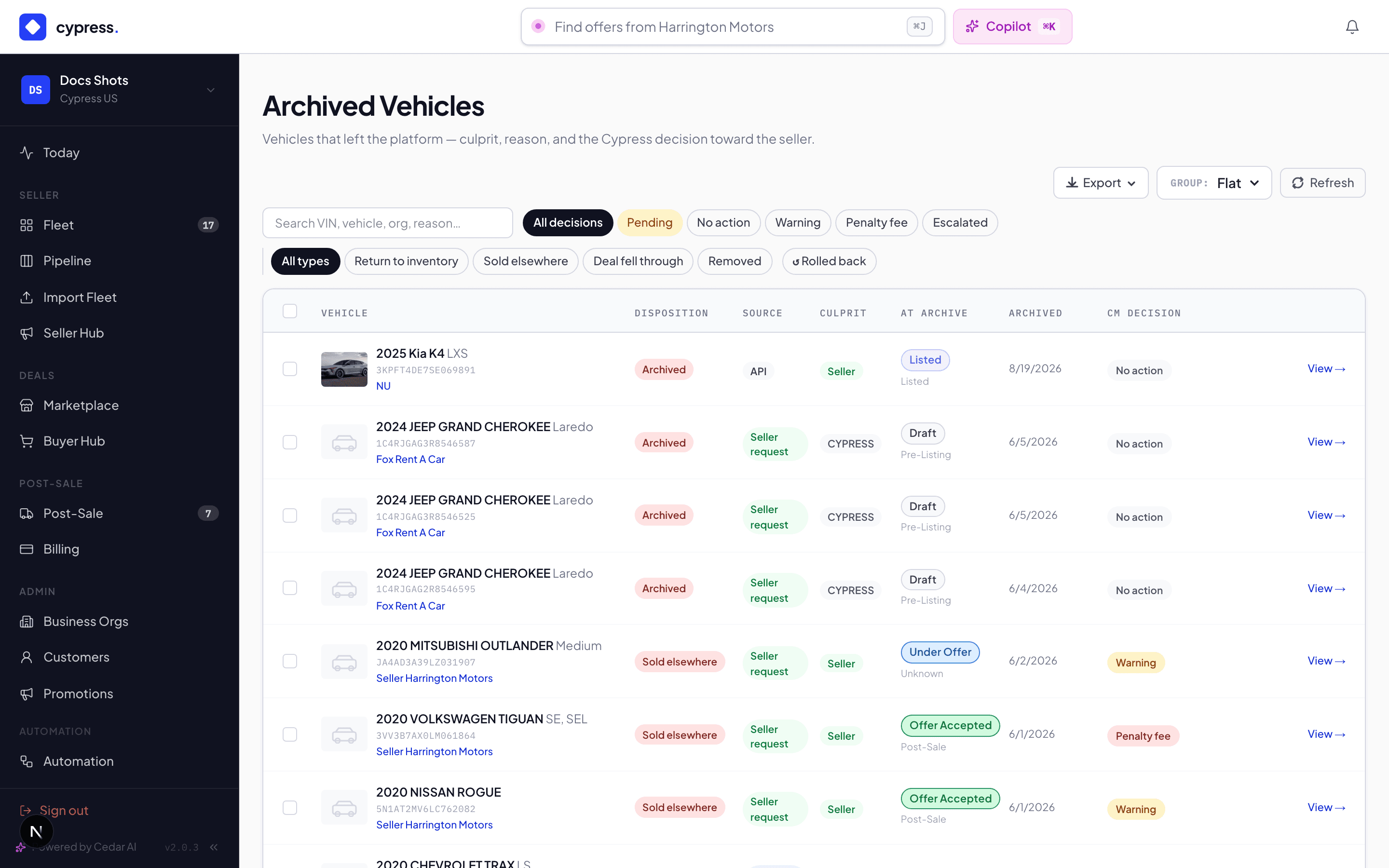
Admin → Archived Vehicles is the CM's registry, filterable by phase, source, and pending decisions. The work finds you rather than waiting to be found: the BackOffice nav badges Update Requests with the pending count and Archived Vehicles with Post-Sale decisions still owed, and Mission Control raises pending archive requests as a decision item — flagged loudest when the vehicles are still live and taking offers. A seller's archive that took effect at once arrives in the registry with its decision Pending; group by organization to spot an org archiving most of what it onboards. Sellers keep their archived vehicles in fleet history; analytics keep counting what the vehicle earned — sold-then-archived deals stay excluded from sales by that report's counting rule, while promotions and channels keep their attribution.
Worked example
The Transit's ending is the boring one: SOLD in June, and SOLD is where it stays — a completed sale never enters the archive, and the analytics keep counting it. Acme's other van is the interesting one: mid-negotiation, the month-two CSV claimed sold-elsewhere. Two open offers, so it's staged → Alex approves (the evidence held up) → both offers withdrawn with notices, no closing to cancel, archived with source Batch. The decision: Warning — second time this quarter Acme sold around an active negotiation, and the note says the next one carries a fee. The same file marked a third van, listed with no offers, sold elsewhere too: archived when the import ran, nothing waiting for Alex, and its record sits on Archived Vehicles with the decision Pending.
Business rules
- Nothing is deleted, ever. Archive is a state with a record, and the record is append-only like the rest of the audit trail.
- A buyer is what sends a seller's archive to review. An open offer or a sale in progress makes it a request; without one, it takes effect at once. The rule counts open offers, not the Under Offer label, which can outlive its last open offer.
- A pending archive request pauses the listing and nothing else. A LISTED vehicle goes on hold the moment the request is filed from the app or the API (a CSV request leaves it as it is) — the seller just said the car should come off the market, so it stops taking new buyers immediately — but existing offers stay open and no cleanup runs. Approval is the moment of effect; a rejection resumes the listing with its negotiations intact. The seller sees an Archive requested — awaiting Cypress review banner on the vehicle the whole time.
- SOLD and ARCHIVED are mutually exclusive endings. Archiving is refused on a sold vehicle; a sale only leaves the books through the closing-cancel flow, which says so honestly.
- Withdrawn-by-archive offers notify their buyers with the reason — buyers never discover a dead negotiation by silence.
- Two rollbacks don't exist: un-archiving twice is refused; the second thought needs a human conversation, not a button.
Under the hood
The archive cleanup is a single shared path (the app, the batch importer,
the API, and closings all call it), which is why the guarantees never
depend on the door. The choice between at once and a request is one
shared rule too, so the app and the CSV importer always agree on it.
Integrators see VEHICLES.DISPOSITION.STAGED when a request is filed and
VEHICLES.DISPOSITION.RESOLVED when the CM decides; an archive that took
effect at once sends only RESOLVED, marked automatic — the
developer delisting docs map the intents.
Update Requests & the audit trail
How changes to live vehicles are governed, and how to answer “who changed this?”
Planning
Plan what you sell and what you buy, quarter by quarter. Sell planning is for fleets, Buy planning is for dealers, and Planning together covers what the two plans share. Each side is a product your organization switches on.